Category: Blog

  • Snippet Pixie 1.1 adds snippets export and import

    I’m super happy to announce that Snippet Pixie 1.1 has been released. 🎉

    Snippet Pixie

    This release includes two features that go hand in hand, snippets export and import.

    Snippet Pixie is a great way to build a library of time and keystroke saving short text abbreviations that automatically expand while you type, but up until this release you could only add snippets to your second machine by either manually adding them again or finding and copying the settings database.

    Export

    It’s now possible to export your snippets to a JSON format file for the purpose of backup or transfer to another machine for import. Now when you add new snippets on one machine you can quickly add them to another machine.

    Import

    When using the import feature Snippet Pixie by default will not overwrite existing snippets with the same abbreviation, but you can optionally do that if you’ve made changes to the abbreviations on one installation and want to apply them to another.

    For safety, the import feature also does not delete any existing snippets.

    UI

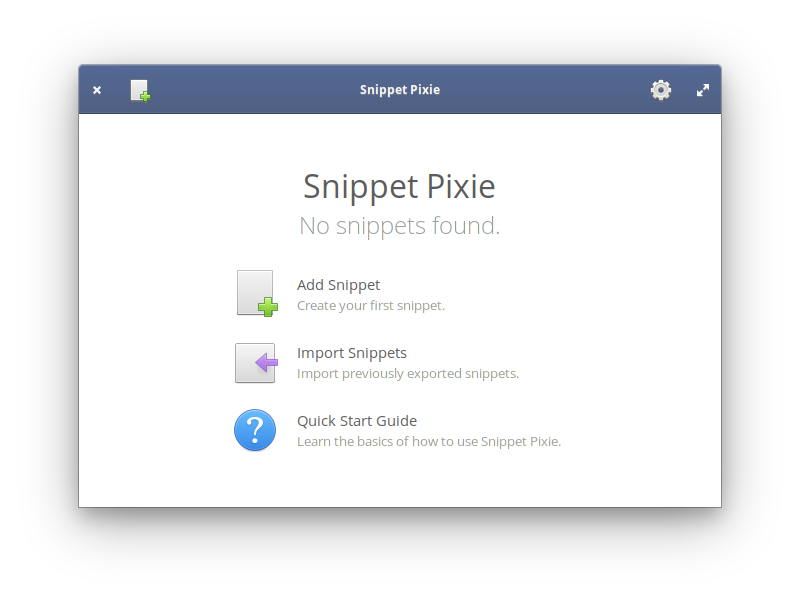
    The welcome screen in Snippet Pixie now includes an Import Snippets option to get new installations up and running quickly. If you’ve already got some snippets in Snippet Pixie then you can use the “Import snippets…” option from the cog menu.

    The cog menu is where you’ll find the “Export snippets…” option too, it’s enabled if you have some snippets to export.

    CLI

    Want to script an automatic backup or import? Snippet Pixie has your back as it also has new command line options for export and import.

    -e, --export=filename
    Export snippets to file
    
    -i, --import=filename
    Import snippets from file, skips snippets where abbreviation already exists
    
    --force
    If used in conjunction with import, existing snippets with same abbreviation are updated
    

    File Format

    Some people might be wondering why I picked JSON as the file format. The primary reason is flexibility and general support for the format. There are something like eleventy million utilities for handling JSON, so if you want to manipulate or generate your own file of snippets you’ll be able to do it easily.

    I’ll document the format properly at some point, but it’s very simple as this vastly trimmed down export of some of my snippets shows…

    {
      "generator" : "com.github.bytepixie.snippetpixie",
      "version" : 101,
      "data" : [
        {
          "snippets" : [
            {
              "abbreviation" : "joy`",
              "body" : "😂"
            },
            {
              "abbreviation" : "ksig`",
              "body" : "Kind regards,\n\nIan"
            },
            {
              "abbreviation" : "shrug`",
              "body" : "¯\_(ツ)_/¯"
            },
            {
              "abbreviation" : "sp`",
              "body" : "Snippet Pixie"
            },
            {
              "abbreviation" : "spu`",
              "body" : "[www.snippetpixie.com](https://www.snippetpixie.com)"
            }
          ]
        }
      ]
    }
    

    The generator and version elements are very important, Snippet Pixie will not currently import a file that doesn’t have those two elements with those same values as they signify a format that it understands.

    The data array contains a list of data types with data that can be imported, currently there’s only snippets.

    Each of the objects in the snippets array contains only an abbreviation and body, on export they are ordered alphabetically by the abbreviation and if there are duplicates (it’s possible) then by a hidden id which typically means by order of addition unless entries have been renamed. Due to this ordering, if overwriting duplicates on import is allowed then last duplicate in the file will “win”, but by default first entry will “win” if the abbreviation does not exist in Snippet Pixie’s library already.

    As you can see from the example, it’s UTF-8 and supports emoji and new lines (those n bits), and characters like ” are escaped etc.

    Get It!

    As always, you can get Snippet Pixie from the elementary AppCenter.

    AppCenter

    Hope you like it, if you have any feature requests or problems with Snippet Pixie, please stop by the GitHub repository and share your thoughts!

    GitHub repository

    Share your thoughts

    Snippet Pixie start screen with import snippets option

  • WP Cron Pixie 1.4 Released

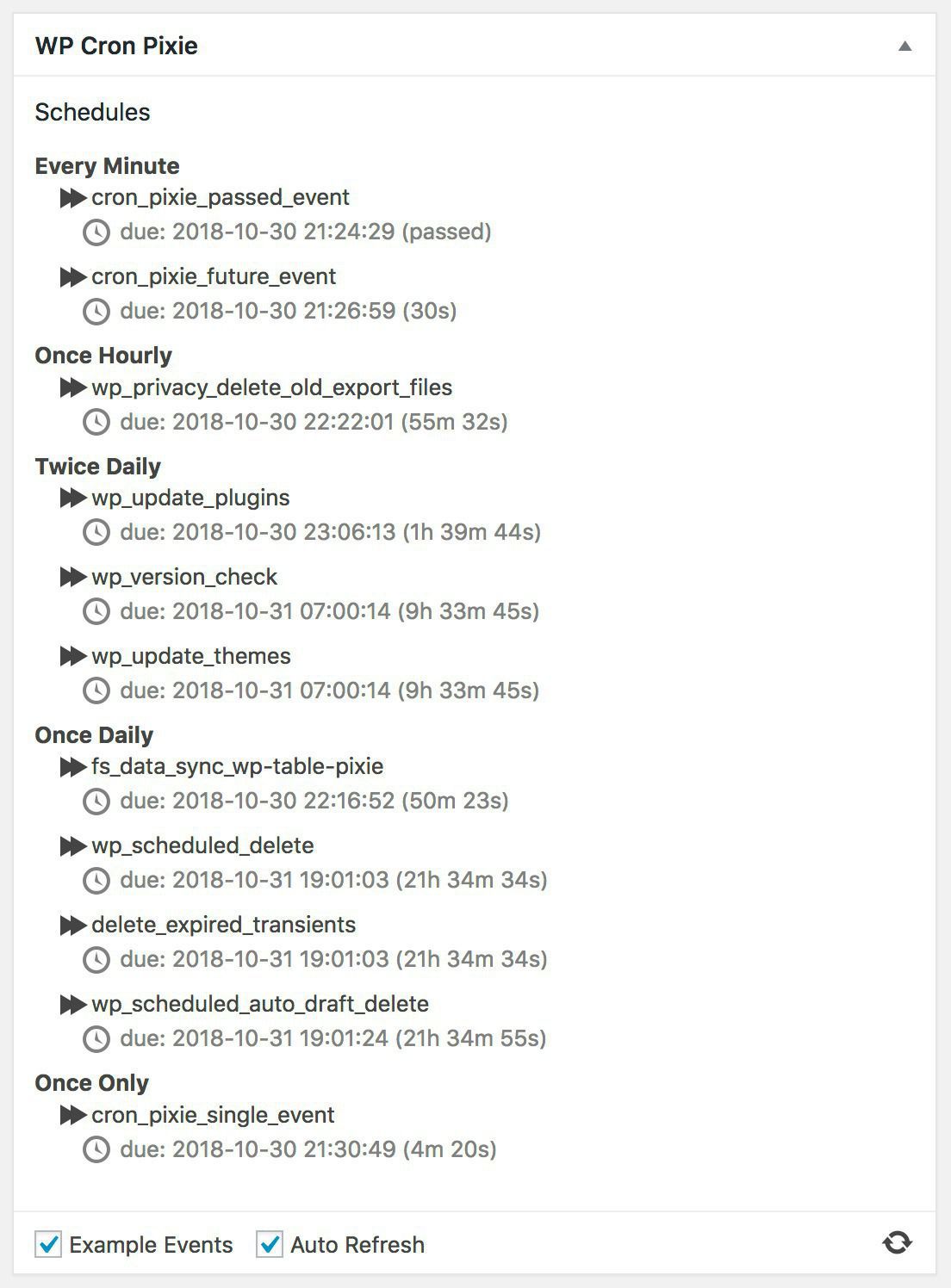
    Just released WP Cron Pixie 1.4, the latest update to my little dashboard widget to view the WordPress cron, and run an event now rather than later.

    In this release we have the following changes…

    • Added checkbox to control whether example cron events should be added to cron.
    • Added checkbox to control whether the display should auto refresh.
    • Added “Refresh” icon for manual refresh of data.
    • Fixed not all strings in UI being translatable.
    • Elm 0.19 frontend.

    A couple of things not mentioned in the changelog are that the “Refresh” icon does a nifty little spin as data is being refreshed or events are being run manually to give a little UI feedback, and this version has been tested with WordPress 5.0 beta 2.

    It’s available from the WordPress plugin repository, or from its GitHub repository.

    WordPress plugin repository

    GitHub repository

    I had a lot of fun developing this version, using the Elm language for web development is so fast and efficient. Elm is a small language packed with power, the combination of a functional and static typed compiled language with a well thought out application architecture make for a great development platform.

    Elm

    WP Cron Pixie dashboard widget screenshot

  • Switched Personal Site to Micro.blog

    I've bitten the bullet and switched my personal site to be hosted on Micro.blog.

    Micro.blog

    It's been a long time coming, I should have taken the plunge over a year ago when I first got the bug, but decided at the time to keep my WordPress site and cross post to Micro.blog. You can tell from my distinct lack of posts that I never really got into that, I mainly used the old site for announcing stuff (a bit like I'm doing now I suppose!), and only sporadically posted to Micro.blog itself, or Twitter for that matter.

    So this move is part of an attempt to be more social, something that Brad Touesnard has said I suck at big time!

    Brad Touesnard

    It's also prompted by a desire to consolidate and clean up a few of my "web properties", with an emphasis on simplifying my hosting etc. There's some stuff coming down the pipe from Delicious Brains that I intend to use for my business stuff, but this personal stuff should hopefully flourish here.

    coming down the pipe

  • New WordPress Plugin: WP Table Pixie

    New WordPress Plugin: WP Table Pixie

    What’s this now? A new WordPress plugin called WP Table Pixie? Why yes, Options Pixie and Meta Pixie got together and made a baby!

    WP Table Pixie

    Options Pixie

    Meta Pixie

    So, when I introduced Meta Pixie my friend and colleague at Delicious Brains, Ashley Rich, had just two comments…

    introduced Meta Pixie

    Delicious Brains

    Ashley Rich

    Nice, it supports user meta and everything. How come you decided to make it a separate plugin?

    Apart from obviously loving it ;-), his second comment was basically asking how come I released a brand new plugin for accessing metadata tables rather than adding the functionality to the Options Pixie plugin?

    My answer boiled down to how the WordPress database’s options and various *meta tables are a different structure, the name Options Pixie didn’t really fit for tables like postmeta, and frankly it was nice to have more plugins for people to be able to purchase a Pro addon for and for me to cross promote.

    A year and bit later, my opinion has changed in a number of ways, and I’ve decided to reboot work on my personal WordPress plugin development by merging Options Pixie and Meta Pixie into a single plugin called WP Table Pixie.

    At first, WP Table Pixie supports the following tables: commentmeta, options, postmeta, termmeta, sitemeta (multisite) and usermeta. However, the name “WP Table Pixie” is obviously a little more generic than that initial list of tables might suggest. I’m not promising anything, and I haven’t figured out a good UI yet, but I’m keen to try and expand the plugin to handle more than just those options and metadata tables, plenty of plugins have custom tables that it would be nice to be able to drill down into and manage. If that’s something that appeals, let me know! However, I realised that although the options and metadata tables have obviously different structures, I could mung things a bit in the UI and swap out column labels such as Related ID and Autoload as appropriate as long as I did some jiggery pokery in the background to make things sane.

    let me know

    I’ve come to very much dislike how having two free plugins with Pro addons means a total of four plugins needing to be installed when wanting to inspect and edit both options and metadata for a customer (I use these plugins a lot when doing support for Delicious Brains).

    Multiple Meta and Options Pixie Plugins

    Hence WP Table Pixie is now a single free plugin that can do the job of the free Options & Meta Pixie plugins to VIEW ALL THE THINGS, but can also be replaced by the Premium version to also EDIT ALL THE THINGS.

    WP Table Pixie

    Premium version

    This means customers need only install the one plugin, there’s no need to install the free plugin before installing the version of WP Table Pixie they receive after purchase. And believe me, there’s a lot of benefit to developing a free and expanded premium plugin rather than an addon for a free plugin, I squashed many subtle and not so subtle bugs during the development of WP Table Pixie from a single codebase. With WP Table Pixie I’m moving away from running my own store on my business site, and instead I am using Freemius for both in-plugin upgrades and sales initiated from the (really rough at the moment) product page. There are a few reasons why I’ve made this move from an Easy Digital Downloads based sales site to using the Freemius service, it feels like I should probably go into those reasons in a follow-up post.

    business site

    Freemius

    product page

    Easy Digital Downloads

    If you’re an existing customer that’s bought the Pro addon for Options Pixie, Meta Pixie or both (thank you), am I leaving you out to dry? Of course not! By now every Options or Meta Pixie Pro customer should have received an email with a WP Table Pixie license for a multiple sites plan (because the previous plugins started at 10 site licenses) that expires a year after their current license expires. If you had bought both of the previous Pro addons, then you’re getting a two years extension to your license as big thank you!

    If you have any comments or questions about WP Table Pixie, please drop me a tweet.

    drop me a tweet

  • Didn’t notice a new release of ActorDB, but someone did and submitted a PR for ActorDB for Docker, I love open source software!

  • New Xojo Web SDK Control: ToastrIJ

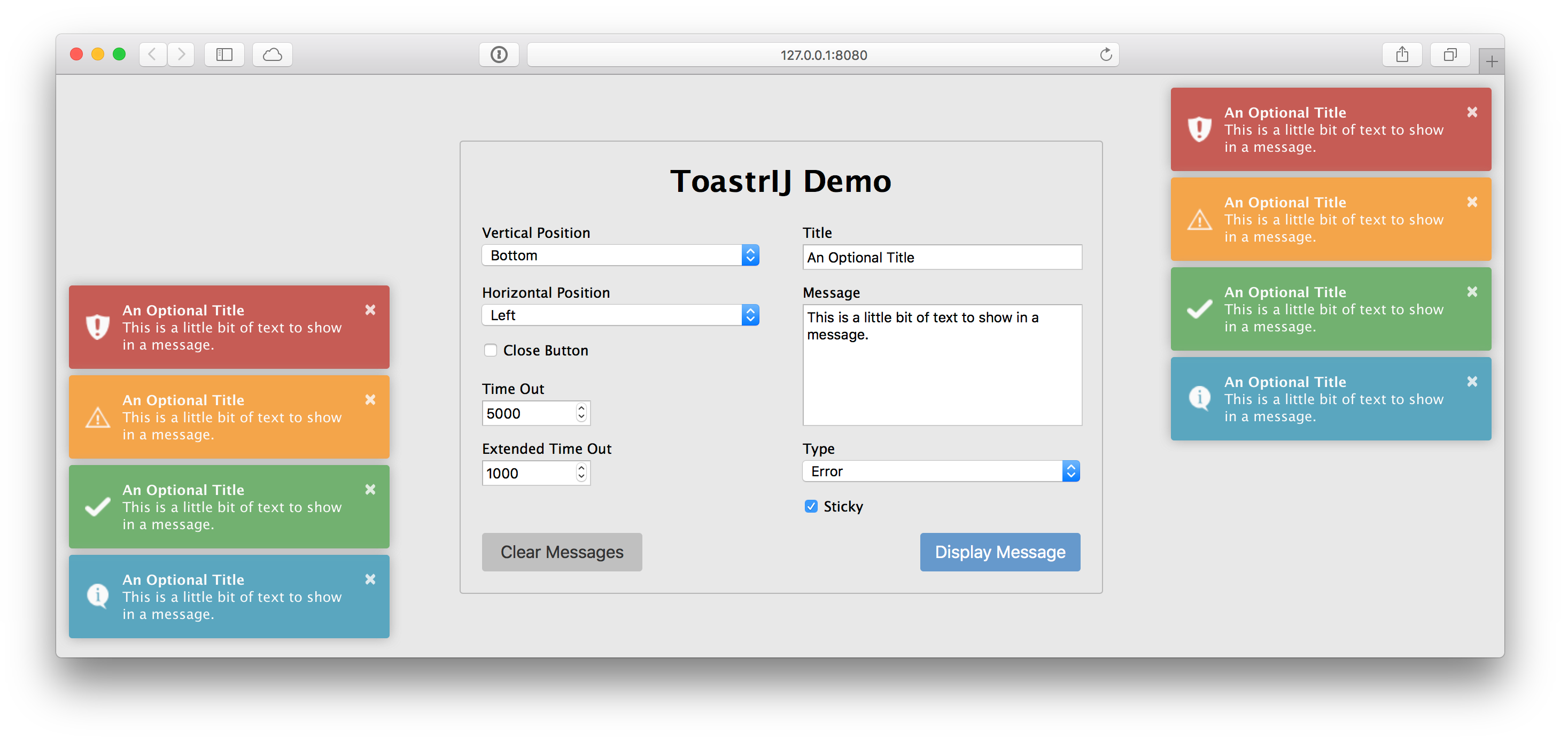
    I’ve created a little open source Xojo Web SDK control called ToastrIJ.

    Xojo

    ToastrIJ

    It’s a thin wrapper around the most excellent toastr JavaScript library to enable the display of notifications. You know, those little growl like notifications to display information, success, warning and error messages.

    toastr

    It’s under the MIT license, and you can grab it from GitHub.

    MIT license

    ToastrIJ on GitHub

    ToastrIJ Demo

  • Meta Pixie Pro Released

    Meta Pixie Pro Released

    What? Really? So soon after releasing Meta Pixie?

    Post about releasing Meta Pixie

    Yep, just one week after releasing Meta Pixie I’ve managed to finish off and release Meta Pixie Pro.

    Meta Pixie Pro

    To be honest, I was already working on the Pro addon for Meta Pixie when I announced Meta Pixie’s release last week, as I had to wait for Meta Pixie to be approved and added to the WordPress Plugin Directory. It took a few late nights of development and much testing, but I wanted to get it out before Christmas and I’m pretty stoked at how well development went.

    WordPress Plugin Directory

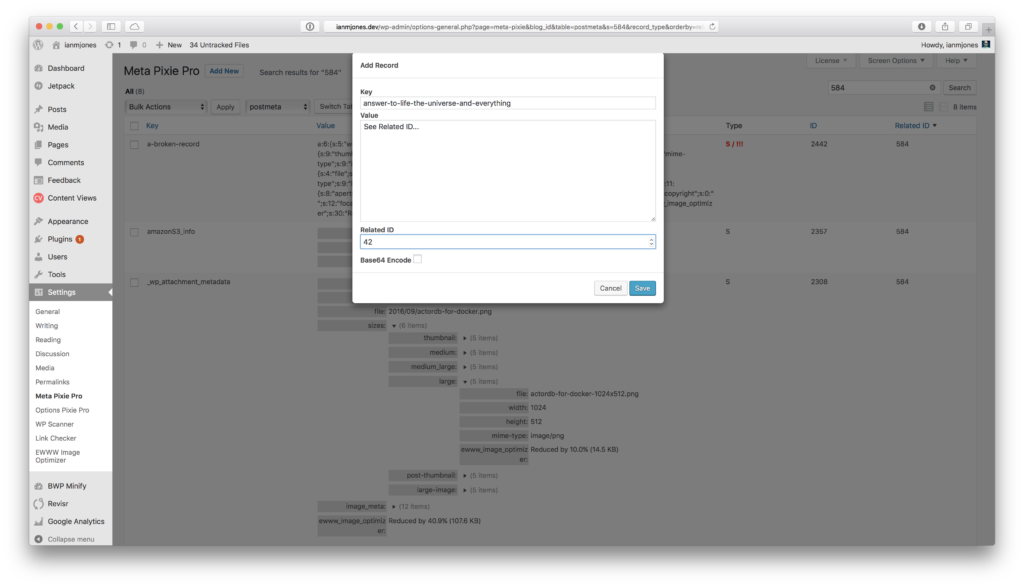
    Meta Pixie Pro adds the following features to Meta Pixie:

    • Add, edit, delete records.
    • Fix broken serialized values.
    • Bulk deleting and fixing of records.
    • Priority email support.

    List, sort, search, view, add, edit, delete and fix your WordPress site’s commentmeta, postmeta, termmeta, sitemeta and usermeta records with style.

    Like Options Pixie Pro, you can pick up a Meta Pixie Pro license for 10, 25 or 50 sites, starting at the super low price of $39. If you want a license for more than 50 sites, drop us line.

    Options Pixie Pro

    Meta Pixie Pro license

    drop us line

    If you stick both Options Pixie Pro and Meta Pixie Pro in your cart, you’ll get a 20% discount on the second item! (tip: if you’re buying a larger pack for one of the plugins, stick it in your cart second for a bigger discount!)

    Meta Pixie Pro screenshot

  • New WordPress Plugin: Meta Pixie

    New WordPress Plugin: Meta Pixie

    Ever since I released Options Pixie to enable easy viewing of options records in a WordPress database, my colleague at Delicious Brains, Ashley Rich, has been bugging me virtually non-stop to create something that lets us look at postmeta records. It’s really handy for us when working on WP Offload S3 to be able to see the metadata attached to a Media Library item.

    Options Pixie

    Delicious Brains

    Ashley Rich

    WP Offload S3

    Well, a couple of weeks ago I finally found a few spare evenings to work on a new plugin that enables viewing of not only postmeta table records, but also commentmeta, termmeta, usermeta, and on multisite installs, sitemeta too.

    Meta Pixie is now available from the WordPress Plugins repository, and once installed you’ll find a Meta Pixie menu option within the Settings menu.

    Meta Pixie

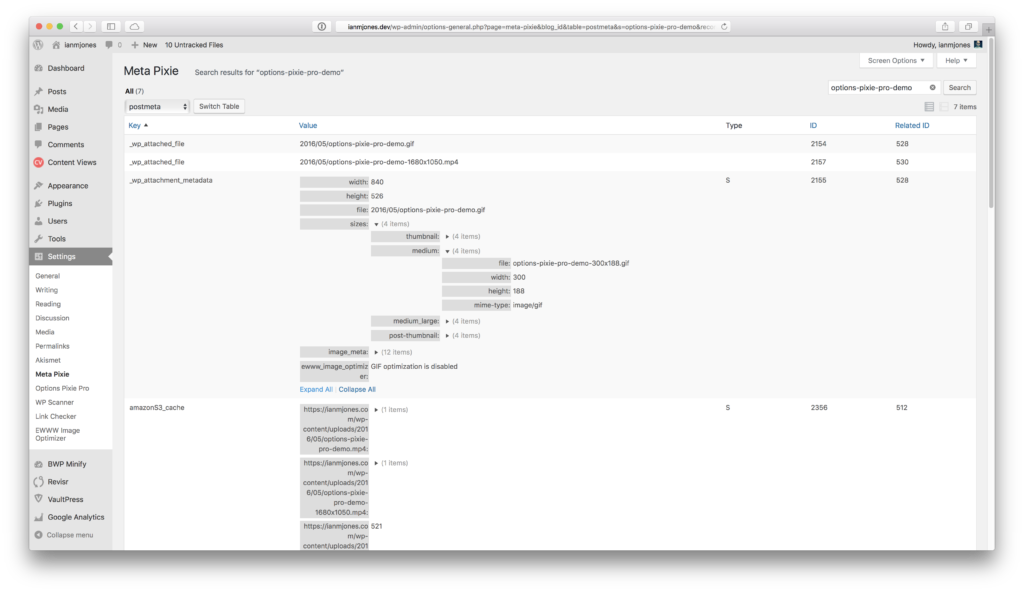
    Meta Pixie screenshot

    Now you can inspect your WordPress metadata records to find out what’s really going on. For example, you can easily check that a Media Library item has the correct thumbnail metadata.

    You can also check the integrity of serialized values, Meta Pixie will highlight broken serialized values (i.e. where it expects a string to be 256 characters long but its actually 255).

    For us on the WP Offload S3 team it’s awesome to be able to view the plugin specific metadata that we need to generate, as well as settings stored in the sitemeta table of a multisite without having to resort to database admin tools. The rich view means we can easily see the structure of a serialized record without having to unpick plain text.

    I’m considering creating a Meta Pixie Pro addon that enables add, edit, delete of metadata records, as well as fixing of broken serialized values. If this sounds like something you could use, please let me know by adding your vote to its product page.

    Meta Pixie Pro

  • ActorDB for Docker

    ActorDB for Docker

    Last weekend I re-stumbled across ActorDB, a very interesting distributed database system that scales near linearly by scoping work to Actors. Every database action, whether that's an insert, select, update, delete or whatnot, always starts by specifying the Actor. This effectively scopes the changes to a single database, which then replicates to its sibling databases on other ActorDB nodes in a cluster. There's a lot more to it than that, as you can of course work with multiple actors within a transaction, and can connect to any node, in any cluster, and the data will be routed properly. In short, think user-centric databases all clustered and replicated together, using the SQLite engine backed by LMDB storage and using Raft for consensus. There's a little buzz-word bingo for you.

    ActorDB

    SQLite

    LMDB

    Raft

    After reading everything I could find on ActorDB, and still having a bit of time to kill before having to go transfer our daughter from one place to another yet again, I figured I'd have a quick play with it.

    As is rapidly becoming my norm, I went to Docker Hub to find a Docker image to spin up. To my utter shock and horror (there might be a little bit of exaggeration there), there was not a single image for ActorDB to be found!

    Docker Hub

    Docker

    My first thought was that maybe there was a very good reason for there not being a Docker image available, but after a little look around that there interwebs I came to the conclusion that it was simply because it's a young project, and generally run on real machines in production. Nothing made me think it was a terrible idea to run ActorDB in a Docker container, so why not give it a bash? ActorDB for Docker was born!

    ActorDB for Docker

    The Dockerfile

    Having recently done a bunch of work for Delicious Brains that involved using Docker, I wasn't too phased by the idea of spinning up a new Dockerfile, and luckily there's an ActorDB package for Debian.

    Delicious Brains

    Dockerfile

    ActorDB package for Debian

    I built a basic image based on Debian Jessie, and then logged into it and experimented with the steps I needed to run to get ActorDB installed and running. It took much less time than I expected as ActorDB is pretty self contained, the biggest issues I had were with making sure curl had all its dependencies in place to actually download the .deb file from within the running container (it needs some extra root certificates installed via a package).

    Debian Jessie

    I also rather stupidly forgot that the actordb program runs as a daemon by default, so the container kept just running and exiting cleanly. Once I realised what was going on, I simply ran the container with –entrypoint /bin/bash and then ran actordb without any arguments to get its usage info. Turns out you can run actordb forground rather than actordb start to get it to run in the current shell. Just what I needed.

    I've been working with a PhantomJS image recently, and noticed that it used a script to ensure that the phantomjs binary did not run as the first process in the container (PID 1) as it may cause issues with shutting it down. So I nicked that idea.

    PhantomJS image

    The final Dockerfile is pretty simple, makes sure to expose the required ports and volume primary paths that ActorDB uses, and the image is available as an automated build on Docker Hub.

    Final Dockerfile

    Automated build on Docker Hub

    Docker Compose

    A distributed database is no good without multiple nodes to distribute its data around, and of course I wanted to ensure the image could be used in a network of containers. I used Docker Compose to set up a very rudimentary cluster of three nodes, you can see the setup in the project root's docker-compose.yml file.

    Docker Compose

    docker-compose.yml

    While the containers seemed to work (on second start, see issue #1 for details), could ping each other by their service names (e.g. actordb-server-1 could ping actordb-server-2), I spent ages trying to get the instances of ActorDB to actually replicate data between them. I eventually sorted it out with the following two important realisations:

    Issue #1

    1. The -name setting in each node's vm.args file must have a unique name before the @, the ip address/domain name after the @ doesn't make it unique.

    vm.args

    2. You must update your initialisation script that is run on the leader to also register the other nodes in the cluster (you can register them manually later, but will need to copy the leader's lmdb file to them first).

    initialisation script

    Once I'd worked that out, I was super happy to have a fully working cluster of ActorDB nodes!

    Quick Example

    The following text is a quick run through of bringing up a cluster, initialising it, writing some data to the first node, switching to the second node and showing the data replicated from the first, creating some more data, and then showing it all on the third node, but using the MySQL client. Enjoy!

    Ians-MBP:actordb-for-docker ian$ ./up.sh
    Creating network actordbfordocker_default with the default driver
    Creating actordbfordocker_actordb-server-1_1
    Creating actordbfordocker_actordb-server-2_1
    Creating actordbfordocker_actordb-server-3_1
    

    actordb-server-1 – Use actordb_console to run the SQL script that initialises the database:

    Ians-MBP:actordb-for-docker ian$ docker-compose exec actordb-server-1 actordb_console -f /etc/actordb/init.example.sql
    Config updated.
    Config updated.
    Schema updated.
    

    actordb-server-1 – Use actordb_console to show the schema, create and select some data:

    Ians-MBP:actordb-for-docker ian$ docker-compose exec actordb-server-1 actordb_console -u myuser -pw mypass
    *******************************************************************
    Databases:
    use config (use c)  initialize/add nodes and user account management
    use schema (use s)  set schema
    use actordb (use a) (default) run queries on database
    *******************************************************************
    Commands:
    open         (windows only) open and execute .sql file
    q            exit
    h            print this header
    commit (c)   execute transaction
    rollback (r) abort transaction
    print (p)    print transaction
    show (s)     show schema
    show status  show database status
    show queries show currently running queries
    show shards  show shards on node
    *******************************************************************
    actordb> actor type1(hello_world);
    actordb (1)> insert into tab(id, txt) values(1,"Hello World");
    actordb (2)> c
    Error: {error,{nocreate,>}}
    actordb> show
    ****************************************************************************************************************************************************************
    sql                                                                                                                                                 type       |
    ----------------------------------------------------------------------------------------------------------------------------------------------------------------
    $CREATE TABLE tab (id INTEGER PRIMARY KEY, txt TEXT);                                                                                               type1      |
    $CREATE TABLE tab1 (id INTEGER PRIMARY KEY, txt TEXT);                                                                                              type1      |
    $ALTER TABLE tab ADD i INTEGER;                                                                                                                     type1      |
    $CREATE TABLE tabx (id INTEGER PRIMARY KEY CHECK (typeof(id) == "integer"), txt TEXT CHECK (typeof(id) == "text"));                                 type1      |
    $CREATE TABLE asdf (id INTEGER PRIMARY KEY AUTOINCREMENT, txt BLOB);                                                                                type2      |
    $CREATE TABLE actors (id TEXT PRIMARY KEY, hash INTEGER, val INTEGER) WITHOUT ROWID;                                                                counters   |
    $CREATE TABLE actors (id TEXT PRIMARY KEY, hash INTEGER, size INTEGER)  WITHOUT ROWID;                                                              filesystem |
    $CREATE TABLE users (id INTEGER PRIMARY KEY AUTOINCREMENT, fileid TEXT, uid INTEGER, FOREIGN KEY (fileid) REFERENCES actors(id) ON DELETE CASCADE); filesystem |
    ----------------------------------------------------------------------------------------------------------------------------------------------------------------
    actordb> actor type1(hello_world) create;                 
    actordb (1)> insert into tab(id, txt) values(1,"Hello World");
    actordb (2)> c
    Rowid: 1, Rows changed: 1
    actordb> actor type1(hello_world) create;                 
    actordb (1)> select * from tab;
    actordb (2)> c
    *********************
    i    id txt         |
    ---------------------
    null 1  Hello World |
    ---------------------
    actordb> q
    Bye!     
    

    actordb-server-2 – Use actordb_console to see the data created on actordb-server-1, and create some more:

    Ians-MBP:actordb-for-docker ian$ docker-compose exec actordb-server-2 actordb_console -u myuser -pw mypass
    *******************************************************************
    Databases:
    use config (use c)  initialize/add nodes and user account management
    use schema (use s)  set schema
    use actordb (use a) (default) run queries on database
    *******************************************************************
    Commands:
    open         (windows only) open and execute .sql file
    q            exit
    h            print this header
    commit (c)   execute transaction
    rollback (r) abort transaction
    print (p)    print transaction
    show (s)     show schema
    show status  show database status
    show queries show currently running queries
    show shards  show shards on node
    *******************************************************************
    actordb> actor type1(hello_world) create;
    actordb (1)> select * from tab;
    actordb (2)> c
    *********************
    i    id txt         |
    ---------------------
    null 1  Hello World |
    ---------------------
    actordb> actor type1(hello_world) create;
    actordb (1)> insert into tab(id, txt) values(2, "ActorDB Rules!");
    actordb (2)> c
    Rowid: 2, Rows changed: 1
    actordb> q                                                    
    Bye!     
    

    actordb-server-3 – Use the mysql client to connect to actordb-server-3's MySQL protocol port:

    Ians-MBP:actordb-for-docker ian$ mysql -u myuser -p -h127.0.0.1 -P33337
    Enter password: 
    
    Welcome to the MySQL monitor.  Commands end with ; or g.
    Your MySQL connection id is 0
    Server version: 5.5.0-myactor-proto 5.5.0-myactor-proto
    
    Copyright (c) 2000, 2015, Oracle and/or its affiliates. All rights reserved.
    
    Oracle is a registered trademark of Oracle Corporation and/or its
    affiliates. Other names may be trademarks of their respective
    owners.
    
    Type "help;" or "h" for help. Type "c" to clear the current input statement.
    
    mysql> actor type1(hello_world) create; select * from tab;
    Query OK, 0 rows affected (0.01 sec)
    
    +------+----------------+------+
    | id   | txt            | i    |
    +------+----------------+------+
    |    1 | Hello World    | NULL |
    |    2 | ActorDB Rules! | NULL |
    +------+----------------+------+
    2 rows in set (0.00 sec)
    
    mysql> actor type1(hello_world) create; update tab set i = id * 100;
    Query OK, 0 rows affected (0.00 sec)
    
    Query OK, 2 rows affected (0.02 sec)
    
    mysql> actor type1(hello_world) create; select * from tab;
    Query OK, 0 rows affected (0.01 sec)
    
    +------+----------------+------+
    | id   | txt            | i    |
    +------+----------------+------+
    |    1 | Hello World    |  100 |
    |    2 | ActorDB Rules! |  200 |
    +------+----------------+------+
    2 rows in set (0.00 sec)
    
    mysql> exit;
    Bye

    
  • Options Pixie Pro Released, Finally.

    Options Pixie Pro Released, Finally.

    Well, I finally did it, I got Options Pixie Pro 1.0 for WordPress finished and released!

    Options Pixie Pro

    After many late nights (but no weekends), I finally got to a point where I was very happy with how Options Pixie Pro was working, and confident that it provided enough value to be worthy of release.

    Nights & Weekends podcast

    It’s pretty awesome to have a new product out in the wild, it’s been over 10 years since I released my last product on my own, through pinching time here and there in the evenings.

    over 10 years since I released my last product

    It feels a bit weird too when I realise that Options Pixie Pro is new to everybody. I’ve been using it for months during my normal work day, especially when testing WP Offload S3 as it’s been perfect for inspecting the options records created for its settings and processing queues. It’s very handy too when you need to add, edit or delete options records to mimic various scenarios while testing a plugin.

    WP Offload S3

    Favourite Feature

    I think one of my favourite features of Options Pixie Pro is how you can edit a Base64 encoded serialized array, or fix a broken serialized array hidden behind Base64 encoding. Options Pixie Pro lets you see the hidden serialized string, edit or auto-fix it, and re-encodes it for you on save. I can only assume that the reason theme developers Base64 encode their settings is to preserve extended character sets regardless of MySQL’s character encoding settings, but now you can edit and auto-fix those values. And if you can’t be bothered to count the number of characters in the string you’ve just edited deep within a serialized array or object string, no problem, as long as the format is still valid Options Pixie Pro will fix those pesky character counts for you on save.

    Row Actions

    Of course, there are row level and bulk actions for fixing serialized values…

    Options Pixie Pro - Fix Serialized Row Action

    Options Pixie Pro - Fixed Serialized Record

    Bulk Actions

    And the same goes for row and bulk actions for deleting records…

    Options Pixie Pro - Delete Row Action

    Multisite Support

    And if you manage a multisite install of WordPress, you can inspect, add, edit, delete and fix options records across all your subsites…

    Options Pixie Pro - Multisites Supported

    Quick Demo

    Below I’ve embedded a quick animated gif of me exercising some of the features of Options Pixie Pro, click it to get a larger format version.

    options-pixie-pro-demo

    Full size demo video

    Learning Experience

    It’s been quite some learning experience. There’s a lot involved in developing any kind of software product that you intend to sell and support. Apart from the actual software development, getting a website set up to sell direct downloads is generally more involved than it might look at first. But the good thing is, once it’s set up for the first product, the second should be a lot easier to add.

    If you’re looking to List, sort, search, view, add, edit, delete and fix your WordPress site’s options records with style, then please pop over to my business site and take a look at Options Pixie Pro!

    Take a look at Options Pixie Pro