Tag: fogbugz

  • Phew, CaseDetective 1.2 released!

    Hooray! The pressure has been released as CaseDetective 1.2 for FogBugz is out the door!

    On Thursday evening (nearly Friday morning) CaseDetective 1.2 hit the ‘net after a pretty swift gestation period compared to previous versions, two months of development plus a few weeks of beta testing.

    Things have gone really well with this version, I set my sights on just a couple of major features with the intent of getting it out within 3 months, and I just managed to get it finished on time.

    I started this release at the beginning of July, once I’d got back from holiday and had settled into my new contracting gig. From the start I followed a pretty punishing schedule, every week day I’d check my mail etc while having breakfast, then I did a full day of on-site 4GL development consultancy, and then in the evenings after getting home I’d have dinner with my wife and then spend the rest of the evening working on CaseDetective. I’d also steel the odd hour or two on the weekends if we were out and about.

    I think It’s paid off, the beta release was very stable, the only changes I needed before final release were either existing problems that I hadn’t been aware of until some new customers tried CaseDetective or small cosmetic changes.

    While fixing one of those existing problems I stumbled across a REALbasic keyword that sparked a connection with a problem I was aware of but could not find a way to fix, thinking it a problem with RB. I was having problems with email messages, RB has some really great ways of handling email messages, but I kept missing the first few lines of an email message or the headers wouldn’t be found when I pumped the source into the EmailMessage class. I’d tried all kinds of pre-processing encoding/decoding of the raw email source text to try and wiggle out the line ending and other features of the text that might cause the problems. But it wasn’t until I found the ReplaceLineEndings that it all went away, this one function allowed me to fix all the different line endings that email messages pick up on their travels in one fell swoop. This bug had been haunting me since I started on the preview pane, now it has been vanquished (hopefully forever), hooray!

    It was particularly good timing fixing this bug before the final release of CaseDetective 1.2 as the new Save to PDF and Print features rely on being able to correctly process email messages to extract the text and attachments.

    Anyway, best get on and start writing the newsletter to let more people know about the new release, and then maybe start on some other promo tasks.

    CaseDetective has picked up a few more sales recently, it may be due to the onset of 1.2 or maybe people’s trial periods finishing after using it for 30 separate days or so. Personally I think it’s because I’ve been talking about the new version and generally making sure people know that CaseDetective has a future and will continue to evolve. So I’m going to start doing a bit more of that.
  • CaseDetective 1.2 Beta/RC going great guns.

    Thought I’d better drop you all a quick updated as to how the beta of CaseDetective 1.2 is going.

    It’s doing really well; the first beta had just a couple of very minor issues, so minor in fact that from the second version I’ve renamed it as a release candidate.

    Since then a couple of issues from previous versions of CaseDetective have been brought to my attention, and I’ve decided to make sure they are fixed before v1.2 makes it’s final release, so I’m working on them now.

    While working on those fixes I’ve had the chance to find a couple of other bugs and cleanups that also need sorting, so I’m glad I decided to take the extra time, I’d much rather delay the release a short while than have to release a bug fixed version soon after.

    Can’t say for sure how long it’s going to take to get the final version fixed and out, it should be pretty soon, but it’s tough now that I only have evenings to work on CaseDetective.

    All the while my EyeTV is accumulating shows for me to catch up on, and I’m not even that much of a TV watcher, it’s going to be hard finding time to watch them all.

  • CaseDetective 1.2 Private Beta Almost Ready

    Just like Jon trainer, I haven’t met my self imposed deadline of releasing the next version of CaseDetective for private beta.

    I had hoped to get the next version out by the end of August, but things have been very very hectic in the real world lately. Even though I’ve been trying to catch up recently by seriously burning the candle from both ends, it just hasn’t come together as quickly as I hoped, even with cutting some features.

    But, the good news is that I’m nearly finished, it’s just a case of testing all the combinations that I need to support, i.e. Windows and Mac OS X versions connecting to MS SQL Server, MS Access and MySQL (4 & 5) databases on various hosts, and then I’ve got to get some docs together etc. But the chances are I’ll skip the docs and update them while it’s out being tested.

    What are the major changes in CaseDetective 1.2 apart from bug fixes? In this release I’ve addressed the 4 top requests:

    1) DSN less connections on Windows.

    2) Direct connections to MySQL 4.1 and 5.

    3) Printing of cases.

    4) Less painful initial sync.

    Since people started using CaseDetective they’ve been confused by the need to use an ODBC Data Source Name (DSN) when connecting to either MS SQL Server or MS Access. This has now been addressed for the Windows version, you can now enter database connection details directly into CaseDetective’s preferences window. This should make getting started much quicker and easier.

    Along the same lines, now that FogBugz supports MySQL 5, I’ve been getting lots of requests for being able to connect to such databases. It seems that the Beta MySQL 5 ODBC drivers aren’t too stable and have been causing people problems, CaseDetective 1.2 will support connecting to MySQL 5 without the need for ODBC.

    CaseDetective 1.2 has rudimentary printing of cases and saving to PDF. Why do I say rudimentary? Well, although many people will find the printing capabilities sufficient, it’s not as feature complete as it could be, and there’s no print preview yet. I’m hoping to get some feedback from the release so I can find out what printing features users are looking for.

    And finally, but certainly not least, some users have been having problems doing the initial full sync that CaseDetective 1.1 does. 1.2 addresses this by syncing the “big stuff” (comments, emails and attachments) in the background, slowly catching up. If CaseDetective is closed before the case events are all sync’d, then it’ll just carry on syncing on the next run.

  • CaseDetective 1.1.2 Released, Oops!

    CaseDetective 1.1.2 is just a little update to make sure Attachments are sync’d before Bugs and BugEvents to ensure referential consistency, particularly if the app is quit before the sync completes. This was broken by today’s v1.1.1 release.

    Should have known better than to release software on the 6th day of the 6 month in the year 06! 🙂

    Maybe the fact that this is build 222 will help?

  • CaseDetective 1.1.1 Released.

    CaseDetective 1.1.1 has been released, should fix the connection problems some people were having.

  • CaseDetective 1.1 Released.

    CaseDetective 1_1 Released.jpg

    CaseDetective 1.1 has finally hit the server, and is now ready for download from it’s shiny new website.

    I was tempted to call this release “2.0” as it’s changed so much from 1.0.1, but in the end I decided 1.1 felt more natural and true to my intentions.

    This release took a lot longer than planned, mainly due to the huge change in the way cases are retrieved from the server for faster filter browsing.

    But I’ve “sneak peeked” that before on this here blog, so I won’t go over that again, or anything else that I’ve already written about.

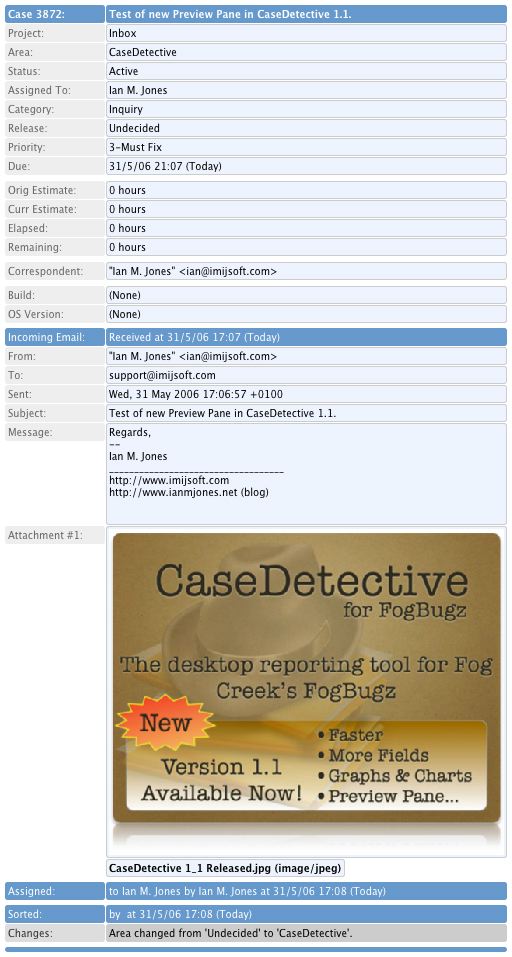
    What I can write about for the first time is the Preview Pane, an area under the list of cases that shows details of the currently selected case and the history of comments, emails and changes that have occurred. In fact, I’m not even going to write about it, I’ll just show you a picture of what you can get if you right-click on it and save it as an image…

    Preview Pane.jpg

    Current users of CaseDetective should start to see update notices the next day they start CaseDetective (if they have automatic updates turned on) or the next time they “Check for update”.

    I’ll be sending out a short newsletter in the not too distant future too.

    CaseDetective 1.1 for FogBugz is a free update for all current users. New users can buy CaseDetective for $69, and there is a free 30 day usage trial available.

  • Documentation, bleugh!

    CaseDetective for FogBugz 1.1 is done, finished, complete … almost. Just need to get the documentation done.

    It’s always the last thing to be done, we developers always put it off to the last moment and generally see it as that horrid task sent by the devil to torment us.

    Except this time I’m not minding it too much for some reason.

    Maybe it’s because I’ve decided to really shake up the documentation and website this time round, last time it was a little half hearted and I’m feeling I need to make a big push this time to get a much better quality set of docs there.

    Since releasing CaseDetective last year I’ve had a fair few support requests that really shouldn’t have been there, documentation should have nipped them in the bud. Whether that be information on the website for prospective downloaders or in the help docs for those looking to get a little more from CaseDetective. Obviously my docs just weren’t up to scratch.

    At first I’m just getting the basic documentation framework back into shape before private beta as I’m changing the way I produce them a little, it won’t be anywhere near complete but should give an idea as to the format (placeholders will abound).

    Originally I authored my documentation and CaseDetective website in separate RapidWeaver files and then processed the documentation output through HelpLogic to get the final help files and separate docs website. There are pros and cons to doing this.

    On the plus side it was easy to set up the documentation file so that it didn’t use any index.html files, HelpLogic doesn’t allow them as they conflict with files it has to create. It also meant I could have a nice docs website that looked and performed just like a normal help file, with searching, contents, index and everything.

    On the minus side is the fact that I was maintaining two separate files which shared a lot of the same information, such as support contacts, features overview etc. Also, that separate docs website may be searchable by itself, but not from Google and other search engines as it uses frames, so does not contribute much to my marketing effort (when I actually start to do some that is). The separate docs site also doesn’t have my CaseDetective theme, it’s totally different so doesn’t look part of the main CaseDetective website. Both the searching and not being integrated into the main site are potentially big hindrances to getting free marketing from the content (when it improves) and looking professional.

    So I’m now using one RapidWeaver file for my CaseDetective website and just rejigging it so that I only have one index.html, the main one which would never be included in the help files anyway.

    My (new) website will have fully integrated documentation using the same theme as the rest of the site and will of course be searchable by search engines. And when building my in-application help files I simply switch the theme to a plain theme I’ve created and extract to a folder that HelpLogic will pick up from. Then I just delete the index.html file and it’s associated resource files and use HelpLogic to reformat everything for Windows and Mac help formats. A quick compile to CHM format with the free Windows HTMLHelp Studio and index the Mac OS X Help Book with the free Help Indexer and we’re ready to build the Windows setup file and Mac disk image. It takes much less time than it did to write this paragraph, honest!

    Well, I guess I should get back to it, those private beta testers must be chomping at the bit by now, desperate to get their hands on CaseDetective 1.1b1!

  • CaseDetective 1.1 Sneak Peek #4: Graphs

    So far the sneak peeks for CaseDetective 1.1 haven’t been all that enthralling, even I am able to admit that the features I’ve shown aren’t that big a deal to most users of CaseDetective and FogBugz.

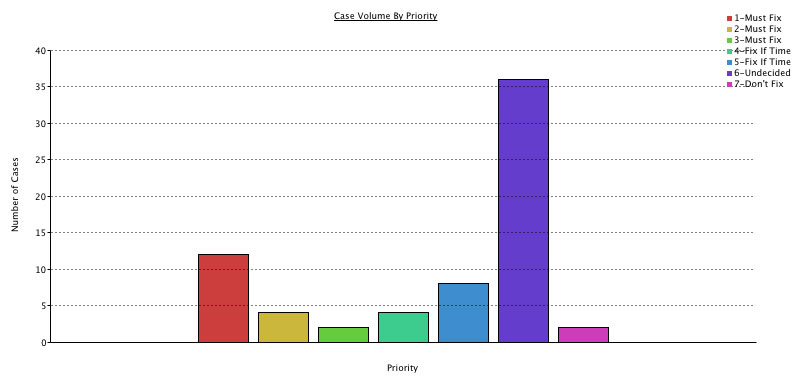
    This one may turn a few heads though, CaseDetective for FogBugz 1.1 will include the ability to view some “potted” graphs, just like this one:

    SimpleGraphS.jpg

    The above graph was grabbed from the new “Overview” pane, which includes the previously sneak peeked Last 50 Events list. To be able to include graphs of statistics from FogBugz in your reports, all you have to do is select an appropriate filter and pick the type of graph you want, then simply copy and paste the graph into your report. It’s as simple as 1-2-3!

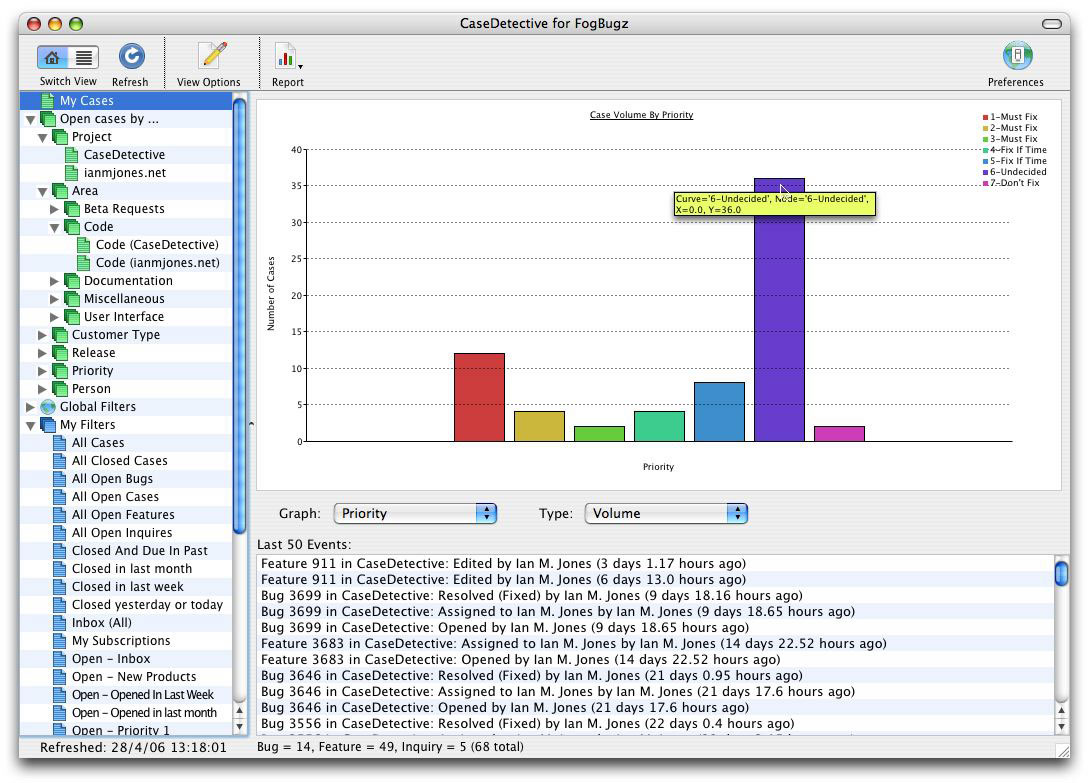
    SimpleGraphWithPopUpS.jpg

    And as you can see from the above screenshot (click it for a better view), when you hover your cursor over a “node” you get a little yellow pop-up with a bit of info about it, such as the number of cases (Y value).

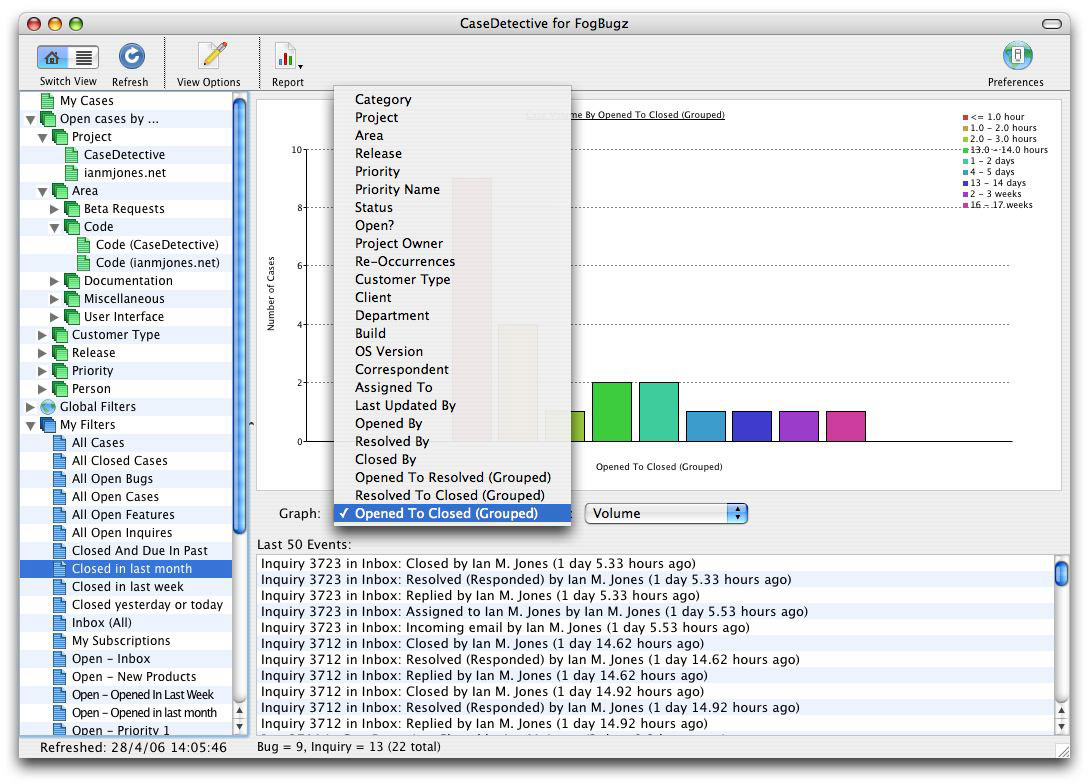
    For some people this could be a real time saver, as it’s a very quick way of finding out how many of your FogBugz Cases are in a particular Priority, Status, Release and so on, there are quite a few fields you can graph:

    GraphFieldsS.jpg

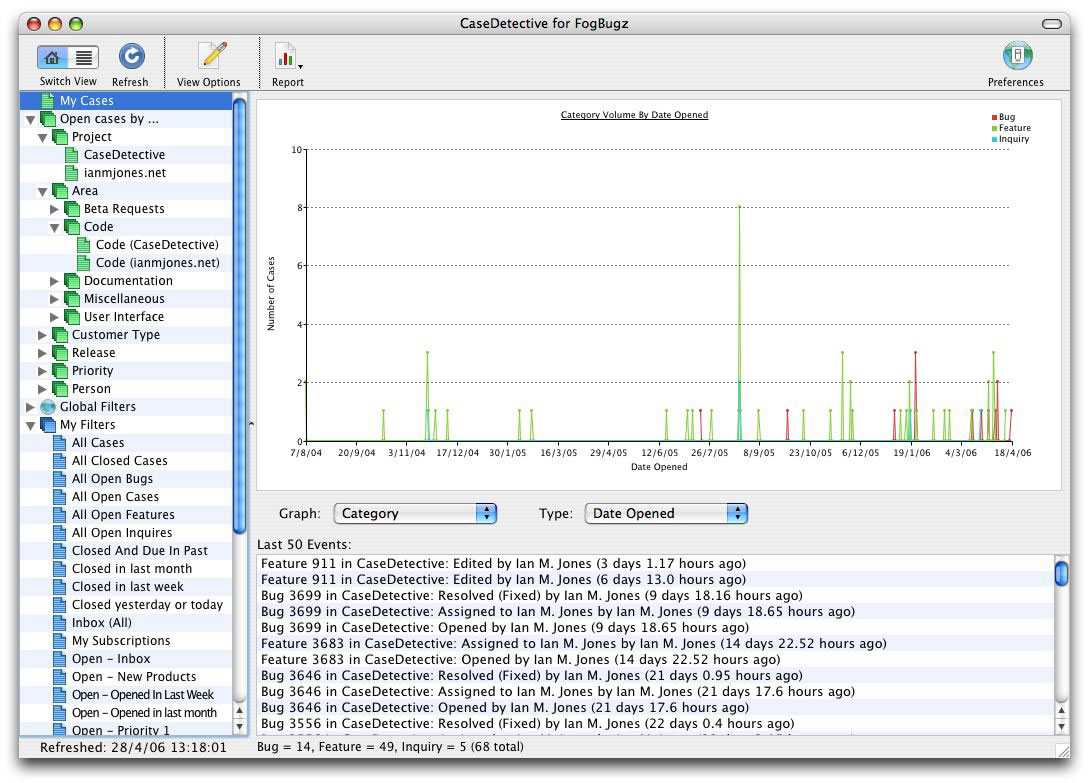
    And of course, you need to be able to see when it was that you had that sudden spike in feature requests opened, resolved, closed or last updated:

    DateLineGraphS.jpg

    Being able to quickly see patterns in your FogBugz data through graphs and charts in CaseDetective for FogBugz should hopefully help a lot people get through their day that little bit quicker when it comes to getting those reports out.

  • Anchors Away! (CaseDetective 1.1 Sneak Peek #3: Recent Activity List)

    This post was originally a guest post for the Fog Creek Blog, but I’m re-posting it here for completeness with permission from Michael.

    There’s a neat little new feature hidden away in FogBugz 5 (currently in beta) that I think a lot of people will find useful (and not just because I asked for it), HTML anchors on displayed bug events.

    I guess I should explain why I asked for them and why I think you’ll find them useful…

    A few months ago there was a feature request on the FogBugz discussion forum that I thought was pretty good, so I nicked it for CaseDetective (thanks Sam Chrisp)!

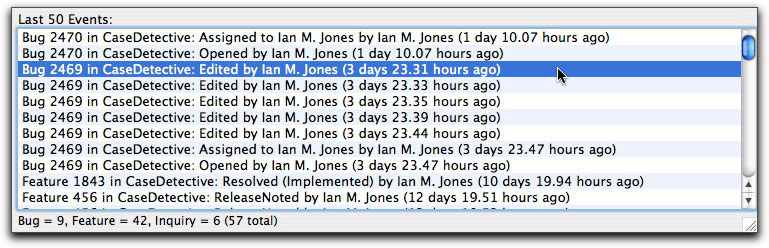
    The feature request was for a “Recent Activity List”, basically a listing of the last X number of edits and comment events so that the FogBugz user could see what has recently happened, and then click through to any Case that’s of interest. The feature request even included a picture of the list that the user had created for themselves by modifying the FogBugz code.

    I liked the idea and felt it would be useful as long as you could click on an event line in CaseDetective and go directly to the FogBugz edit entry in the Case view page without having to scroll down the page to it. There was one snag though, FogBugz 4 didn’t have any HTML anchors on each of the entries in the view page so CaseDetective couldn’t construct a URL to go directly to the entry. Darn!

    So I fired off a quick email to Michael (Pryor, I think you all know who he is 🙂 ) asking whether he’d consider adding anchors to the view pages in FogBugz so that anyone could construct a URL to go directly to the event. Michael said he’d pass it on to the development team for appraisal.

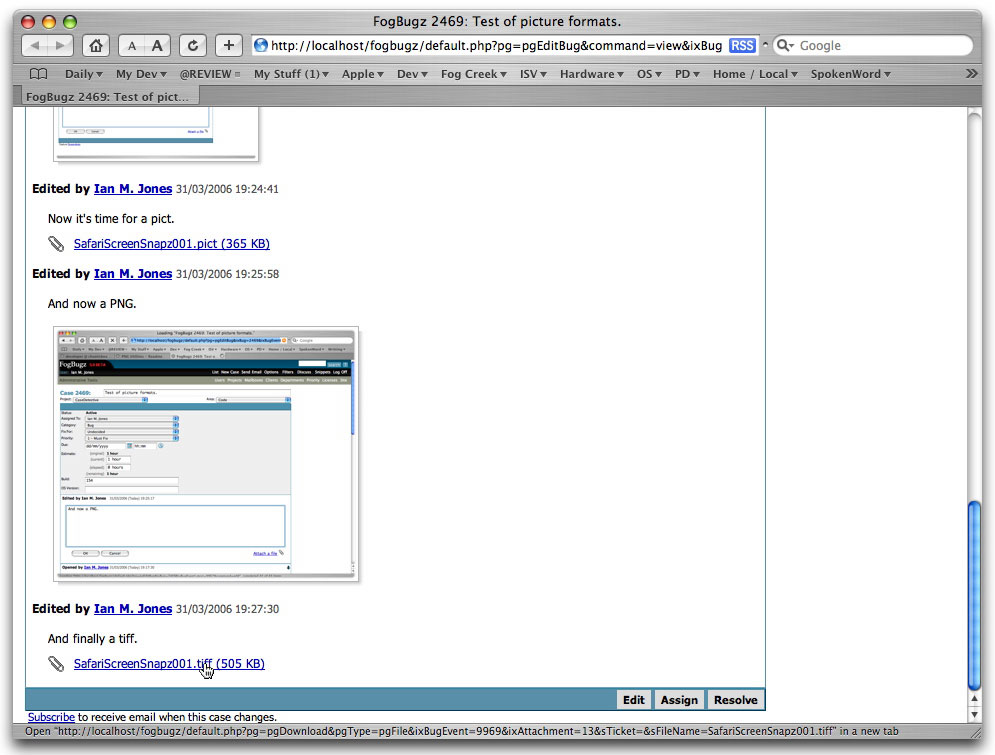
    The announced features for FogBugz 5 didn’t mention anchors so I thought I’d missed the boat and would have to wait a little while before implementing my Recent Events list. However, while playing with the FB5 beta late one night (make that early one morning, just couldn’t sleep until I found out everything that was new) I checked the HTML source for the Case View page and there they were, BugEvent anchors. Yeehaa!

    Here’s the deal, every bug event that is displayed in a Case has an anchor in it’s header, something like “<a name=”BugEvent.9969″>”.

    This means you can send someone directly to a comment or edit with a URL such as:

    http://server.example.com/fogbugz/default.php?pg=pgEditBug&command=view&ixBug=2469#BugEvent.9969

    or the even simpler:

    http://server.example.com/fogbugz/?2469#BugEvent.9969

    As long as the URL ends with a “#” followed by the anchor’s name, you should be good to go.

    This kind of thing is very useful when you want to point someone to a particular comment or edit, instead of having to say:

    “Please have a look at the comment dated 03/04/2006 10:20:30 made by John Doe in case 2469”

    you can say:

    “Please look at this comment: <link>” and past in a direct link to the comment.

    Of course, it’s helped me a lot as it meant CaseDetective could acquire the Recent Events list I wanted to implement. Double click an event…

    CaseDetective-1_1-RecentEvents-SneakPeek.jpg

    … and you’ll be taken directly to it in your default browser:

    FogBugz5-Anchors.jpg

    This event list will make up the bottom half of CaseDetective 1.1s new “Overview” view, which I’ll discuss a little more on my blog soon.

    CaseDetective 1.1 is still in development, but we’re working hard on getting it into your hands as soon as possible. Stay tuned for more updates as we get closer to release.

  • CaseDetective 1.1 Sneak Peek #2: Open cases by Area

    In FogBugz there is this concept of a Project Area. Areas are usually something like “Code”, “Documentation”, “User Interface” and so on, a way of categorizing a Bug, Feature or Inquiry so that the correct person can pick it up. They are very useful, a great way compartmentalizing you Cases for better resource and time management.

    The problem is, these Areas are children of a Project, so it’s impossible to create a filter in FogBugz that captures all cases that are in an Area regardless of the Project they are in, for example; all Cases related to “Code”. This is a real shame, as many people use Areas for all kinds of things, and would love to see all cases that have the same Area. Some people think of Areas as a kind of tag.

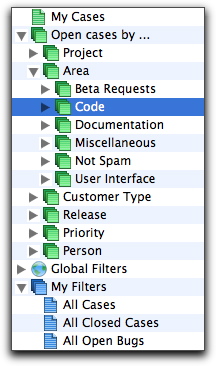
    In CaseDetective 1.1 for FogBugz we’ve opened up Areas a little by giving you a “Open cases by Area” summary filter, allowing you to see all open Cases in each of your Areas, regardless of the Project they’re in.

    CaseDetective-1_1-OpenCasesByArea-SneakPeek1.jpg

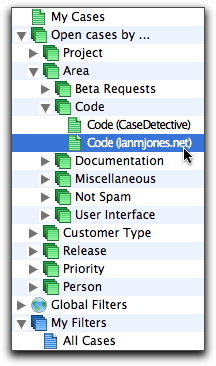
    But, if you then need to drill down to find out which Projects those Cases are in, you can.

    CaseDetective-1_1-OpenCasesByArea-SneakPeek2.jpg

    Some way of seeing all cases in an Area name without having to select a Project has been one of the most requested features I’ve seen, and something I’ve long wanted myself.

    CaseDetective 1.1 is still in development, but we’re working hard on getting it into your hands as soon as possible. Stay tuned for more updates as we get closer to release.