
Didn’t notice a new release of ActorDB, but someone did and submitted a PR for ActorDB for Docker, I love open source software!
-
-
Had a great day at the National Marine Aquarium in Plymouth today.

-
Got a puncture while driving Abi to school this morning, luckily there was a lay-by just after it happened. Not a good start to the day though.
-
Micro.blog has re-kindled my interest in IndieWeb. Need to read up on current standards and how WordPress fits in.
-
Contributed some code to @kbjohnson90’s Micro Posts WordPress plugin last night, could be a nice way to #microblog with #wordpress
-
New Xojo Web SDK Control: ToastrIJ
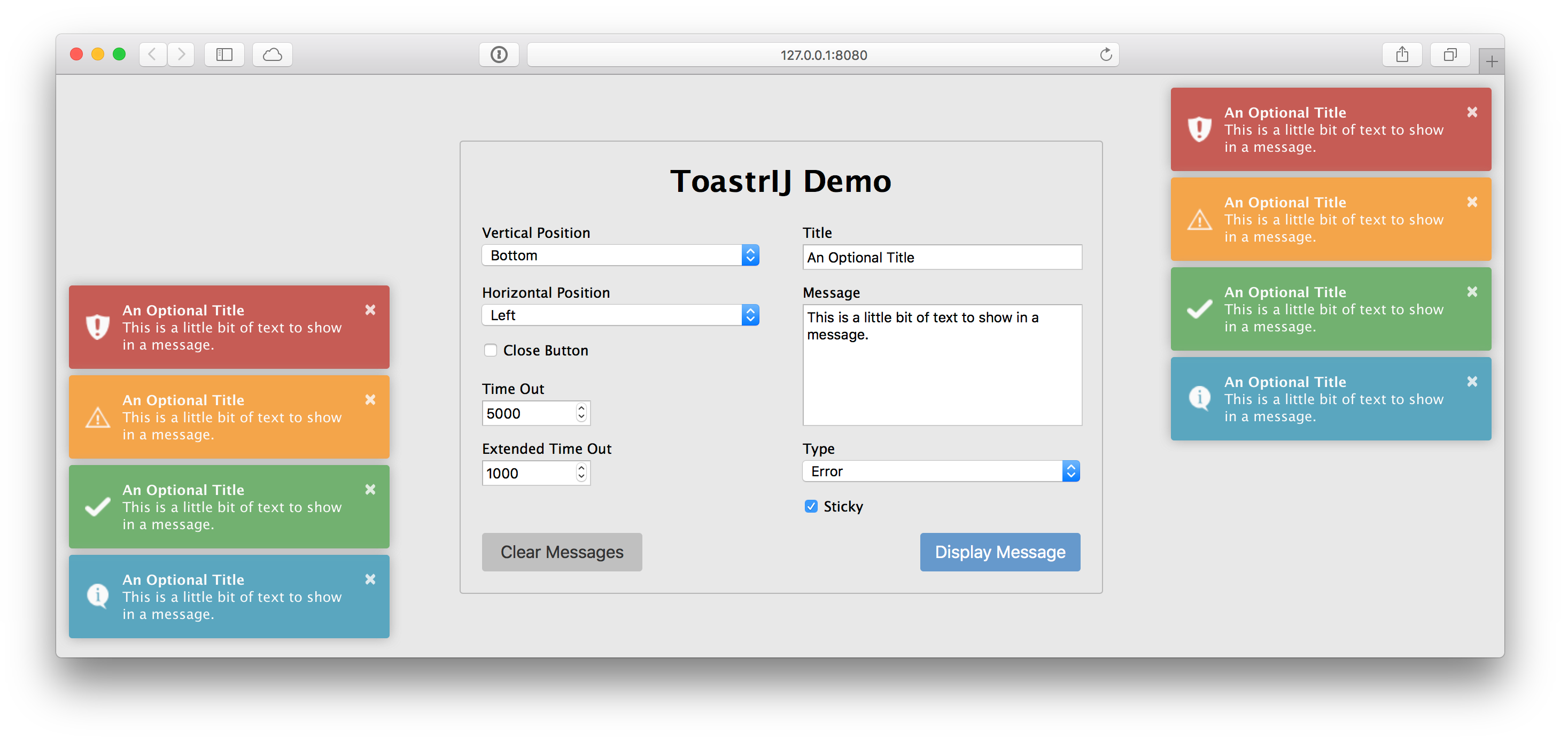
I’ve created a little open source Xojo Web SDK control called ToastrIJ.
It’s a thin wrapper around the most excellent toastr JavaScript library to enable the display of notifications. You know, those little growl like notifications to display information, success, warning and error messages.
It’s under the MIT license, and you can grab it from GitHub.
-
Meta Pixie Pro Released

What? Really? So soon after releasing Meta Pixie?
Post about releasing Meta Pixie
Yep, just one week after releasing Meta Pixie I’ve managed to finish off and release Meta Pixie Pro.
To be honest, I was already working on the Pro addon for Meta Pixie when I announced Meta Pixie’s release last week, as I had to wait for Meta Pixie to be approved and added to the WordPress Plugin Directory. It took a few late nights of development and much testing, but I wanted to get it out before Christmas and I’m pretty stoked at how well development went.
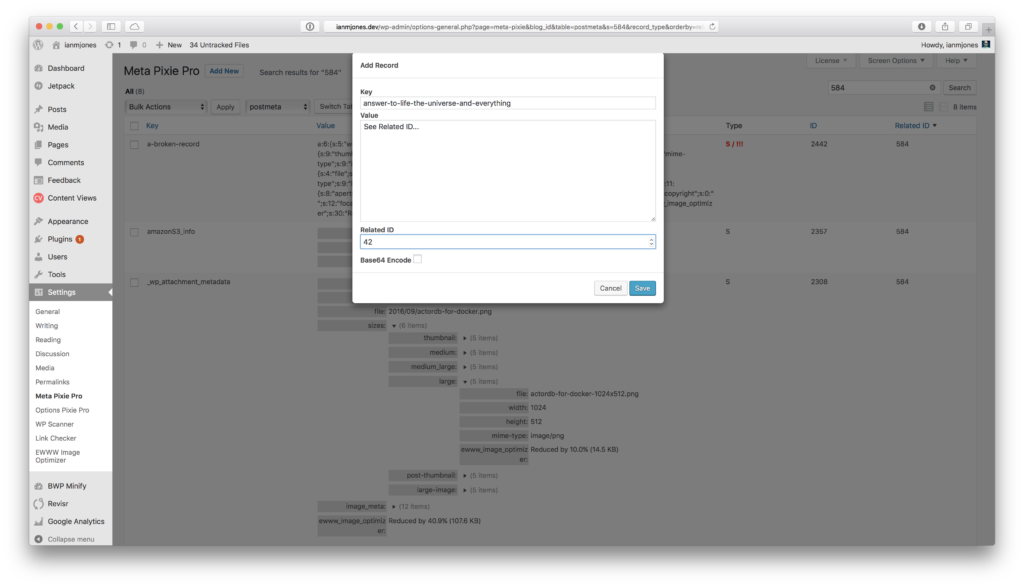
Meta Pixie Pro adds the following features to Meta Pixie:
- Add, edit, delete records.
- Fix broken serialized values.
- Bulk deleting and fixing of records.
- Priority email support.
List, sort, search, view, add, edit, delete and fix your WordPress site’s commentmeta, postmeta, termmeta, sitemeta and usermeta records with style.
Like Options Pixie Pro, you can pick up a Meta Pixie Pro license for 10, 25 or 50 sites, starting at the super low price of $39. If you want a license for more than 50 sites, drop us line.
If you stick both Options Pixie Pro and Meta Pixie Pro in your cart, you’ll get a 20% discount on the second item! (tip: if you’re buying a larger pack for one of the plugins, stick it in your cart second for a bigger discount!)
-
New WordPress Plugin: Meta Pixie

Ever since I released Options Pixie to enable easy viewing of options records in a WordPress database, my colleague at Delicious Brains, Ashley Rich, has been bugging me virtually non-stop to create something that lets us look at postmeta records. It’s really handy for us when working on WP Offload S3 to be able to see the metadata attached to a Media Library item.
Well, a couple of weeks ago I finally found a few spare evenings to work on a new plugin that enables viewing of not only postmeta table records, but also commentmeta, termmeta, usermeta, and on multisite installs, sitemeta too.
Meta Pixie is now available from the WordPress Plugins repository, and once installed you’ll find a Meta Pixie menu option within the Settings menu.
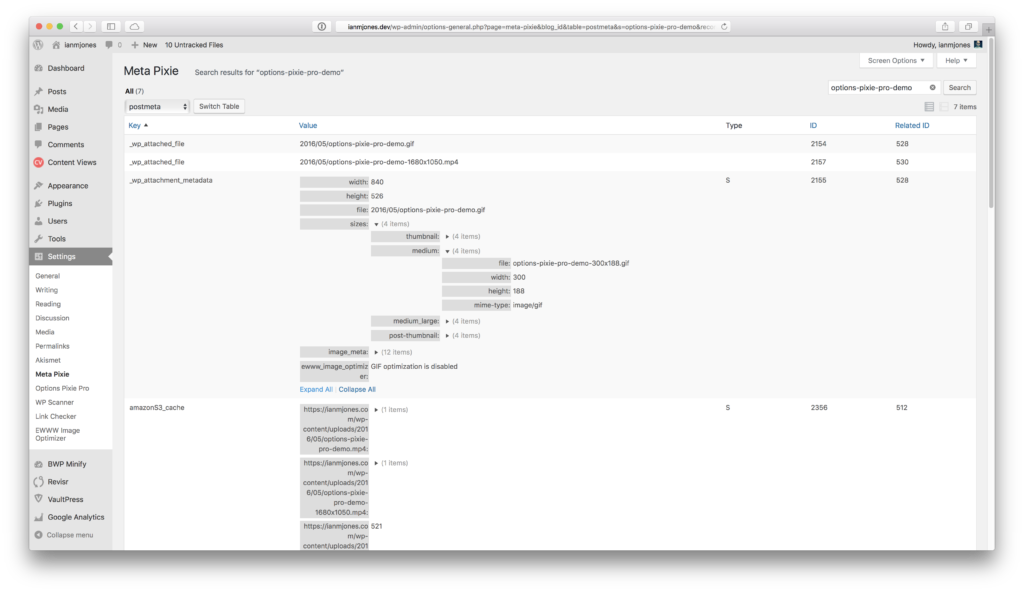
Now you can inspect your WordPress metadata records to find out what’s really going on. For example, you can easily check that a Media Library item has the correct thumbnail metadata.
You can also check the integrity of serialized values, Meta Pixie will highlight broken serialized values (i.e. where it expects a string to be 256 characters long but its actually 255).
For us on the WP Offload S3 team it’s awesome to be able to view the plugin specific metadata that we need to generate, as well as settings stored in the sitemeta table of a multisite without having to resort to database admin tools. The rich view means we can easily see the structure of a serialized record without having to unpick plain text.
I’m considering creating a Meta Pixie Pro addon that enables add, edit, delete of metadata records, as well as fixing of broken serialized values. If this sounds like something you could use, please let me know by adding your vote to its product page.
-
ActorDB for Docker

Last weekend I re-stumbled across ActorDB, a very interesting distributed database system that scales near linearly by scoping work to Actors. Every database action, whether that's an insert, select, update, delete or whatnot, always starts by specifying the Actor. This effectively scopes the changes to a single database, which then replicates to its sibling databases on other ActorDB nodes in a cluster. There's a lot more to it than that, as you can of course work with multiple actors within a transaction, and can connect to any node, in any cluster, and the data will be routed properly. In short, think user-centric databases all clustered and replicated together, using the SQLite engine backed by LMDB storage and using Raft for consensus. There's a little buzz-word bingo for you.
After reading everything I could find on ActorDB, and still having a bit of time to kill before having to go transfer our daughter from one place to another yet again, I figured I'd have a quick play with it.
As is rapidly becoming my norm, I went to Docker Hub to find a Docker image to spin up. To my utter shock and horror (there might be a little bit of exaggeration there), there was not a single image for ActorDB to be found!
My first thought was that maybe there was a very good reason for there not being a Docker image available, but after a little look around that there interwebs I came to the conclusion that it was simply because it's a young project, and generally run on real machines in production. Nothing made me think it was a terrible idea to run ActorDB in a Docker container, so why not give it a bash? ActorDB for Docker was born!
The Dockerfile
Having recently done a bunch of work for Delicious Brains that involved using Docker, I wasn't too phased by the idea of spinning up a new Dockerfile, and luckily there's an ActorDB package for Debian.
I built a basic image based on Debian Jessie, and then logged into it and experimented with the steps I needed to run to get ActorDB installed and running. It took much less time than I expected as ActorDB is pretty self contained, the biggest issues I had were with making sure curl had all its dependencies in place to actually download the .deb file from within the running container (it needs some extra root certificates installed via a package).
I also rather stupidly forgot that the actordb program runs as a daemon by default, so the container kept just running and exiting cleanly. Once I realised what was going on, I simply ran the container with –entrypoint /bin/bash and then ran actordb without any arguments to get its usage info. Turns out you can run actordb forground rather than actordb start to get it to run in the current shell. Just what I needed.
I've been working with a PhantomJS image recently, and noticed that it used a script to ensure that the phantomjs binary did not run as the first process in the container (PID 1) as it may cause issues with shutting it down. So I nicked that idea.
The final Dockerfile is pretty simple, makes sure to expose the required ports and volume primary paths that ActorDB uses, and the image is available as an automated build on Docker Hub.
Docker Compose
A distributed database is no good without multiple nodes to distribute its data around, and of course I wanted to ensure the image could be used in a network of containers. I used Docker Compose to set up a very rudimentary cluster of three nodes, you can see the setup in the project root's docker-compose.yml file.
While the containers seemed to work (on second start, see issue #1 for details), could ping each other by their service names (e.g. actordb-server-1 could ping actordb-server-2), I spent ages trying to get the instances of ActorDB to actually replicate data between them. I eventually sorted it out with the following two important realisations:
1. The -name setting in each node's vm.args file must have a unique name before the @, the ip address/domain name after the @ doesn't make it unique.
2. You must update your initialisation script that is run on the leader to also register the other nodes in the cluster (you can register them manually later, but will need to copy the leader's lmdb file to them first).
Once I'd worked that out, I was super happy to have a fully working cluster of ActorDB nodes!
Quick Example
The following text is a quick run through of bringing up a cluster, initialising it, writing some data to the first node, switching to the second node and showing the data replicated from the first, creating some more data, and then showing it all on the third node, but using the MySQL client. Enjoy!
Ians-MBP:actordb-for-docker ian$ ./up.sh
Creating network actordbfordocker_default with the default driver
Creating actordbfordocker_actordb-server-1_1
Creating actordbfordocker_actordb-server-2_1
Creating actordbfordocker_actordb-server-3_1
actordb-server-1 – Use actordb_console to run the SQL script that initialises the database:
Ians-MBP:actordb-for-docker ian$ docker-compose exec actordb-server-1 actordb_console -f /etc/actordb/init.example.sql
Config updated.
Config updated.
Schema updated.
actordb-server-1 – Use actordb_console to show the schema, create and select some data:
Ians-MBP:actordb-for-docker ian$ docker-compose exec actordb-server-1 actordb_console -u myuser -pw mypass
*******************************************************************
Databases:
use config (use c)  initialize/add nodes and user account management
use schema (use s)  set schema
use actordb (use a) (default) run queries on database
*******************************************************************
Commands:
open         (windows only) open and execute .sql file
q            exit
h            print this header
commit (c)   execute transaction
rollback (r) abort transaction
print (p)    print transaction
show (s)     show schema
show status  show database status
show queries show currently running queries
show shards  show shards on node
*******************************************************************
actordb> actor type1(hello_world);
actordb (1)> insert into tab(id, txt) values(1,"Hello World");
actordb (2)> c
Error: {error,{nocreate,>}}
actordb> show
****************************************************************************************************************************************************************
sql                                                                                                                                                 type       |
----------------------------------------------------------------------------------------------------------------------------------------------------------------
$CREATE TABLE tab (id INTEGER PRIMARY KEY, txt TEXT);                                                                                               type1      |
$CREATE TABLE tab1 (id INTEGER PRIMARY KEY, txt TEXT);                                                                                              type1      |
$ALTER TABLE tab ADD i INTEGER;                                                                                                                     type1      |
$CREATE TABLE tabx (id INTEGER PRIMARY KEY CHECK (typeof(id) == "integer"), txt TEXT CHECK (typeof(id) == "text"));                                 type1      |
$CREATE TABLE asdf (id INTEGER PRIMARY KEY AUTOINCREMENT, txt BLOB);                                                                                type2      |
$CREATE TABLE actors (id TEXT PRIMARY KEY, hash INTEGER, val INTEGER) WITHOUT ROWID;                                                                counters   |
$CREATE TABLE actors (id TEXT PRIMARY KEY, hash INTEGER, size INTEGER)  WITHOUT ROWID;                                                              filesystem |
$CREATE TABLE users (id INTEGER PRIMARY KEY AUTOINCREMENT, fileid TEXT, uid INTEGER, FOREIGN KEY (fileid) REFERENCES actors(id) ON DELETE CASCADE); filesystem |
----------------------------------------------------------------------------------------------------------------------------------------------------------------
actordb> actor type1(hello_world) create;
actordb (1)> insert into tab(id, txt) values(1,"Hello World");
actordb (2)> c
Rowid: 1, Rows changed: 1
actordb> actor type1(hello_world) create;
actordb (1)> select * from tab;
actordb (2)> c
*********************
i    id txt         |
---------------------
null 1  Hello World |
---------------------
actordb> q
Bye!
actordb-server-2 – Use actordb_console to see the data created on actordb-server-1, and create some more:
Ians-MBP:actordb-for-docker ian$ docker-compose exec actordb-server-2 actordb_console -u myuser -pw mypass
*******************************************************************
Databases:
use config (use c)  initialize/add nodes and user account management
use schema (use s)  set schema
use actordb (use a) (default) run queries on database
*******************************************************************
Commands:
open         (windows only) open and execute .sql file
q            exit
h            print this header
commit (c)   execute transaction
rollback (r) abort transaction
print (p)    print transaction
show (s)     show schema
show status  show database status
show queries show currently running queries
show shards  show shards on node
*******************************************************************
actordb> actor type1(hello_world) create;
actordb (1)> select * from tab;
actordb (2)> c
*********************
i    id txt         |
---------------------
null 1  Hello World |
---------------------
actordb> actor type1(hello_world) create;
actordb (1)> insert into tab(id, txt) values(2, "ActorDB Rules!");
actordb (2)> c
Rowid: 2, Rows changed: 1
actordb> q
Bye!
actordb-server-3 – Use the mysql client to connect to actordb-server-3's MySQL protocol port:
Ians-MBP:actordb-for-docker ian$ mysql -u myuser -p -h127.0.0.1 -P33337
Enter password:

Welcome to the MySQL monitor.  Commands end with ; or g.
Your MySQL connection id is 0
Server version: 5.5.0-myactor-proto 5.5.0-myactor-proto

Copyright (c) 2000, 2015, Oracle and/or its affiliates. All rights reserved.

Oracle is a registered trademark of Oracle Corporation and/or its
affiliates. Other names may be trademarks of their respective
owners.

Type "help;" or "h" for help. Type "c" to clear the current input statement.

mysql> actor type1(hello_world) create; select * from tab;
Query OK, 0 rows affected (0.01 sec)

+------+----------------+------+
| id   | txt            | i    |
+------+----------------+------+
|    1 | Hello World    | NULL |
|    2 | ActorDB Rules! | NULL |
+------+----------------+------+
2 rows in set (0.00 sec)

mysql> actor type1(hello_world) create; update tab set i = id * 100;
Query OK, 0 rows affected (0.00 sec)

Query OK, 2 rows affected (0.02 sec)

mysql> actor type1(hello_world) create; select * from tab;
Query OK, 0 rows affected (0.01 sec)

+------+----------------+------+
| id   | txt            | i    |
+------+----------------+------+
|    1 | Hello World    |  100 |
|    2 | ActorDB Rules! |  200 |
+------+----------------+------+
2 rows in set (0.00 sec)

mysql> exit;
Bye
-
Building Reactive WordPress Plugins – Part 3 – Elm

In the final part of the Building Reactive WordPress Plugins series across on the Delicious Brains blog, I explore using Elm rather than JavaScript to write the front end of WP Cron Pixie, the small WordPress dashboard widget for showing what’s in the WordPress cron.
I had more fun writing the code for this article than any other in the series. I hope you enjoy reading it and maybe it gets you thinking about trying out Elm for your next web frontend.