Buster Grotbot Pickle Jones, our scatty New Zealand cat, nicknamed “Boo”, says it’s too hot to work today!


Always developing
Buster Grotbot Pickle Jones, our scatty New Zealand cat, nicknamed “Boo”, says it’s too hot to work today!
There’s a brand new version of WP Cron Pixie available to install, and with luck, even though it’s changed immensely under the hood, you’ll not see any difference compared to the previous version! 😄
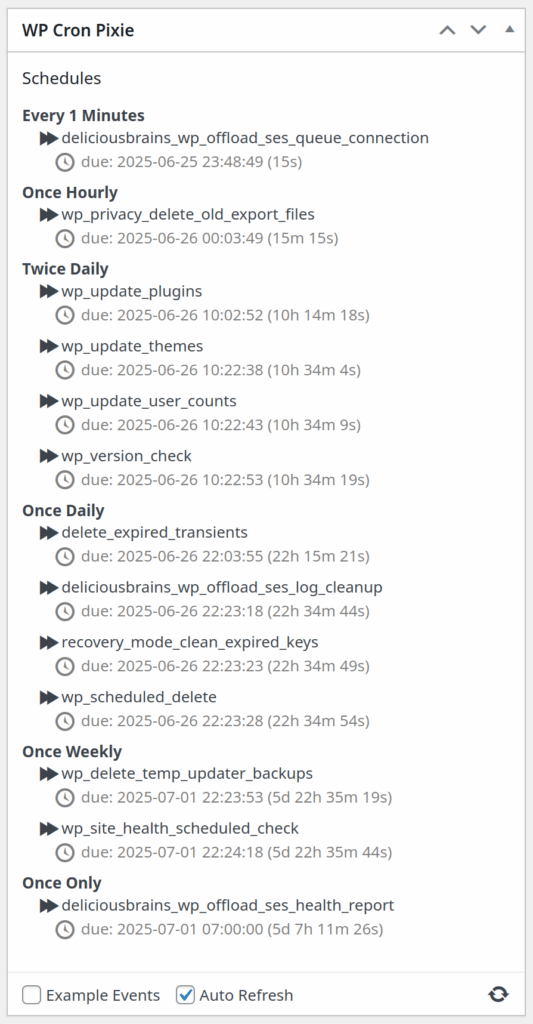
WP Cron Pixie is a little WordPress dashboard widget to view the WordPress cron, and run an event now rather than later.
The front end has been rewritten in Gleam, a “friendly language for building type-safe systems that scale“!
Back in May 2023 I got interested in Gleam after seeing Kris Jenkins interview Louis Pilfold on the Developer Voices podcast, I loved the idea of a type safe functional language with a clean but familiar syntax, that compiles to Erlang to run on the BEAM, or to JavaScript to run basically everywhere.
I poked around at Gleam now and then, not really getting anywhere, and decided I needed to write some project in it, that’s usually the best way for me to pick up a language. So back in April 2024 I started rewriting WP Cron Pixie’s front end from Elm to Gleam as part of my YouTube channel.
I recorded a few episodes, but alas, life got in the way, and I stopped recording videos for my YouTube channel while distracted by some personal and work projects, including moving house.
It’s only recently that things have settled down a little, and I’ve started to have a bit of time to start working on personal software projects again. Unfortunately my new home office is a horrible echo producing machine, so I can’t currently record any videos. So, until I can shoe-horn some soft surfaces into my small office to dampen the sound, I’m just enjoying working on projects without someone watching over my shoulder. 😉
After messing about with Kamal and Concourse CI, and then experimenting with how to test a Gleam project with that setup, I had the itch to get back into writing Gleam again.
Since I first started this project over a year ago, a bunch of things have improved in the world of Gleam, including decoders, which is what I’d been working on at the time I stopped. This meant I had to change quite a bit of the Gleam code I’d already written for decoding the data loaded by the widget when first shown, but to be fair, I hadn’t really got much done yet anyway.
I found the new decoder setup really nice, if still a little tricky to get my head around at first, but after a bit of help via the super nice folks in the Discord community, I was off and running. I built a bunch of data decoding into a data module, using TDD to make sure it all worked even though I had no UI yet to view the decoded data.
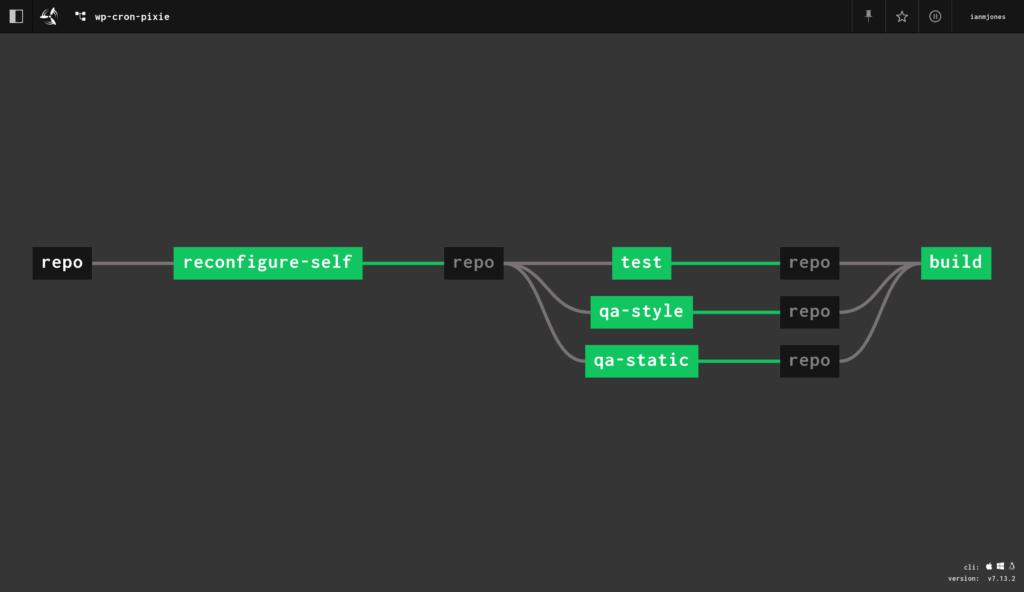
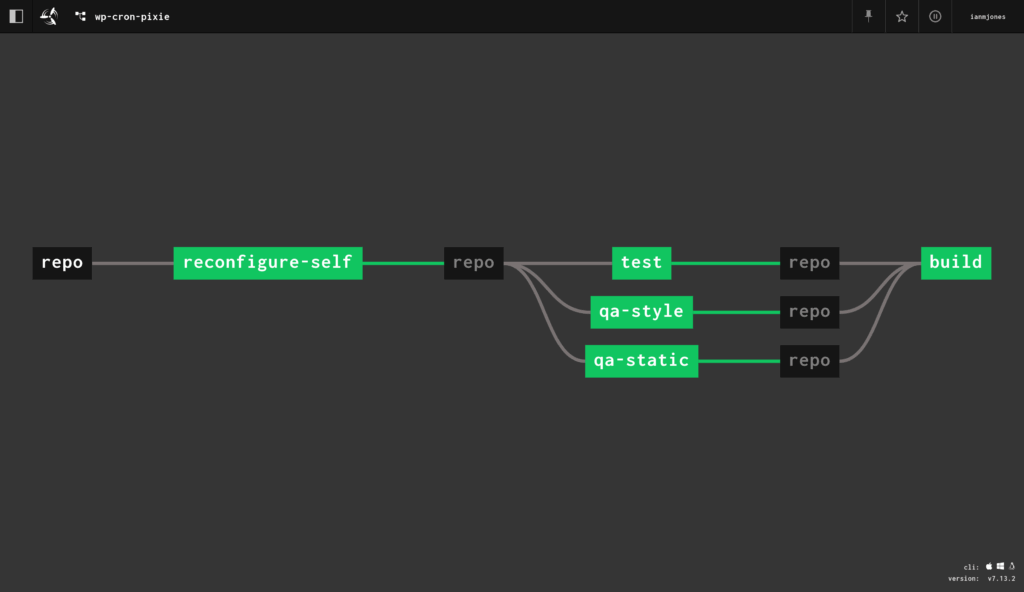
And of course, although I used watchexec to continuously run the tests and build and install the plugin into my local test site every time I saved changes, I also set up a concourse-ci.yml file to make sure any commits I pushed up to the repo got tested by my dinky little Concourse CI server.
With the initial data being correctly decoded as flags for the Lustre based UI, I found it relatively quick and easy to build out the UI given that I could effectively copy the same layout as I’d used in the Elm version.
I started off the UI rendering conversion by simply grabbing the output HTML from WP Cron Pixie .1.4.4, and using Louis’ HTML to Lustre Converter to get a static rendering using Lustre syntax. From there, I chopped up the pieces into separate views to handle converting the data Model into things like a list of cron schedules, each with a list of cron jobs, while retaining the same classes that the existing CSS used. In the end, I don’t think I changed the CSS at all.
Compared to how I’d structured the Elm code, I did make some small improvements along the way while building out the UI in Gleam and Lustre, but having the Elm code for reference definitely sped up the development time. The UI code is looking pretty sweet if you ask me! 😊
One thing that is different in Gleam and Lustre compared to Elm is how you make a timer, like what I needed to trigger the auto-refresh of the UI every 5 seconds. In Elm you have subscriptions, and can subscribe to a time tick. However, with Lustre, there is no built in subscription feature, but it does still have effects, and Gleam has a very powerful foreign function interface (FFI) mechanism. This meant I could create a very simple JavaScript timer:
/**
 * Start a periodic timer that fires a callback on a regular cadence.
 *
 * @param {int}    interval Seconds between each tick.
 * @param {object} callback A function to be called on each tick.
 */
export function set_interval(interval, callback) {
	window.setInterval(callback, interval * 1000);
}
And then use that in the UI:
@external(javascript, "./internal/tick.mjs", "set_interval")
fn set_interval(_interval: Int, _callback: fn() -> a) -> Nil {
  Nil
}

/// Start a timer that ticks every given number of seconds.
fn start_timer(seconds interval: Int) -> effect.Effect(Msg) {
  use dispatch <- effect.from
  use <- set_interval(interval)

  dispatch(Tick)
}

/// Handle tasks every time the timer ticks.
fn handle_tick(model model: Model) -> #(Model, effect.Effect(Msg)) {
  case model.auto_refresh {
    True -> #(
      Model(..model, refreshing: True),
      get_schedules(model.admin_url, model.nonce),
    )
    False -> #(model, effect.none())
  }
}
It was then easy to hook into the dispatched Tick message within the update function:
fn update(model: Model, msg: Msg) -> #(Model, effect.Effect(Msg)) {
  case msg {
    Tick -> handle_tick(model)
    RefreshSchedules -> #(
      Model(..model, refreshing: True),
      get_schedules(model.admin_url, model.nonce),
    )
    ...
}
The timer is actually started from the init function:
fn init(flags: String) -> #(Model, effect.Effect(Msg)) {
  ...
  #(model, start_timer(model.timer_period))
}
Hooking up the change events in the form fields in the widget’s settings footer, and handling clicks was super easy with Lustre, and Bob’s yer Uncle, I had a fully working WordPress widget using Gleam for building the UI.
Having built out the UI with Gleam, I then set about improving the back end PHP code.
I made quite a few changes, fixed a couple of bugs, improved security, separated the AJAX handing code from the underlying handling code in case I decide to switch to a WP-REST-API mechanism, and generally cleaned things up.
To aid with the cleanup, I added PHPStan and PHP_CodeSniffer to the mix to perform static analysis and code style checks respectively.
PHPStan is currently passing at level 9, just one step down from the max of 10, which is unfortunately impossible to get to due to some of the referenced WordPress functions, and with only a couple of ignored rules that are due to the way a couple of WP cron functions need to be used.
Likewise, the PHP_CodeSniffer checks are passing all the extended WordPress rules, with just an exclusion because the plugin needs to create its own cron schedule, and the ruleset is currently using a deprecated rule that naturally needs to be skipped.
All in all, I had a lot of fun rewriting WP Cron Pixie’s UI in Gleam, and improving the PHP side of things too.
I am now thinking about what improvements I can make to WP Cron Pixie, might have a crack at using Birdie to snapshot test the UI, and wondering what my next Gleam based project will be as I’ve definitely got the “Gleam ALL THE THINGS” bug!
Turns out, running PHPStan in a Docker based Concourse CI environment on a dinky little $6 DigitalOcean Droplet just isn’t going to cut it.
I always planned on updating the Droplet to something with at least 2 CPUs, once I had a few bits and bobs running on it, didn’t expect running PHPStan on WP Cron Pixie’s code base to be the reason. 🤷
Note for future self on how to successfully cleanly copy an entire git repository from GitHub to SourceHut, with all branches and tags intact.
This is how I did it for wp-cron-pixie:
# on sourcehut, create new repo, then ...
git clone --bare git@github.com:ianmjones/wp-cron-pixie.git
cd wp-cron-pixie.git/
git branch -m master trunk # optional, rename default branch
git push --mirror git@git.sr.ht:~ianmjones/wp-cron-pixie
# on sourcehut, update default branch in repo's settings if not correct.
cd ../
rm -rf wp-cron-pixie.git
git clone git@git.sr.ht:~ianmjones/wp-cron-pixie
cd wp-cron-pixie/
# Check everything is as expected ...
git branch -a
git tag -l
# on github, archive old repo.In my previous Kamal Deploy Concourse CI article I showed how I set up a small personal Concourse CI server via Kamal, and added an example “Hello, World!” pipeline to make sure it worked.
In this article I’ll show you how I then created a git commit triggered self updating Concourse CI pipeline for a bare-bones Gleam project, hosted in a private git repository. The pipeline also demonstrates the simple mechanism used for ensuring that a couple of parallel jobs have to be successful before a later job is allowed to run.
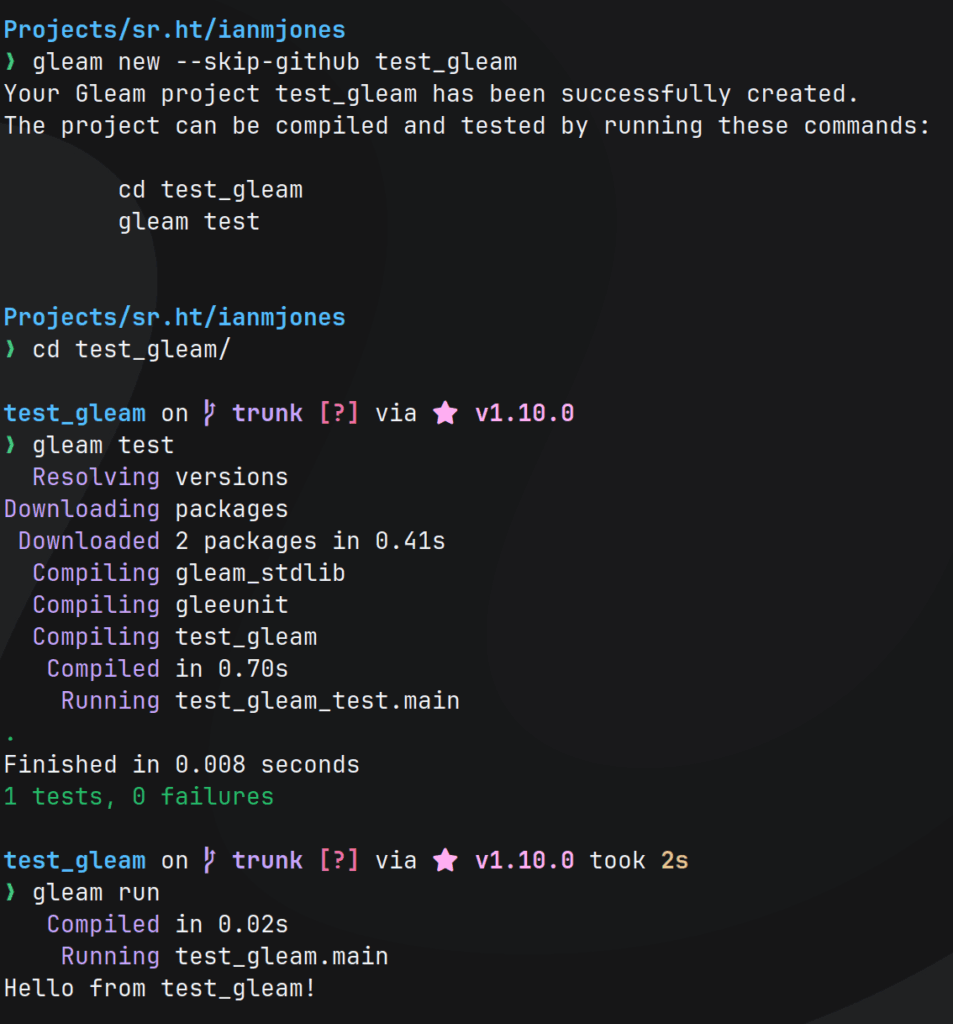
First up, I created a new Gleam project, skipping creation of GitHub specific bits as I use SourceHut for my git hosting:
gleam new --skip-github test_gleamThen, I followed the instructions to make sure the new project was testable:
cd test_gleam/
gleam test
I also made sure it actually ran:
gleam runThis is what that all looked like:
When you look at src/test_gleam.gleam, you can see it’s a super simple app:
import gleam/io

pub fn main() -> Nil {
  io.println("Hello from test_gleam!")
}
The test file in test/test_gleam_test.gleam is similarly simple:
import gleeunit
import gleeunit/should

pub fn main() -> Nil {
  gleeunit.main()
}

// gleeunit test functions end in `_test`
pub fn hello_world_test() {
  1
  |> should.equal(1)
}
You’ll notice that it doesn’t actually test the app’s code, but just proves that tests can be run. I’ll sort that out later, it’ll be a good test of the Concourse pipeline being triggered on git commit.
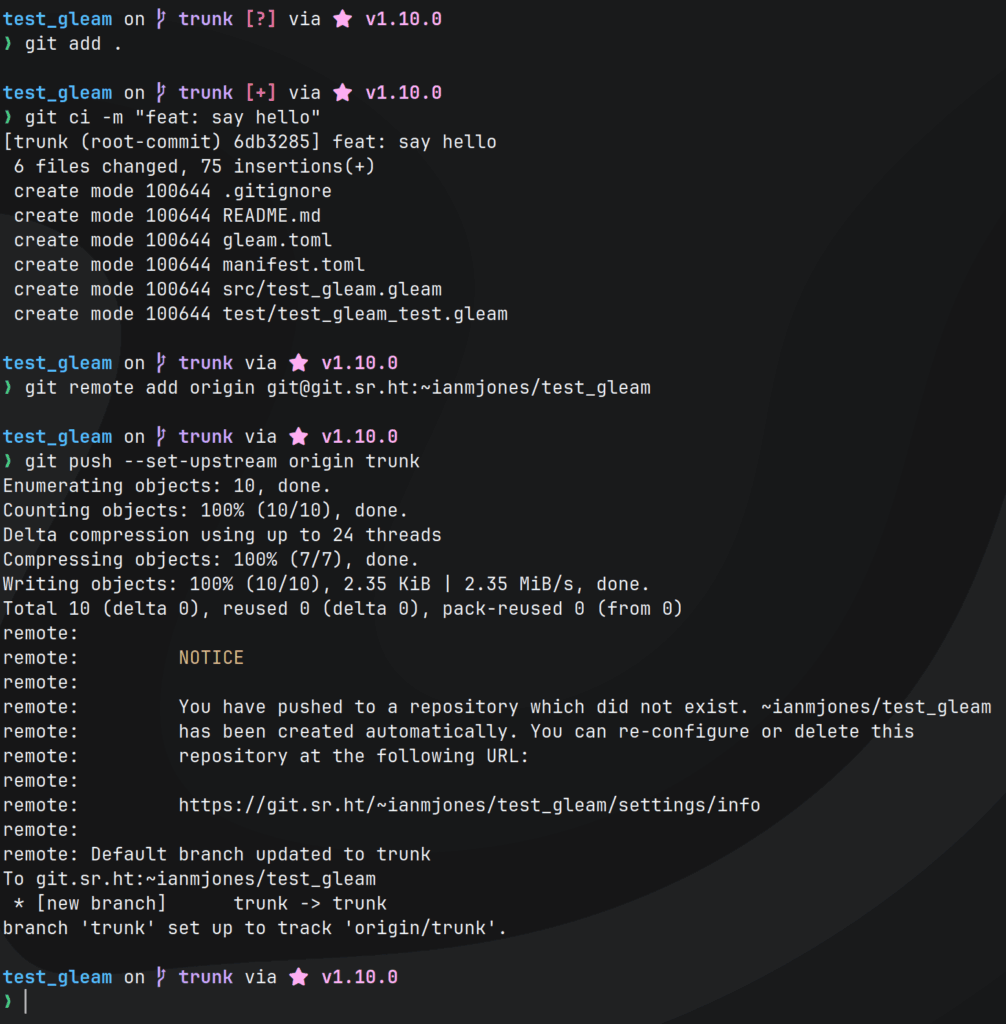
Before going any further, I committed the project to git, and pushed to a new remote repo on SourceHut:
git add .
git ci -m "feat: say hello"
git remote add origin git@git.sr.ht:~ianmjones/test_gleam
git push --set-upstream origin trunk
As seen in the following screenshot, that resulted in SourceHut setting up a new private repository for me:
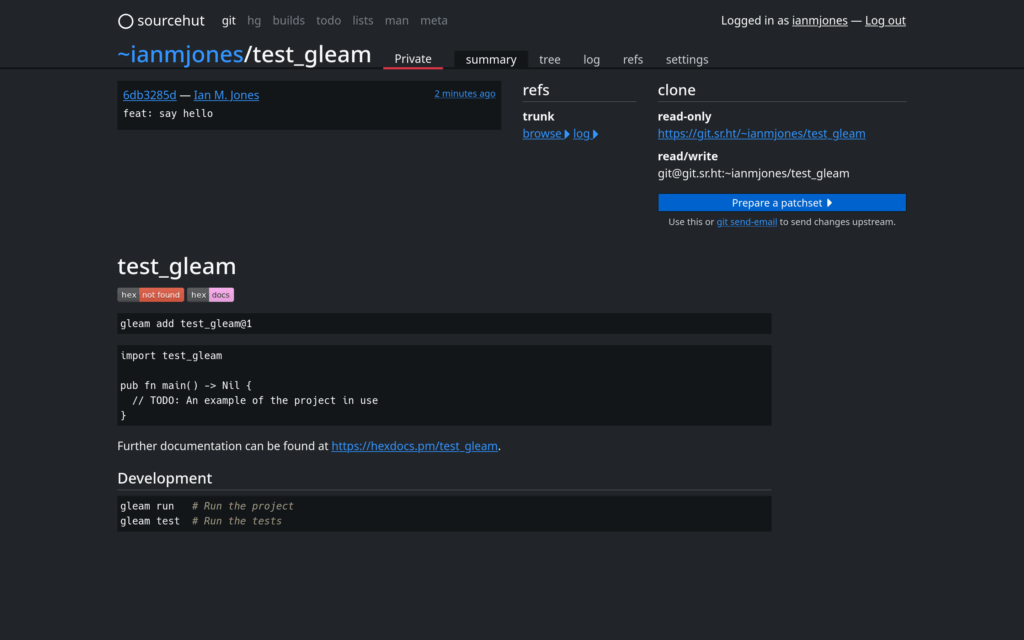
I now had the project safely tucked away at https://git.sr.ht/~ianmjones/test_gleam, with the website showing the project’s default README.md:
I wanted a Concourse pipeline that had the following properties:
gleam test and gleam build in parallel when changes were committed to the repotest and build steps both passAfter a few iterations, the following is the concourse-ci.yml pipeline file I came up with, which I’ll break down after you’ve thoroughly digested it:
resources:
  - name: repo
    type: git
    source:
      uri: git@git.sr.ht:~ianmjones/test_gleam

jobs:
- name: reconfigure-self
  plan:
    - get: repo
      trigger: true
    - set_pipeline: self
      file: repo/concourse-ci.yml

- name: test
  plan:
  - get: repo
    trigger: true
    passed: [reconfigure-self]
  - task: gleam-test
    config: &gleam-config
      platform: linux
      image_resource:
        type: registry-image
        source:
          repository: ghcr.io/gleam-lang/gleam
          tag: nightly-erlang
      inputs:
        - name: repo
      run:
        path: sh
        args:
        - -cx
        - |
          cd repo
          gleam test

- name: build
  plan:
  - get: repo
    trigger: true
    passed: [reconfigure-self]
  - task: gleam-build
    config:
      <<: *gleam-config
      run:
        path: sh
        args:
        - -cx
        - |
          cd repo
          gleam build

- name: run
  plan:
  - get: repo
    trigger: true
    passed: [test,build]
  - task: gleam-run
    config:
      <<: *gleam-config
      run:
        path: sh
        args:
        - -cx
        - |
          cd repo
gleam runresources:
- name: repo
type: git
source:
uri: git@git.sr.ht:~ianmjones/test_gleamI only needed one resource (a.k.a. external item), of type git, referencing the git repository where the test_gleam project lived.
I haven’t specified a check interval, so it’ll use the default of running a super light check for new commits every minute.
I’m using the git@... form of the repo URL so that should I wish, I could in the future add steps to the pipeline that push changes back to the repo, although that’s not something I’ve done in the version of the pipeline I created.
If you followed the link to see details of the git resource type, you may have noticed that for a private repo you’ll need some way of supplying credentials for accessing the repo for pull or push. This is usually with the private_key: property, which just supplies a SSH private key as a multi-line string, but I’ve not got that here, as I did not want to commit a private key to the git repo. So how did I grant access to the repo for the pipeline?
This was probably the trickiest part of creating the pipeline when using Concourse deployed via Kamal, as I found there were a number of issues with trying to pass the private key string down into Concourse through a Kamal secret env var without issues with the way the formatted string is handled.
In the end, I found out about how you can configure defaults for resource types by passing down a CONCOURSE_BASE_RESOURCE_TYPE_DEFAULTS env var that points to a YAML file that specifies some resource type configuration to be added across the Concourse cluster. This was perfect for my needs as it meant I could create a private key in 1Password specifically for Concourse, add its public key to SourceHut to grant access to the repo, and during deploy with Kamal, dump a YAML file 1Password attachment with private_key: filled in into a know place on the server, and have it mounted into the Concourse container so it could pick it up.
I’ll show more details about that later in the article when I talk about the changes I made to the Kamal config.
The rest of the pipeline is purely jobs to be run.
- name: reconfigure-self
  plan:
    - get: repo
      trigger: true
    - set_pipeline: self
      file: repo/concourse-ci.yml
In this job, it periodically checks the git “repo” resource, and it only runs if there is a new commit.
All it does is look for a file called concourse-ci.yml in the root of the repo, and updates the configuration of the pipeline with its contents.
This is how, after a first manual set of the pipeline, any changes can then be applied by committing changes to the concourse-ci.yml file and pushing to the SourceHut repo.
- name: test
  plan:
  - get: repo
    trigger: true
    passed: [reconfigure-self]
  - task: gleam-test
    config: &gleam-config
      platform: linux
      image_resource:
        type: registry-image
        source:
          repository: ghcr.io/gleam-lang/gleam
          tag: nightly-erlang
      inputs:
        - name: repo
      run:
        path: sh
        args:
        - -cx
        - |
          cd repo
          gleam test
The test job boils down to using the GitHub hosted ghcr.io/gleam-lang/gleam container to run gleam test.
It too checks the “repo” resource to see if there are commits to trigger a run of the job, but it will only run if the reconfigure-self job has passed first.
After a couple of iterations I simplified the other Gleam related jobs later in the pipeline by referencing this job’s config in their task definition. That’s why I have config: &gleam-config in this job, which is called an anchor.
- name: build
  plan:
  - get: repo
    trigger: true
    passed: [reconfigure-self]
  - task: gleam-build
    config:
      <<: *gleam-config
      run:
        path: sh
        args:
        - -cx
        - |
          cd repo
          gleam build
This is basically the same as the test job, except it runs gleam build in the container. It’ll run in parallel with the test job, and it too waits for the reconfigure-self job to pass before it’ll run.
The <<: *gleam-config bit pulls in the config from the test job in such a way that it can be partially overridden. I overrode the run: definition so that it runs a build rather than running the tests.
- name: run
  plan:
  - get: repo
    trigger: true
    passed: [test,build]
  - task: gleam-run
    config:
      <<: *gleam-config
      run:
        path: sh
        args:
        - -cx
        - |
          cd repo
          gleam run
The final job is to run gleam run, and by now you probably understand everything in it as it’s almost the same as the build job I just showed you.
The one notable difference is passed: [test,build], which just tells this job to only run if both the test and build jobs have passed.
There were a couple of changes I made to my kamal-deploy-concourse-ci repo compared to what I initially showed you in my previous Kamal Deploy Concourse CI article.
Here’s my updated config/deploy.yml file:
service: ci
image: ianmjones/ci

servers:
  web:
    hosts:
      - test.ianmjones.com
    options:
      privileged: true
      cgroupns: host
    cmd: quickstart

volumes:
  - ./.kamal/apps/ci/concourse-ci:/app/concourse-ci

proxy:
  ssl: true
  host: ci.ianmjones.com
  app_port: 8080
  healthcheck:
    path: /

registry:
  username: ianmjones
  password:
    - KAMAL_REGISTRY_PASSWORD

builder:
  arch: amd64

env:
  clear:
    CONCOURSE_POSTGRES_HOST: ci-db
    CONCOURSE_POSTGRES_USER: concourse_user
    CONCOURSE_POSTGRES_DATABASE: concourse
    CONCOURSE_EXTERNAL_URL: https://ci.ianmjones.com
    CONCOURSE_MAIN_TEAM_LOCAL_USER: ianmjones
    CONCOURSE_WORKER_BAGGAGECLAIM_DRIVER: overlay
    CONCOURSE_X_FRAME_OPTIONS: allow
    CONCOURSE_CLUSTER_NAME: imj-ci
    CONCOURSE_WORKER_CONTAINERD_DNS_SERVER: "8.8.8.8"
    CONCOURSE_WORKER_RUNTIME: "containerd"
    CONCOURSE_BASE_RESOURCE_TYPE_DEFAULTS: /app/concourse-ci/type-defaults.yml
  secret:
    - CONCOURSE_POSTGRES_PASSWORD
    - CONCOURSE_CLIENT_SECRET
    - CONCOURSE_TSA_CLIENT_SECRET
    - CONCOURSE_ADD_LOCAL_USER

accessories:
  db:
    image: postgres
    host: test.ianmjones.com
    env:
      clear:
        POSTGRES_DB: concourse
        POSTGRES_USER: concourse_user
        PGDATA: /database
      secret:
        - POSTGRES_PASSWORD
    directories:
      - data:/database
There are just two changes from the previous version.
The first is the addition of a volumes: top level key just after the servers: key:
volumes:
  - ./.kamal/apps/ci/concourse-ci:/app/concourse-ci
All this does is mount a .kamal/apps/concourse-ci directory from where Kamal runs the CI container on the server into the main Concourse container with path /app/concourse-ci.
The second update that adds an entry to the env: key will give you an idea as to why the above volume was needed:
CONCOURSE_BASE_RESOURCE_TYPE_DEFAULTS: /app/concourse-ci/type-defaults.ymlAs mentioned at the end of the resources: section earlier in this article, this CONCOURSE_BASE_RESOURCE_TYPE_DEFAULTS variable tells Concourse where to pick up a YAML file that includes some default values for some resource types.
As you can see, Concourse is told that there will be a type-defaults.yml file in the /app/concourse-ci directory, which is actually mounted from the server’s ~/.kamal/apps/ci/concourse-ci directory.
The ~/.kamal/apps/ci directory is created by Kamal for the ci service I’ve defined, and in the next change to my kamal-deploy-concourse-ci repo is where I’ll show you how I created the concourse-ci/type-defaults.yml file under there, and with what contents.
I added a new Kamal hooks file called .kamal/hooks/pre-app-boot that handles putting the type-defaults.yml file onto the server during the deploy of the app:
#!/bin/sh

echo "Booting $KAMAL_SERVICE version $KAMAL_VERSION on $KAMAL_HOSTS..."

set -euo pipefail

#
# Make sure we get the latest version of concourse-ci-type-defaults.yml
#
rm -f .kamal/concourse-ci-type-defaults.yml
op read --out-file .kamal/concourse-ci-type-defaults.yml op://Private/imj-ci/concourse-ci-type-defaults.yml

#
# Push the concourse-ci-type-defaults.yml file to each server where the app is running.
#
for ip in ${KAMAL_HOSTS//,/ }; do
  sftp root@"${ip}" <<-EOF
    mkdir .kamal/apps/${KAMAL_SERVICE}/concourse-ci
    put .kamal/concourse-ci-type-defaults.yml .kamal/apps/${KAMAL_SERVICE}/concourse-ci/type-defaults.yml
EOF
done

#
# Clean up.
#
rm -f .kamal/concourse-ci-type-defaults.yml
The main things this script does is:
.kamal/concourse-ci-type-defaults.yml file if it exists.concourse-ci-type-defaults.yml file attached to a “imj-ci” item in my “Private” 1Password vault to .kamal/concourse-ci-type-defaults.yml..kamal/apps/${KAMAL_SERVICE}/concourse-ci directory exists (where KAMAL_SERVICE will be “ci” in my case)..kamal/concourse-ci-type-defaults.yml file into the new directory, renamed as type-defaults.yml..kamal/concourse-ci-type-defaults.yml file.In 1Password, attached to the “imj-ci” item in my “Private” vault, I had a concourse-ci-type-defaults.yml file that looked something like the following (I’ve obviously replaced the private key’s contents with gibberish):
git:
  private_key: |
    -----BEGIN OPENSSH PRIVATE KEY-----
    4bunch0fr4nd0mt3x74bunch0fr4nd0mt3x74bunch0fr4nd0mt3x74bunch0fr4nd0mt3
    ...
    ...
    ...
    4bunch0fr4nd0mt3x74bunch0fr4nd0mt3x7
    -----END OPENSSH PRIVATE KEY-----
When that file is picked up by Concourse, it’ll add the private_key: to any use of the git: resource type in the cluster, giving it a private key whose associated public key I’ve granted access to my SourceHut repos.
With the Concourse CI pipeline ready to be used, and Kamal config files also ready to be used, it was time to commit the changes to my kamal-deploy-concourse-ci repo, and deploy the changes to https://ci.ianmjones.com:
git add .
git ci -m "feat: add private ssh key to enable access to private git repos"
git push
kamal deploy
Which looked something like this:
Then it was time to manually set the pipeline to get it added to Concourse, after I added it to the Gleam project repo:
git add .
git ci -m "chore: add Concourse CI pipeline"
git push
fly -t imj-ci set-pipeline -p test-gleam -c concourse-ci.yml
fly -t imj-ci unpause-pipeline -p test-gleam
Because this was the first run, it took a little while as Concourse had to pull down the Gleam container, but later runs should be quicker with the container cached:
I now had a working Concourse CI pipeline for building and testing a Gleam project, with a gated job that could be used for deploying to production, but for me just runs the “Hello, World!” app.
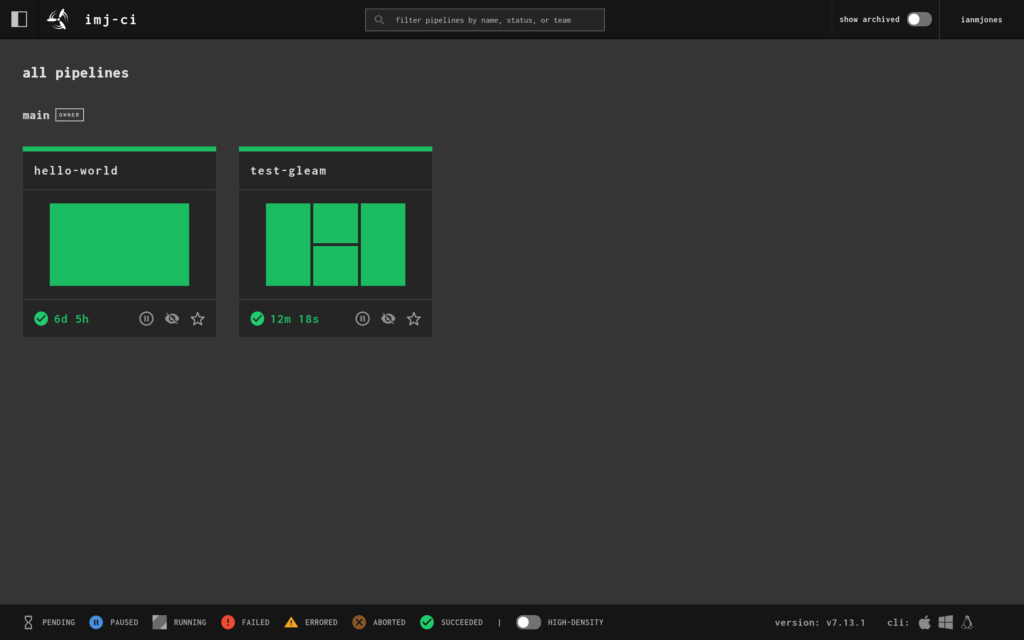
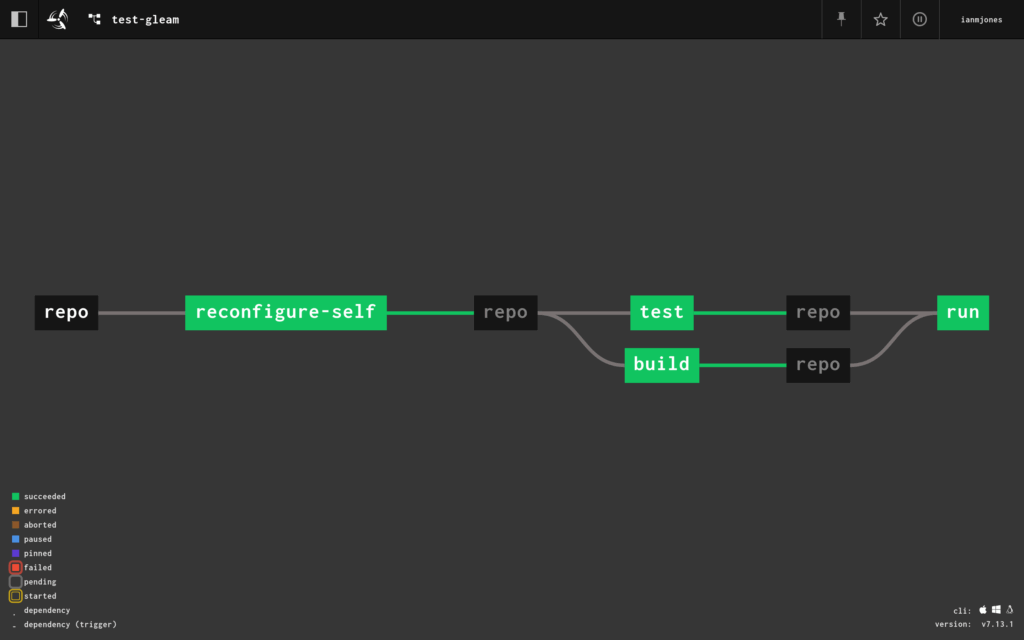
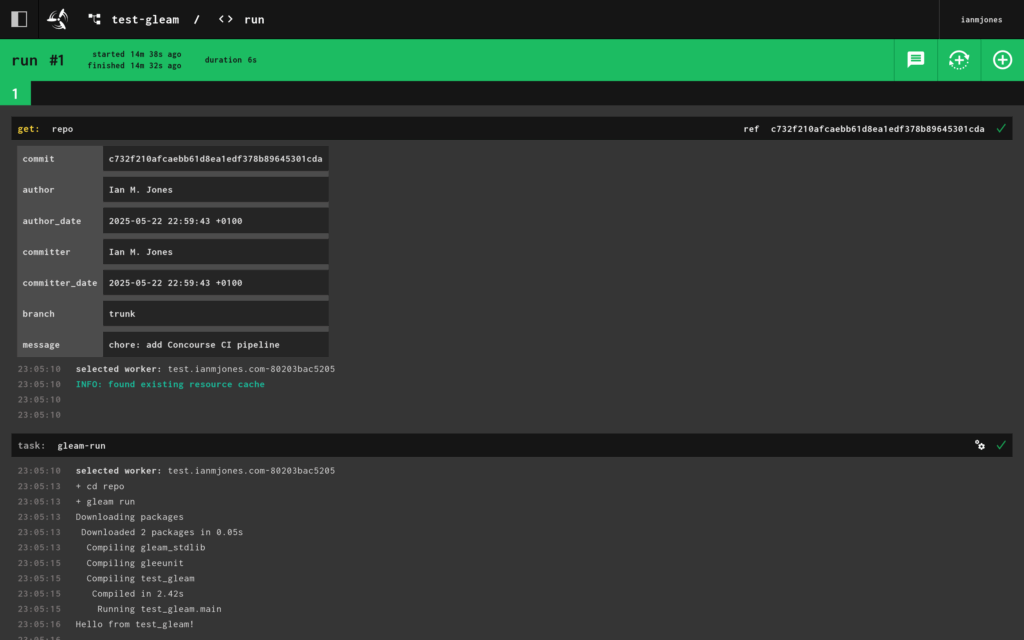
So that’s cool, but I wanted to make sure any changes to the git repo would trigger a run of the pipeline.
So I updated the Gleam code so that the tests were more relevant.
import gleam/io

pub fn main() -> Nil {
  hello() |> io.println
}

pub fn hello() -> String {
  "Hello, World!"
}
Here I just broke out the creation of the greeting text to its own hello() function, and passed its output to the terminal via the pipe operator.
import gleeunit
import gleeunit/should
import test_gleam

pub fn main() -> Nil {
  gleeunit.main()
}

// gleeunit test functions end in `_test`
pub fn hello_world_test() {
  test_gleam.hello()
  |> should.equal("Hello, World!")
}
In the tests I imported the test_gleam module, called test_gleam.hello() and passed its output to a check of the output, which I’d changed to “Hello, World!”.
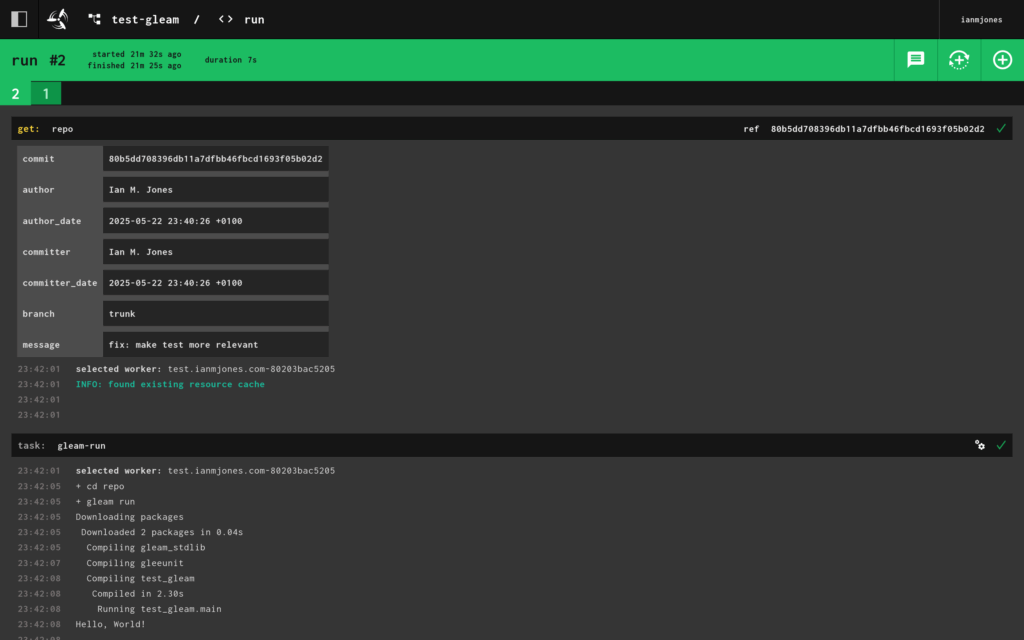
All I needed to do then was commit and push the changes, and the Concourse CI pipeline ran as expected, and faster as the Gleam container was now cached:
When I looked at the details for the “run” job, I could see the second run, and its “Hello, World!” output:
I now have a neat little template for setting up a Concourse pipeline for any Gleam project I might tackle. In fact, projects in pretty much any language where it’s easy enough to grab a container with a reasonable runtime.
My template pipeline is self updating after the first manual “set”, and should work with any private git repo now that my Concourse CI instance has its own private key.
I hope that was useful, if you have any questions or comments, please drop me a line.
I’ve had a bit of a soft spot for Concourse CI for quite a few years now, and recently noticed that development on the project has started to pick up again, mainly thanks to Taylor Silva.
Concourse is a super flexible “open-source continuous thing-doer”, it’s website has a very nice and succinct high level summary of what it is:
Centered around the simple mechanics of resources, tasks, and jobs, Concourse delivers a versatile approach to automation that excels at CI/CD.
I decided it was a good time to have another look at Concourse, have a play with it, try and learn how to use it, and determine whether I could use it for a few projects I have in mind.
However, I didn’t want to just spin up the Docker Compose project locally on my home office desktop computer, but rather “do it properly” and set it up on a server that I could access any time, from pretty much anywhere, cheaply.
That however usually means messing with server configs, installing stuff, running the Concourse service and Postgres database, and of course setting up HTTPS certificates etc. It’s quite a lot of work setting up and running any service. If only there was an easier way that could be as simple to set up and maintain as that Docker Compose solution, but for setting up a VPS or something? 🤔
Ok, you got me, it’s right there in the title of this post, Kamal is the perfect solution for this! It’s a way of setting up a Docker based service on a server, and it takes care of certificates and doing things like switching users to the new version of the app on deploy, rollbacks, and running multiple services on the same server etc. It also manages secondary services, what it calls “accessories”, e.g. databases, caches etc.
In the rest of this article I’m going to show you step by step how I deployed my own Concourse server via Kamal, and ran my first “Hello, World!” pipeline to make sure it worked.
However, this is not an exhaustive guide, just a summary. I’m assuming you’re someone who knows what a VPS is and how to create one somewhere like DigitalOcean (affiliate link giving new customers $200 free credit for 60 days), is comfortable with Docker and git, and of course, has a good idea as to what CI/CD are and why you’d want to use them.
Also, this is probably a really bad way of setting up a Concourse server for your team! You’ll probably want something way more robust, with more workers, and especially when it comes to setting up the database so that there’s less chance of it going away, including setting up a secondary db server etc. For me this is a neat little server to play with, your mileage may vary.
To deploy Concourse using Kamal, I needed somewhere to host it.
I just created a Droplet on DigitalOcean in their London region, because I’m in the UK.
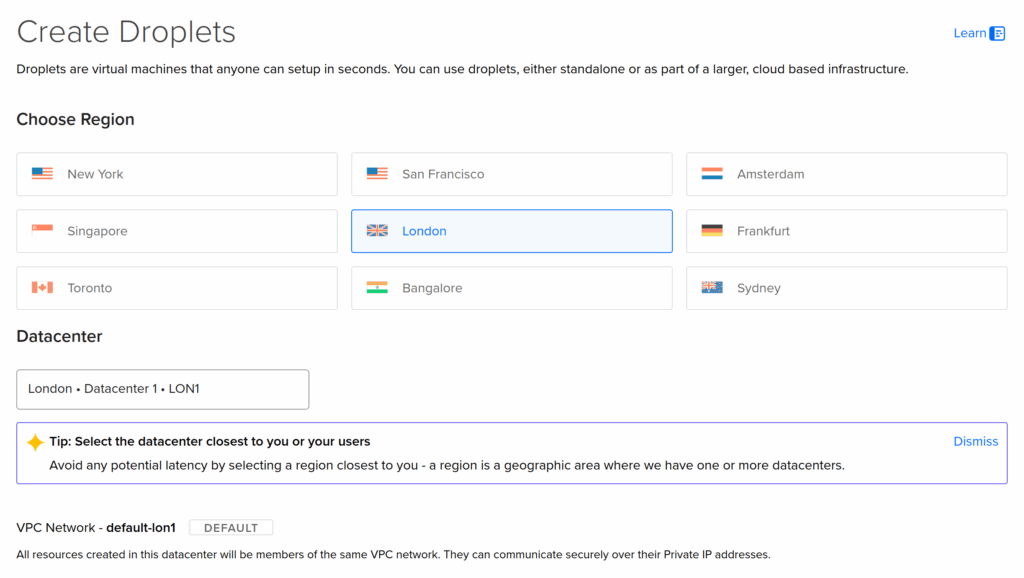
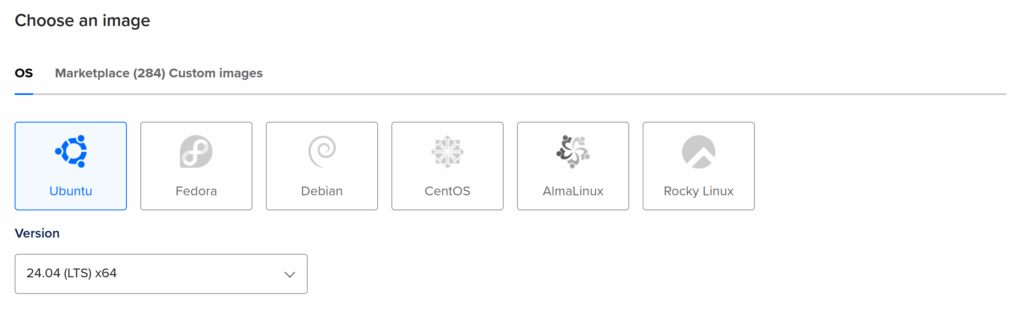
You should use the latest Ubuntu LTS (long term support) as the operating system to have the smoothest experience with Kamal. When I created my server, that was Ubuntu 24.04 LTS.
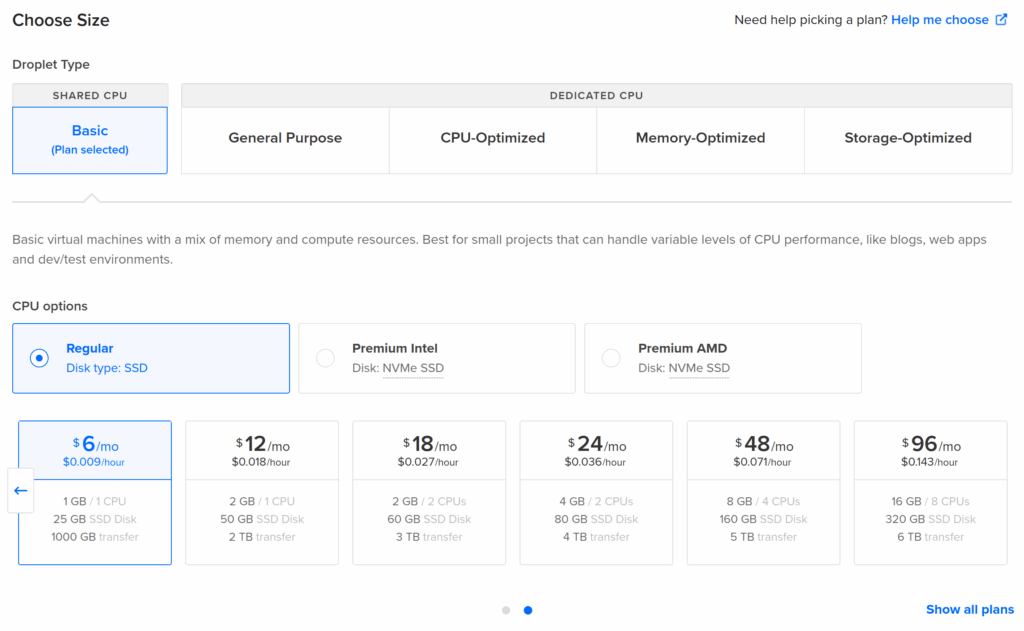
For the size of the VPS, because I’m just playing with Concourse and learning how to use it for now, I just used the smallest available, which was just $6 per month on DigitalOcean when I created it. There’s a good chance that some time in the future I’ll want to upgrade that VPS, which is easy to do on DigitalOcean, but that can wait until I actually need to.
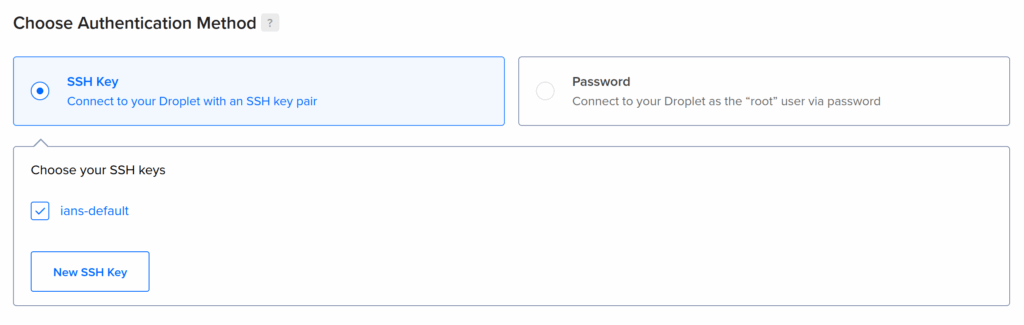
You should also make sure that your personal public SSH key is automatically installed on the server so that Kamal can securely deploy to the server without needing a password to be typed in multiple time etc.
Once my server was up and running, I took note of its IP address and pointed a DNS record at it to make it easier to access, and also easier to remember when creating the config for Kamal.
In my case, I used ci.ianmjones.com for how I access Concourse, but because I might add a couple more test projects to the server, I called it test.ianmjones.com and then added ci.ianmjones.com as a CNAME record.
sr.ht/ianmjones/kamal-deploy-concourse-ci
❯ dig ci.ianmjones.com
ci.ianmjones.com.       60      IN      CNAME   test.ianmjones.com.
test.ianmjones.com. 60 IN A 159.223.244.189Kamal needs somewhere to store config files. Normally that would be within your web app project’s source, but in my case I just wanted a clean project purely for deploying Concourse CI:
mkdir kamal-deploy-concourse-ci
cd kamal-deploy-concourse-ci
Kamal needs a Dockerfile to run as the main service, so I created a file in my project called Dockerfile with the following contents:
FROM concourse/concourseAll I’m doing is using Concourse’s Docker image as the base, we don’t need to add anything else.
This is done because Kamal builds an image from the Dockerfile, stores that in your registry of choice, e.g. Docker Hub, and then pulls that to your server during deployment. Whenever you use Kamal to deploy the latest version of a project, it’ll create a new version of the Docker image for your service, tagged with the project’s latest git commit hash to then deploy. This mechanism makes it pretty easy to see exactly what version of your project has been deployed, and of course this helps should you need to roll back to a previous version.
After making sure I had a recent version of Ruby installed, I installed the Kamal Ruby Gem, and then created the Kamal config files with its init command:
gem install kamal
kamal init
This resulted in a few files created within the new directory:
sr.ht/ianmjones/kamal-deploy-concourse-ci
❯ tree -a
.
├── config
│   └── deploy.yml
├── Dockerfile
└── .kamal
    ├── hooks
    │   ├── docker-setup.sample
    │   ├── post-app-boot.sample
    │   ├── post-deploy.sample
    │   ├── post-proxy-reboot.sample
    │   ├── pre-app-boot.sample
    │   ├── pre-build.sample
    │   ├── pre-connect.sample
    │   ├── pre-deploy.sample
    │   └── pre-proxy-reboot.sample
    └── secrets

4 directories, 12 files
Apart from the Dockerfile I created, the only other files that I’m going to be messing with are config/deploy.yml and .kamal/secrets, the files in .kamal/hooks I’ll talk about in a future post. 😉
The config/deploy.yml file is where we define the shape of our project to be deployed by Kamal.
In the following sub-sections I’m going to show a small section of the updated config/deploy.yml file, with comments intact, and then explain what I changed from the version created by Kamal afterwards.
I liberated a lot of the Concourse specific config from the Docker Compose project for Concourse.
# Name of your application. Used to uniquely configure containers.
service: ci

# Name of the container image.
image: ianmjones/ci

# Deploy to these servers.
servers:
  web:
    hosts:
      - test.ianmjones.com
    options:
      privileged: true
      cgroupns: host
    cmd: quickstart
I called my service “ci“, seemed appropriate!
The Docker image will be created in my “ianmjones” Docker Hub account, and will be called “ci“.
You must create a “web” server role for Kamal to use as the main entrypoint into the app.
My service is going to be deployed to the “test.ianmjones.com” host (my DigitalOcean Droplet I created earlier).
Now comes a couple of Concourse specific changes that I needed …
For Concourse to be able to run its workers, its container must be privileged.
For the same reason, the Concourse container needs to run in the host cgroup namespace.
The concourse command that is called by the container’s ENTRYPOINT, needs to know which mode it is running in. I supplied the argument “quickstart” via CMD to set up a simple all-in-one Concourse node.
# Enable SSL auto certification via Let's Encrypt and allow for multiple apps on a single web server.
# Remove this section when using multiple web servers and ensure you terminate SSL at your load balancer.
#
# Note: If using Cloudflare, set encryption mode in SSL/TLS setting to "Full" to enable CF-to-app encryption.
proxy:
  ssl: true
  host: ci.ianmjones.com
  # Proxy connects to your container on port 80 by default.
  app_port: 8080
  # Need to change from the default healthcheck path of /up.
  healthcheck:
    path: /
Kamal’s proxy acts like a mini router, handing the HTTPS certificate termination and renewals, and routing traffic to the appropriate container. There’s only one Kamal proxy per server, and if you use Kamal to deploy multiple projects it’ll be updated to route traffic and handle certificates for them all. You can however disable the certificate handling if you’re using a load balancer in front of your servers that already handles your certificate renewals and termination duties. I’m not, so I kept ssl turned on.
For this project I want it to handle certificates, and use “ci.ianmjones.com” as the public host name for the service.
The Concourse container exposes port 8080 by default, so we have to specify that rather than use the default of 80 that the proxy will otherwise use.
By default the proxy will hit a /up endpoint on your container to check whether it returns a 200 HTTP status, but the Concourse container doesn’t have that endpoint. So I changed the healthcheck to just whack / instead. You could instead use /api/v1/info like they do in the Concourse Helm Chart.
# Credentials for your image host.
registry:
  # Specify the registry server, if you're not using Docker Hub
  # server: registry.digitalocean.com / ghcr.io / ...
  username: ianmjones

  # Always use an access token rather than real password (pulled from .kamal/secrets).
  password:
    - KAMAL_REGISTRY_PASSWORD

# Configure builder setup.
builder:
  arch: amd64
As mentioned previously, Kamal needs to build and store a Docker image for your project in a container registry that it can access from the server it’s going to deploy to.
In my case I’m just using the default Docker Hub registry, so I just supply my “ianmjones” user name there.
Kamal is going to want to create a private image in the registry, which happens via your local login to your registry when it uses docker push etc. However, it then later needs to pull that private image down to the server, so I needed to supply a password for that.
It’s best to create an access token on your registry for just Kamal to use, just in case something happens and you need to revoke it. Then you should use Kamal’s secrets functionality to securely store and retrieve that token.
Here I’m using a variable called KAMAL_REGISTRY_PASSWORD to supply the password (API token) for Kamal to use when pulling the private container image. When we get to talking about the .kamal/secrets file you’ll see how that all works.
I’m deploying to a server that runs as an amd64 architecture machine, so here I’ve left the builder section in its default config for that.
# Inject ENV variables into containers (secrets come from .kamal/secrets).
#
env:
  clear:
    CONCOURSE_POSTGRES_HOST: ci-db
    CONCOURSE_POSTGRES_USER: concourse_user
    CONCOURSE_POSTGRES_DATABASE: concourse
    CONCOURSE_EXTERNAL_URL: https://ci.ianmjones.com
    CONCOURSE_MAIN_TEAM_LOCAL_USER: ianmjones
    CONCOURSE_WORKER_BAGGAGECLAIM_DRIVER: overlay
    CONCOURSE_X_FRAME_OPTIONS: allow
    CONCOURSE_CLUSTER_NAME: imj-ci
    CONCOURSE_WORKER_CONTAINERD_DNS_SERVER: "8.8.8.8"
    CONCOURSE_WORKER_RUNTIME: "containerd"
  secret:
    - CONCOURSE_POSTGRES_PASSWORD
    - CONCOURSE_CLIENT_SECRET
    - CONCOURSE_TSA_CLIENT_SECRET
    - CONCOURSE_ADD_LOCAL_USER
The env section is where I actually configured Concourse, if you’ve looked at the Docker Compose file from Concourse’s quick start guide, you’re going to see a lot of familiar entries. 😄
As such, I’m just going to explain the bits that differ, or might be Kamal specific.
You’ll notice there’s two subsections, clear and secret. As you might imagine, anything that is at all sensitive should go in the secret section, and will get its value via Kamal’s secrets functionality, which we’ll get to in a minute when we talk about the .kamal/secrets file.
The host for the Postgres database server has been called “ci-db“. This name comes from what I’ve called the database server accessory in the next section we’ll talk about, and how Kamal sets up its internal networking for the containers to be prefixed with the main service’s name. As my service is called “ci“, and I’ve called the accessory “db“, we get a network name for the database server of “ci-db“.
I’m specifying an external URL for Concourse to use so that the web UI works properly, and creates URLs and redirects that know the UI is being accessed at https://ci.ianmjones.com.
You need a user name to log into Concourse with, I’m using “ianmjones“, you should probably use something else! 😄
This variable tells Concourse that my username belongs to the special admin “main” team. I’ll actually define my username in the secret section.
This is an optional name for your Concourse cluster, to be shown in the web UI. You don’t have to add this variable, but it’s a handy reminder should you end up with a few Concourse instances. I named my cluster “imj-ci” to keep it short, and yet distinct from any other cluster I may end up creating in the future.
This tells Concourse what the password is for the Postgres database I’m going to set up in the accessories section, stay tuned for that.
These are part of the security Concourse uses to ensure that the worker scheduler and workers are authorised to do their thing. That kind of detail is way out of scope for this article, but the Concourse site has plenty information on the internals and secret keys. At first I just used the values from the Docker Compose example.
By default this is shown in the Docker Compose file as “test:test”, creating a “test” user with password “test”. As I’m deploying this to a publicly accessible server, I figured I’d use something a little more secure! 😄
When we come to talking about the .kamal/secrets file you’ll see how I populate this variable with my “ianmjones” user name and generated password.
# Use accessory services (secrets come from .kamal/secrets).
#
accessories:
  db:
    image: postgres
    host: test.ianmjones.com
    env:
      clear:
        POSTGRES_DB: concourse
        POSTGRES_USER: concourse_user
        PGDATA: /database
      secret:
        - POSTGRES_PASSWORD
    directories:
      - data:/database
This is the final section, where I defined the “db” accessory that Kamal will stand up if not present, but will be careful with otherwise. Unlike the main service that is expected to be ephemeral and can be rebooted and replaced as needed, accessories are treated as semi-external services that don’t get routinely upgraded. Kamal does have a bunch of commands you can use to manage them though.
As you might expect, I’m deploying a “postgres” container image for my “db” service.
I’m also deploying this db accessory to the same “test.ianmjones.com” server where my main ci service is, but apparently you don’t have to if you want to run multiple servers.
The env entries are pretty self explanatory, setting the Postgres database name and username, where the database data will store its files inside the container, and the Postgres database user’s password that will be grabbed via a Kamal secret.
For when I reboot the server, or upgrade the Postgres database accessory, I need the database data to be persisted outside of the otherwise ephemeral container. In the directories section I specify that a Docker volume called “data” should be created and mounted as /database inside the container to match where I specified that Postgres will store its database files. This is ok for me at the moment while I play with Concourse, but for a more robust solution it might be better to create an independent storage volume in your hosting provider that can be attached to the server and its mounted path used instead of the data volume specified here. You may also forgo using an accessory at all, and instead maybe use a hosting provider managed database server or similar.
Here’s the config/deploy.yml file as one without all the comments:
service: ci
image: ianmjones/ci

servers:
  web:
    hosts:
      - test.ianmjones.com
    options:
      privileged: true
      cgroupns: host
    cmd: quickstart

proxy:
  ssl: true
  host: ci.ianmjones.com
  app_port: 8080
  healthcheck:
    path: /

registry:
  username: ianmjones
  password:
    - KAMAL_REGISTRY_PASSWORD

builder:
  arch: amd64

env:
  clear:
    CONCOURSE_POSTGRES_HOST: ci-db
    CONCOURSE_POSTGRES_USER: concourse_user
    CONCOURSE_POSTGRES_DATABASE: concourse
    CONCOURSE_EXTERNAL_URL: https://ci.ianmjones.com
    CONCOURSE_MAIN_TEAM_LOCAL_USER: ianmjones
    CONCOURSE_WORKER_BAGGAGECLAIM_DRIVER: overlay
    CONCOURSE_X_FRAME_OPTIONS: allow
    CONCOURSE_CONTENT_SECURITY_POLICY: "frame-ancestors *;"
    CONCOURSE_CLUSTER_NAME: imj-ci
    CONCOURSE_WORKER_CONTAINERD_DNS_SERVER: "8.8.8.8"
    CONCOURSE_WORKER_RUNTIME: "containerd"
  secret:
    - CONCOURSE_POSTGRES_PASSWORD
    - CONCOURSE_CLIENT_SECRET
    - CONCOURSE_TSA_CLIENT_SECRET
    - CONCOURSE_ADD_LOCAL_USER

accessories:
  db:
    image: postgres
    host: test.ianmjones.com
    env:
      clear:
        POSTGRES_DB: concourse
        POSTGRES_USER: concourse_user
        PGDATA: /database
      secret:
        - POSTGRES_PASSWORD
    directories:
      - data:/database
If you copy and paste the above into your own config/deploy.yml file, remember to make replacements on any line with “ianmjones” or “imj”!
Now I just needed to supply values for all the secret variables in config/deploy.yml.
here’s my complete .kamal/secrets file, where I’m using 1Password to store my secrets in a couple of items, and using Kamal’s built-in 1password adapter to retrieve them:
# Secrets defined here are available for reference under registry/password, env/secret, builder/secrets,
# and accessories/*/env/secret in config/deploy.yml. All secrets should be pulled from either
# password manager, ENV, or a file. DO NOT ENTER RAW CREDENTIALS HERE! This file needs to be safe for git.

# Option 1: Read secrets from the environment
###KAMAL_REGISTRY_PASSWORD=$KAMAL_REGISTRY_PASSWORD

# Option 2: Read secrets via a command
# RAILS_MASTER_KEY=$(cat config/master.key)

# Option 3: Read secrets via kamal secrets helpers
# These will handle logging in and fetching the secrets in as few calls as possible
# There are adapters for 1Password, LastPass + Bitwarden
#
# SECRETS=$(kamal secrets fetch --adapter 1password --account my-account --from MyVault/MyItem KAMAL_REGISTRY_PASSWORD RAILS_MASTER_KEY)
# KAMAL_REGISTRY_PASSWORD=$(kamal secrets extract KAMAL_REGISTRY_PASSWORD $SECRETS)
# RAILS_MASTER_KEY=$(kamal secrets extract RAILS_MASTER_KEY $SECRETS)

DOCKER_SECRETS=$(kamal secrets fetch --adapter 1password --account ianmjones --from Private/Docker KAMAL_REGISTRY_PASSWORD)
KAMAL_REGISTRY_PASSWORD=$(kamal secrets extract KAMAL_REGISTRY_PASSWORD $DOCKER_SECRETS)

SECRETS=$(kamal secrets fetch --adapter 1password --account ianmjones --from Private/imj-ci POSTGRES_PASSWORD CONCOURSE_CLIENT_SECRET CONCOURSE_TSA_CLIENT_SECRET CONCOURSE_ADD_LOCAL_USER)
POSTGRES_PASSWORD=$(kamal secrets extract POSTGRES_PASSWORD $SECRETS)
CONCOURSE_POSTGRES_PASSWORD=$POSTGRES_PASSWORD
CONCOURSE_CLIENT_SECRET=$(kamal secrets extract CONCOURSE_CLIENT_SECRET $SECRETS)
CONCOURSE_TSA_CLIENT_SECRET=$(kamal secrets extract CONCOURSE_TSA_CLIENT_SECRET $SECRETS)
CONCOURSE_ADD_LOCAL_USER=$(kamal secrets extract CONCOURSE_ADD_LOCAL_USER $SECRETS)
As you can see from the file’s comments, you can instead use environment variables or plain shell commands to grab the values for your secrets, or another adapter other than 1Password’s.
In my case I’ve got two items in 1Password, one for where I store the Docker Hub related secrets, and another specific to this project.
I’ll not go into the details here, but you can see that for the KAMAL_REGISTRY_PASSWORD secret environment variable I fetch the Docker Hub API token I created specially for use with this Kamal project from a 1Password item called “Docker” within my “Private” vault, and then extract the value into the env var.
For all the service and accessory specific secrets, they’re all stored in an “imj-ci” 1Password item, in the same “Private” vault.
You’ll notice that the POSTGRES_PASWORD variable does double duty to also set the required CONCOURSE_POSTGRES_PASSWORD.
For the CONCOURSE_ADD_LOCAL_USER entry, I actually generated another password field, and then copied its value into another field called CONCOURSE_ADD_LOCAL_USER with “ianmjones:” prefixed to the value. But in hindsight, I could have just fetched the original password field and concatenated it to “ianmjones:” when creating the CONCOURSE_ADD_LOCAL_USER env var within the secrets file. 🤷
Because Kamal uses a git commit hash for tagging the Docker image it then deploys to the server, I needed to set up my project for git, and commit all the files.
git init .
git add .
git commit -m "Deploy Concourse CI with Kamal"
It’s optional, but highly recommended, to push your project to a remote git repository so that you have a copy of your project saved somewhere other than on you development machine.
In my case, I created a private repo on SourceHut, set that as the remote origin, and pushed to it.
git remote add origin git@git.sr.ht:~ianmjones/kamal-deploy-concourse-ci
git push --set-upstream origin trunkNow it was time to actually deploy Concourse CI to the server via Kamal.
kamal setupAs this is the first deploy, Kamal needs to set up the server with Docker, create the proxy container, create the accessory container, as well as the main container of the web project, so it’s going to take considerably longer than when you’re later just deploying changes to your project.
Here’s a video of what it looked like when I deployed ci.ianmjones.com for the first time.
There’s a couple of noticeable stalls, one where Docker is being set up on the new server, and another where the Docker image is being pulled down from Docker hub to the server. It still only took 2 minutes for me though, but your first deploy may take longer as the Concourse Docker image will need to be pulled down to your machine during the build of the image that then gets pushed to the container registry.
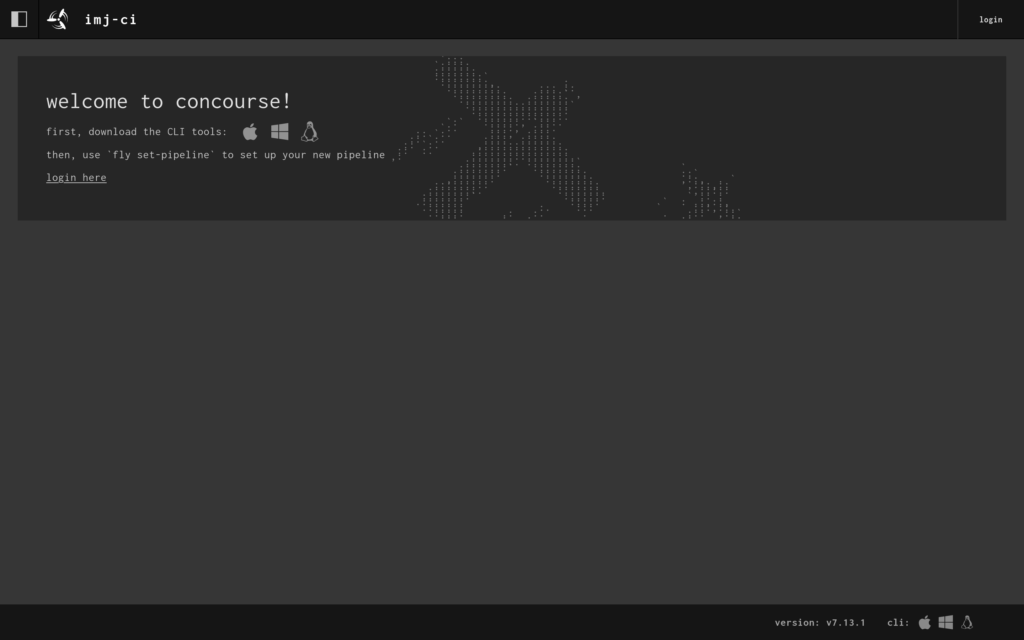
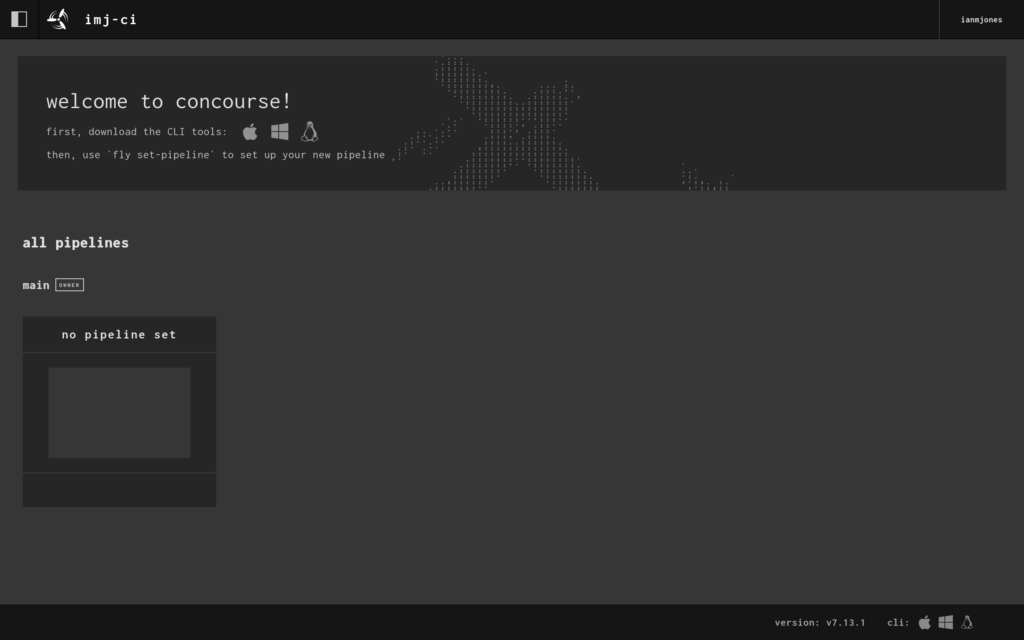
When the setup finished, I had a shiny new Concourse CI server with a web UI I could visit at https://ci.ianmjones.com!
I was then able to log into the web app …
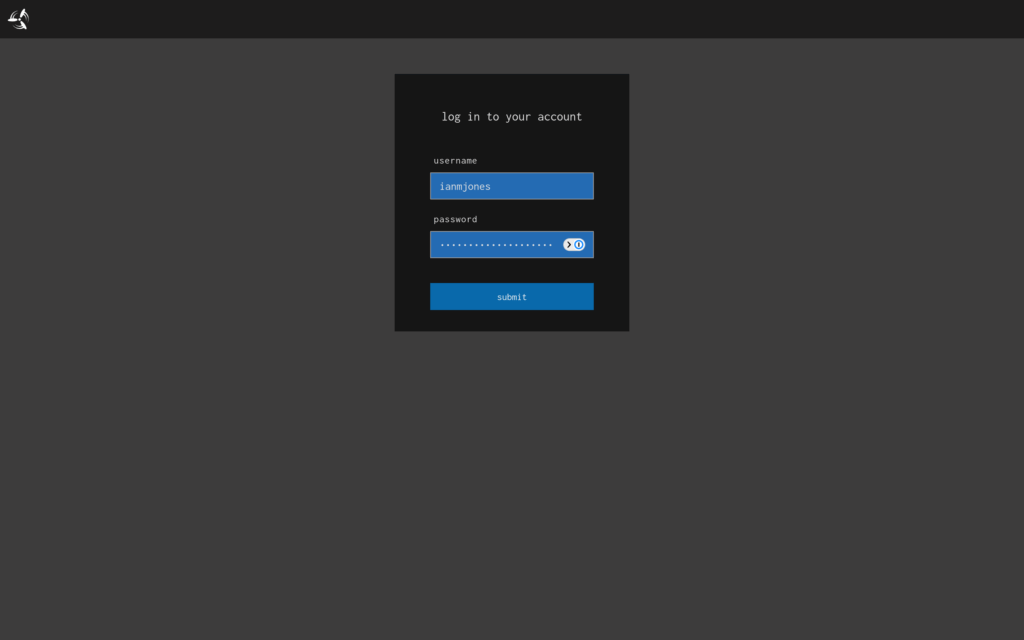
… but there wasn’t much to see as I’d not created any pipelines yet.
Now that I’ve done my first deploy with Kamal that sets up the server and ancillory containers, from now on, if I make any further changes to my kamal-deploy-concourse-ci project, I’ll only need to commit the changes and kamal deploy rather than kamal setup.
git add .
git ci -m "Wibble the widget"
kamal deployIn the web UI you’ll see a welcome panel because there aren’t any pipelines yet, it tells you to download the CLI tool for your operating system by clicking on the appropriate icon. In my case, that’s Linux, so the little penguin got clicked, but you may need to click the Apple or Windows icon.
I then made sure the downloaded fly binary was executable, and moved it into a directory I know is on my PATH.
chmod +x ~/Downloads/fly
mv ~/Downloads/fly ~/bin/flyThen it was time to create a super simple “Hello, World!” pipeline to check that Concourse CI was actually working and can run jobs on its workers.
I highly recommend following the Concourse CI Getting Started guide. As I’ve now got my server set up though, I jumped ahead to the Hello World Pipeline section. It explains how a basic pipeline is structured, so please do go read it.
Once I’d read the Hello World Pipeline doc, I created a hello-world.yml file somewhere outside of my kamal-deploy-concourse-ci directory, with the following contents:
jobs:
- name: hello-world-job
  plan:
  - task: hello-world-task
    config:
      # Tells Concourse which type of worker this task should run on
      platform: linux
      # This is one way of telling Concourse which container image to use for a
      # task. We'll explain this more when talking about resources
      image_resource:
        type: registry-image
        source:
          repository: busybox # images are pulled from docker hub by default
      # The command Concourse will run inside the container
      # echo "Hello world!"
      run:
        path: echo
        args: ["Hello world!"]
Now all I needed to do is login via the fly CLI, “set” (create) the pipeline, and then “unpause” it because pipelines are created in a paused state by default.
fly -t imj-ci login -c https://ci.ianmjones.com
fly -t imj-ci set-pipeline -p hello-world -c hello-world.yml
fly -t imj-ci unpause-pipeline -p hello-world
When I logged in I passed “imj-ci” as the “target”, it’s an arbitrary name of your choosing, and allows you to be logged in to multiple concourse instances at the same time. You do still need to use it for each command though, even if only logged into one instance.
You can optionally pass a user name and password to the login command, but I chose to click the URL it gave me to log in via the web UI.
It was then time to test whether the pipeline could run. As this simple pipeline doesn’t have any kind of checks (watchers) that will trigger it to run automatically, I needed to trigger it manually.
fly -t imj-ci trigger-job --job hello-world/hello-world-job --watchWhen you put all that together, it’ll look something like this:
I now had a successfully run hello-world pipeline in the UI:
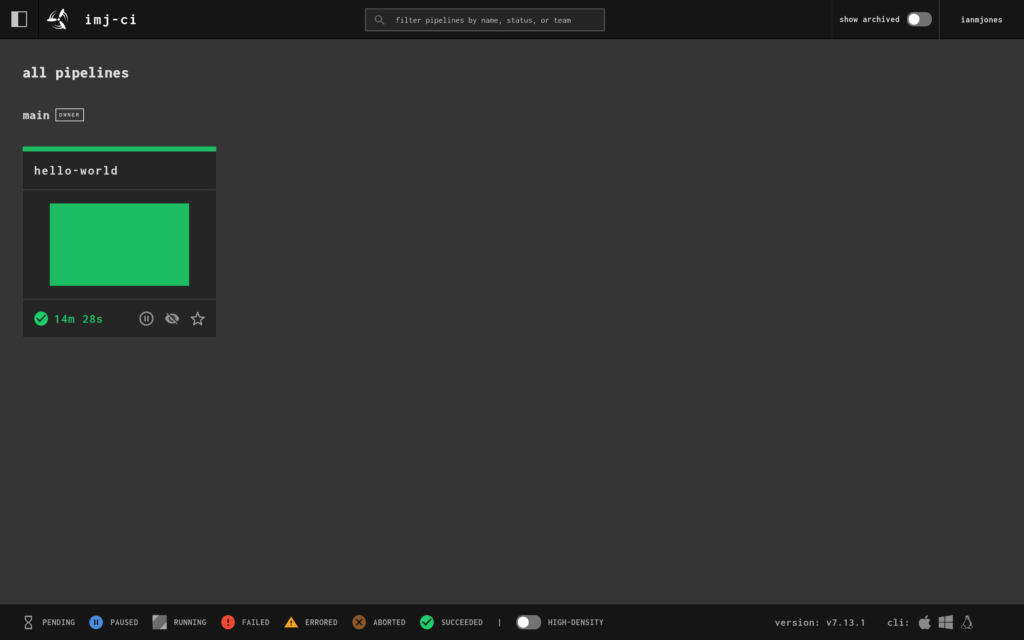
And when I clicked into it, I could see the job’s details and output:
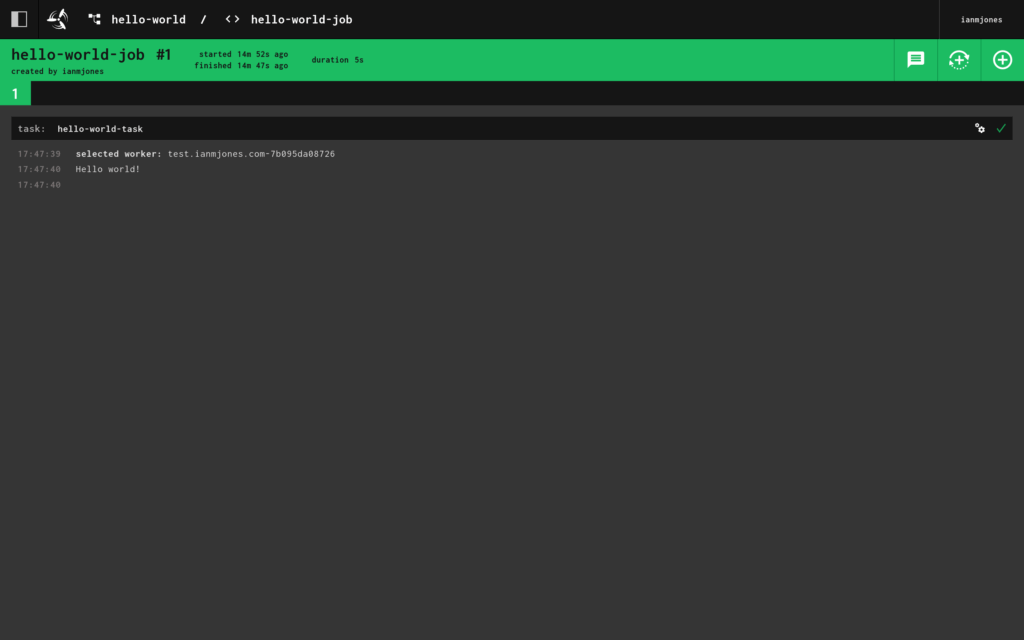
I now have a small Concourse CI server out there in “the Cloud” that I can run all kinds of CI/CD jobs on.
Obviously all I’ve shown is setting up a very basic “Hello, World!” pipeline, but Concourse CI is incredibly flexible and can do pretty much anything you want given that it’s container based, and there’s a whole lotta Docker images and resources out there to help you run stuff in containers.
In my next article I’m going to show you a super simple way to create a pipeline that runs whenever a new commit is made to a software project’s git repo, with build and test jobs that must complete successfully before a final job can run, and where changes to the pipeline’s config are automatically picked up from the project too.
We watched Mickey 17 at the weekend. Fun movie, with some not so subtle social commentary that both made us laugh and feel a little sad for the World we currently live in. Would recommend.
Buster Pickle Grot-Bot Jones, our scatty cat from New Zealand, has just reminded me how nice the UI is on Budgie Desktop when you hit the Print Screen button. 😜
Just a quick test of using an “Aside” post format to write and share a quick thought on my rebooted site, which is back to using WordPress.
And yes, I am using the best stock WordPress theme there has ever been, Twenty Fifteen. 😄