Skip to content
ianmjones

ianmjones

Always developing

  • Always Developing.show
  • Contact
  • Software
  • Work
  • Very Old Stuff
  • Gleaming Wails: Check backend status and then set up periodic check | Always Developing #245

    Live coding an app with Gleam, Lustre, Go and Wails.

    In this session I get the UI to ask the backend whether the Snippet Expander Daemon is running before setting up its periodic check using a timer.

    Snippet Expander:- https://snippetexpander.org

    Source Code: https://git.sr.ht/~ianmjones/snippetexpander

    Always Developing Playlist:- https://www.youtube.com/playlist?list=PLDWtdmaxq1few8CjnK4MC3LLBMVpi_aCS

    Blog:- https://ianmjones.com
    Mastodon:- https://fosstodon.org/@ianmjones

    Tech Used:
    Gleam:- https://gleam.run
    Lustre:- https://hexdocs.pm/lustre
    Go:- https://golang.org
    Wails:- https://wails.io

    ianmjones
    December 4, 2025
    Vlog
  • Gleaming Wails: Setting up periodic check of backend status | Always Developing #244

    Live coding an app with Gleam, Lustre, Go and Wails.

    In this session I get started on the real rewrite of the Snippet Expander UI to use Gleam.
    First thing I tackle is getting the UI to ask the backend whether the Snippet Expander Daemon is running. Once that is working, I set it up as a periodic check using a timer.

    Snippet Expander:- https://snippetexpander.org

    Source Code: https://git.sr.ht/~ianmjones/snippetexpander

    Always Developing Playlist:- https://www.youtube.com/playlist?list=PLDWtdmaxq1few8CjnK4MC3LLBMVpi_aCS

    Blog:- https://ianmjones.com
    Mastodon:- https://fosstodon.org/@ianmjones

    Tech Used:
    Gleam:- https://gleam.run
    Lustre:- https://hexdocs.pm/lustre
    Go:- https://golang.org
    Wails:- https://wails.io

    ianmjones
    December 1, 2025
    Vlog
  • Gleaming Wails: A new series of live coding videos

    I’ve just published the first video in a new series of live coding sessions where I’m developing with Gleam and Lustre to build the front end for a desktop app built with Go and Wails.

    The first video is a bit of test of my recording setup where I walk through a minimal test of connecting Gleam to the Go based Wails back end via its generated JavaScript functions that always return a Promise, and are therefore a little tricky to handle in Gleam. It was quite a relief to come up with a fairly simple mechanism for calling the JavaScript functions through Gleam’s excellent “Externals” Foreign Function Interface (FFI) and end up with a usable Lustre Effect.

    During the “Gleaming Wails” Always Developing series I’ll be replacing the Snippet Expander desktop app’s Svelte based UI with a Gleam based one, continuing my quest to learn Gleam, which I very much enjoy working with, but unfortunately don’t get to do full time.

    As it’s a chunky piece of work that I’m signing up for, hopefully this project will help me get more familiar with the Gleam language and Lustre framework, and help hone my functional programming skills in general. Even though I’ve been programming for well over 40 years now, and getting paid for it for nearly 30, I’ve mostly been working with Object Orientated style languages, and so functional programming doesn’t come easily.

    With luck, along the way some people will learn a thing or two from my fumblings, or get excited about having a go at programming with Gleam.

    You can follow along while I code (mostly) in Gleam on my YouTube channel.

    ianmjones
    November 27, 2025
    Blog, Vlog
    alwaysdeveloping, coding, gleam, live, lustre, snippetexpander, wails, youtube
  • Gleaming Wails: Test of using Gleam & Lustre as frontend for a Wails app | Always Developing #243

    Live coding an app with Gleam, Lustre, Go and Wails.

    In this session I’m just showing a super basic test Gleam and Lustre frontend for a Wails app that handles grabbing data from the Go back end via the JS IPC, handling the returned promise and converting it to an effect that Lustre can use.

    Snippet Expander:- https://snippetexpander.org

    Source Code: https://git.sr.ht/~ianmjones/snippetexpander

    Always Developing Playlist:- https://www.youtube.com/playlist?list=PLDWtdmaxq1few8CjnK4MC3LLBMVpi_aCS

    Blog:- https://ianmjones.com
    Mastodon:- https://fosstodon.org/@ianmjones

    Tech Used:
    Gleam:- https://gleam.run
    Lustre:- https://hexdocs.pm/lustre
    Go:- https://golang.org
    Wails:- https://wails.io

    ianmjones
    November 27, 2025
    Vlog
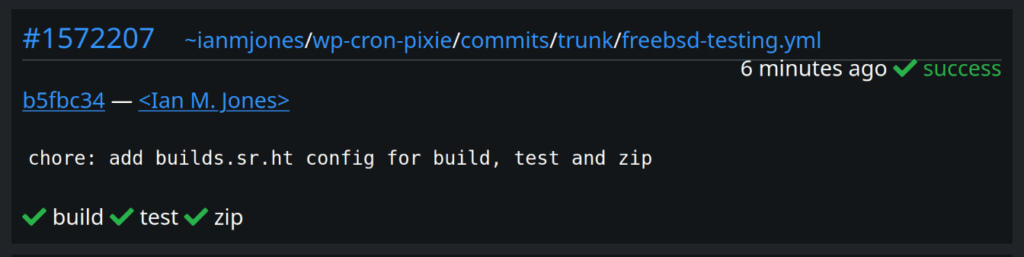
  • Wow, I just created a new config for builds.sr.ht that worked first time!

    That never happens, who ever creates a CI/CD config that runs without error when first submitted?!

    Screenshot of a successful builds.sr.ht run summary card

    Admittedly, not the most complicated of configs, but I suspect using Gleam and FreeBSD helped due to their simplicity and well thought out straight forward usage patterns.

    ianmjones
    September 18, 2025
    Microblog
    ci, freebsd, gleam, plugin, sourcehut, wordpress, wp-cron-pixie
  • WP Cron Pixie v1.6.2 released

    WP Cron Pixie v1.6.2 is just a small bug fix release. The new release can be downloaded and installed from wordpress.org.

    Changelog:

    * Fixed compatibility with PHP 7.4.
    * Updated dependencies.
    ianmjones
    September 8, 2025
    Blog
    plugin, wordpress, wp-cron-pixie
  • Snippet Expander v1.1.1 released

    I’ve just released v1.1.1 of Snippet Expander, “Your little expandable text snippets helper, for Linux”.

    It’s just a small bug fix release to make setting the shortcut for opening the Search & Paste window a little less confusing, particularly on KDE Plasma.

    Changelog:

    * Ensure custom shortcut setting only shown in UI if using GNOME(ish) desktop
    * Add default Ctrl+` Search & Paste window shortcut to KDE Settings app

    Tag: https://git.sr.ht/~ianmjones/snippetexpander/refs/v1.1.1

    Binaries: https://git.sr.ht/~ianmjones/snippetexpander/refs/download/v1.1.1/snippetexpander-v1.1.1.tgz

    ianmjones
    August 21, 2025
    Blog
    linux, snippetexpander
  • WP Cron Pixie v1.6.1 released: Search cron schedules & events

    With WP Cron Pixie v1.6.0 you can now search your cron schedules and events from the admin dashboard widget. The new release can be downloaded and installed from wordpress.org.

    I’ll give a little more detail in the next few sections, but first, here’s the changelog:

    * Added search of schedules and events.
    * Added display of event hook with args when mouse hovers over event name.
    * Auto refresh setting is now saved for each user.

    And shortly after v1.6.1 was released, WP Cron Pixie v1.6.1 was released too, with the following one line changelog:

    * Example events setting is now saved for each subsite in a multisite install.

    Search schedules & events

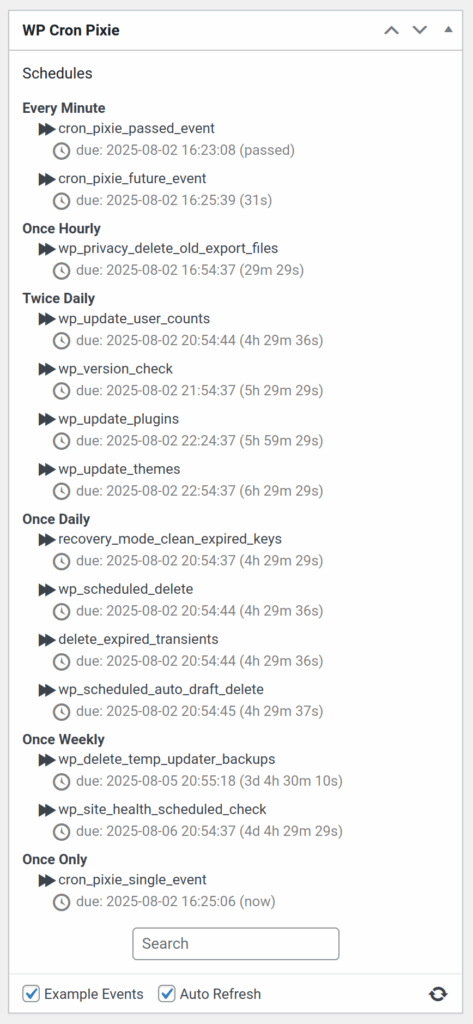
    It’s now possible to search your site’s cron schedules and events, very helpful on a site with lots of events and custom schedules.

    The search box can be found below the list of schedules and events.

    WP Cron Pixie widget with empty search box below schedules.

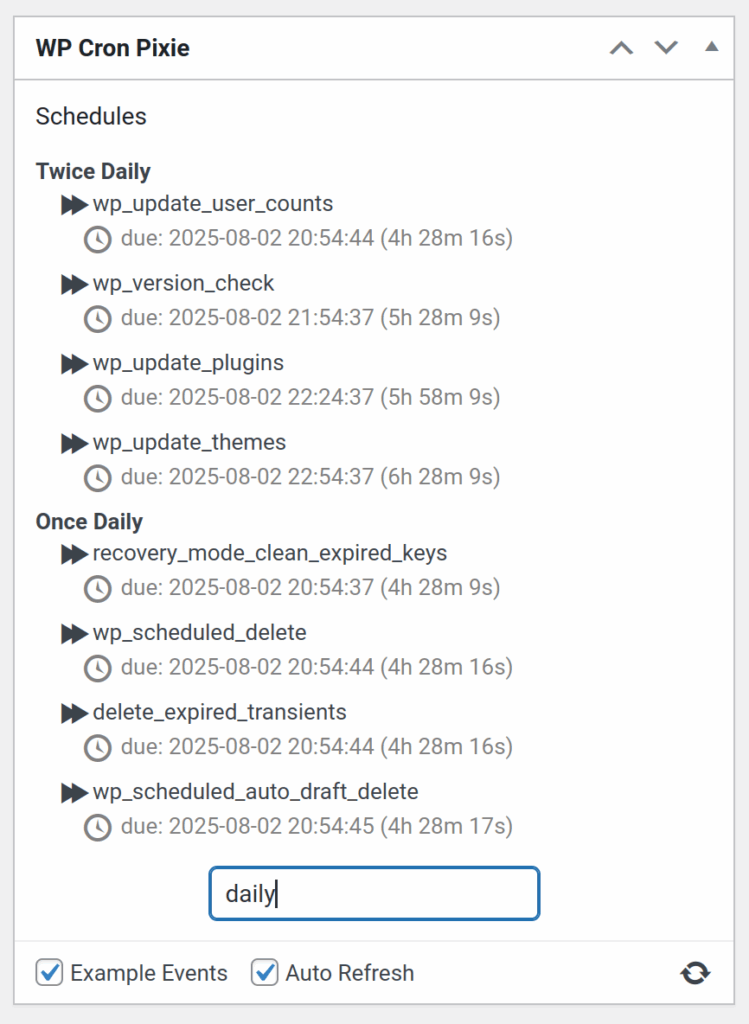
    If you enter some text into the search box that matches part of one or more schedule’s name, the list of schedules will be filtered to those schedules and their events.

    WP Cron Pixie widget with search for daily schedules.

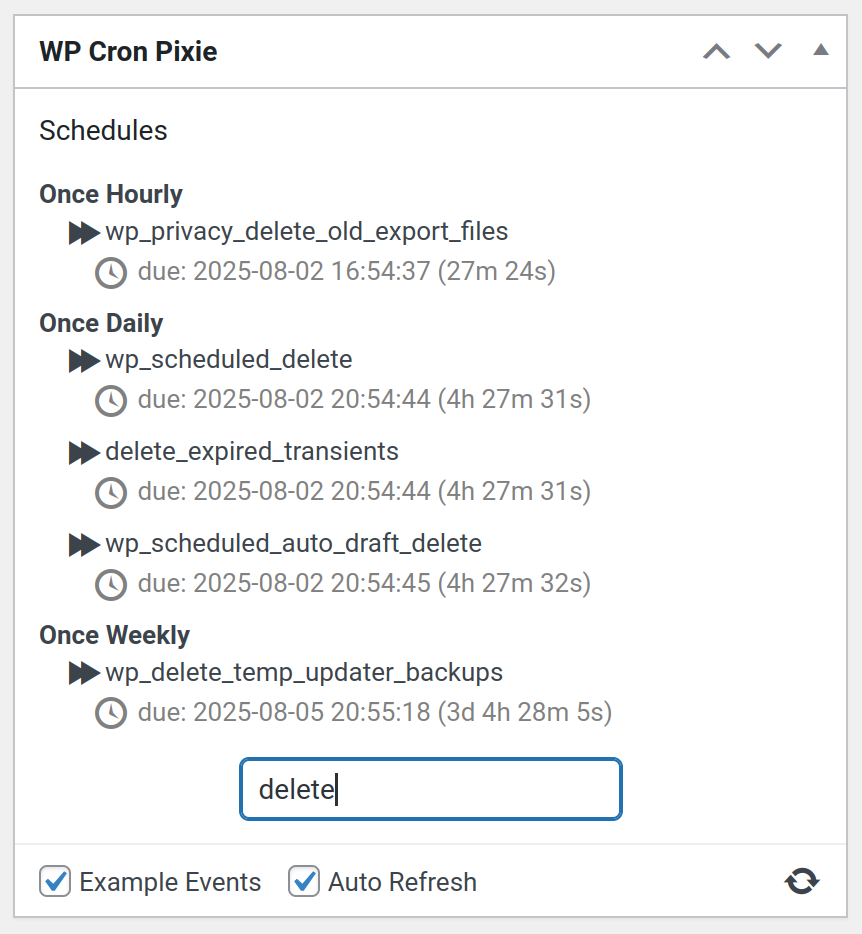
    In a similar way, if you enter search text that matches on part of a cron event’s name, it will be shown along with its schedule, but other events in the same schedule that do not match the search query will not be shown.

    WP Cron Pixie widget with search for cron event names.

    Display event hook’s arguments

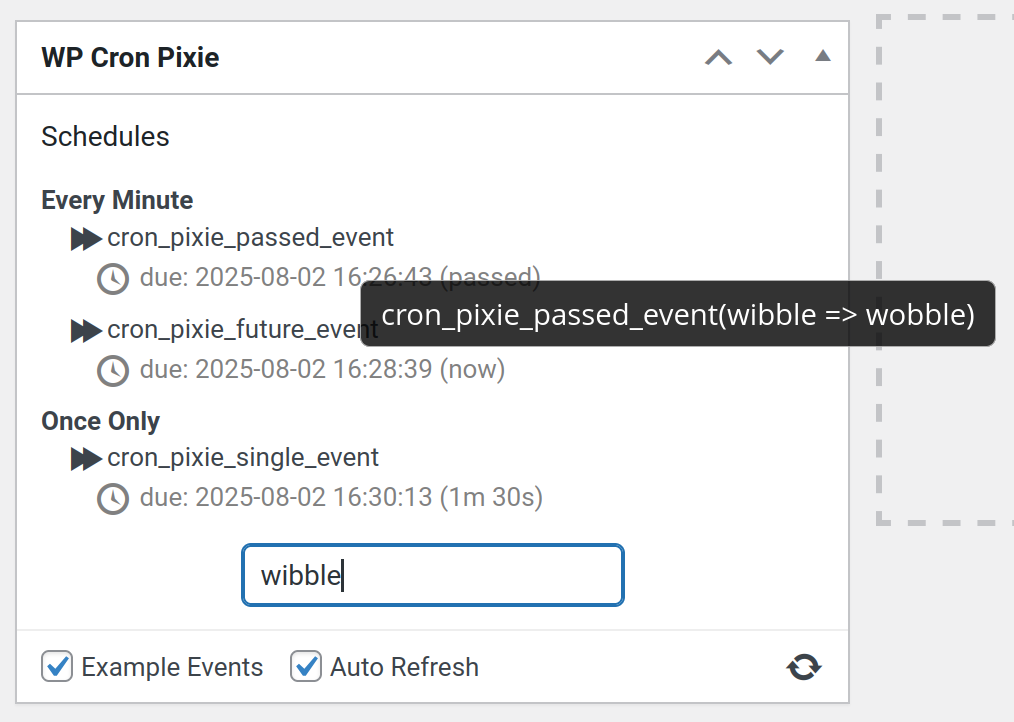
    When you search for something that happens to occur in a cron event’s hook arguments, the corresponding event is shown. That would be quite confusing unless you could see what the event’s hook arguments are, so now when you hover your mouse cursor over an event’s name, it shows the hook with it’s arguments.

    WP Cron Pixie widget with search for "wibble" and showing an event's arguments that match.

    Per-user auto refresh setting

    While developing the search functionality detailed above, which also saves the last entered search text so it is restored when you return to the admin dashboard, I realised WP Cron Pixie wasn’t saving its settings at quite the right level.

    Before WP Cron Pixie v1.6.0, all settings were saved at the site level, or on a multisite, at the network level.

    Now, the Auto Refresh setting is saved per user as each user may have a different preference as to whether they want the cron schedules to automatically refresh or not.

    The Example Events setting remains at the site level as when enabled it creates cron events for the entire site and is unable to be scoped to just a single user. However, while writing this very blog post I realised that the plugin was saving the Example Events setting at the network level for a multisite install, which makes no sense as WP-Cron runs in subsites, not at the network level. Hence how WP Cron Pixie v1.6.1 came into being, ensuring that the plugin can create its example events on any multisite subsite it is used on.

    ianmjones
    August 2, 2025
    Blog
    plugin, wordpress, wp-cron-pixie
  • Nord all the things! (again)

    For a long long time (I have no idea how long it really was), I used the venerable Nord theme colours to theme my desktop and apps, and even my old website.

    Then, when I switched my machines to Solus with the Budgie desktop, I messed about with a whole bunch of other themes, but ended up using the stock dark Budgie theme, and a slightly customised version of the Carbonfox theme for my terminal etc.

    Then, when I rebooted my website, I just went with ye olde Twenty Fifteen theme, using the dark theme, it kinda worked well as a reflection of the colours I was using everywhere else in my digital life, and therefore screenshots I posted didn’t look out of place.

    However, I’ve not been too happy with how my blog posts look in the Twenty Fifteen theme, the content area is just too thin for the type of code and screenshot heavy content I post. It wasn’t a great reading experience. So I felt it was time to find a new theme.

    I wanted something super simple with a nice wide or easily altered content area, and preferably a Nord colour scheme, or super simple palette that I could alter to Nord colours, because I miss using that colour scheme, and for reasons I’ll go to into a second, it’ll match any screenshots going forward.

    After not much looking around actually, I found the Blockbase theme, which is about as simple as it gets.

    And after just a couple of quick tweaks, I got it to something which I really like, and so this here website now looks something like the following screenshot.

    Screenshot of Nord themed website.

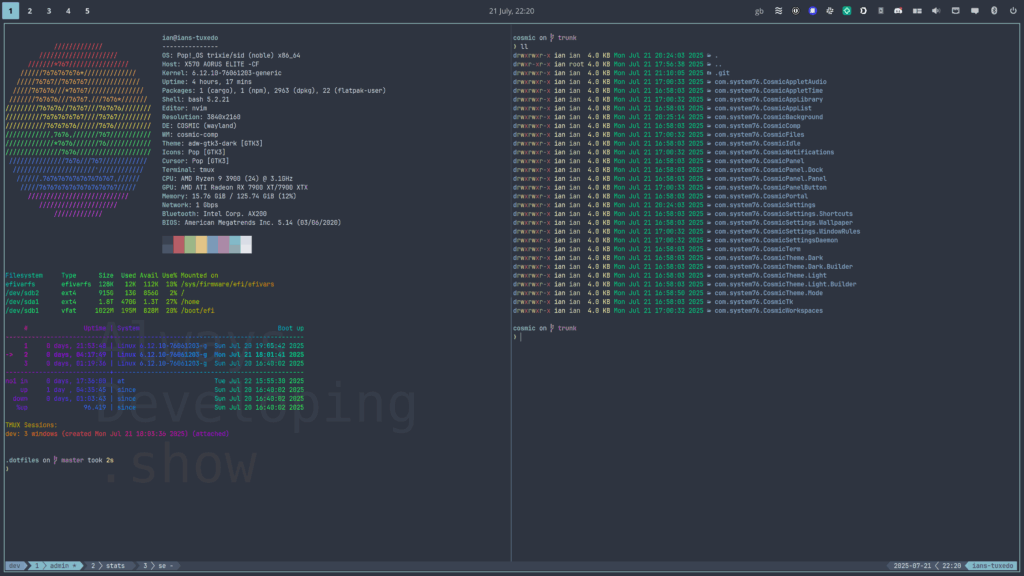
    I mentioned that I’m now using a Nord theme for my desktop again, that’s not the only change, I’ve also switched my desktop machines to use the COSMIC Epoch 1 (alpha 7) desktop environment running on Pop!_OS 24.04 LTS.

    “What?! I thought you’d fallen back in love with Solus?”

    … I hear you ask.

    Well, I do still absolutely love Solus, it’s an awesome Linux distribution, so fast and simple to use, but I’ve been hitting a show stopper issue with running Docker projects that the maintainers have struggled to fix, and a few other smaller day to day problems that over time built up to make me start looking around for another distro.

    After playing with a few BSD and Linux distros again, I thought I’d give COSMIC Epoch another go to see how it’s progressed since I last gave it a spin early last year.

    Even though it is definitely an alpha as a few feature aren’t complete, and being based on Ubuntu 24.04 LTS is a bit painful, it’s so good to have a working Docker setup again, and I really like the COSMIC desktop in tiling mode.

    To be fair, I generally use one app per workspace, but the shortcuts that the peeps at System76 have set as the defaults are spot on, and work very well for me when navigating workspaces etc.

    Screenshot of COSMIC Epoch desktop with Alacritty terminal running tmux.

    In the above screenshot you might just be able to work out that I have my COSMIC config checked into a git repo, which means I can easily use it across all my desktops by checking it out to ~/.config/cosmic. When I saw Jeremy Soller demo that it’s safe to do that in a recent presentation, that was a clincher to get me to try COSMIC again. I’m glad I did.

    I did initially try keeping my cosmic config in my ~/.dotfiles repo, which I then use stow to put into place. However, every now and then COSMIC would clobber the ~/.config/cosmic symlink, creating a directory in its place. So I switched to making it a directory itself, which just so happens to be a git repo so that I can track my changes and push them out to all my Pop!_OS machines. That seems to be working very well.

    And now that I’m back to using Nord for all the things, if I finally get back to making videos for my YouTube channel again, at least I won’t need to change my thumbnail theme!

    ianmjones
    July 21, 2025
    Blog
    cosmic, design, desktop, linux, website, wordpress
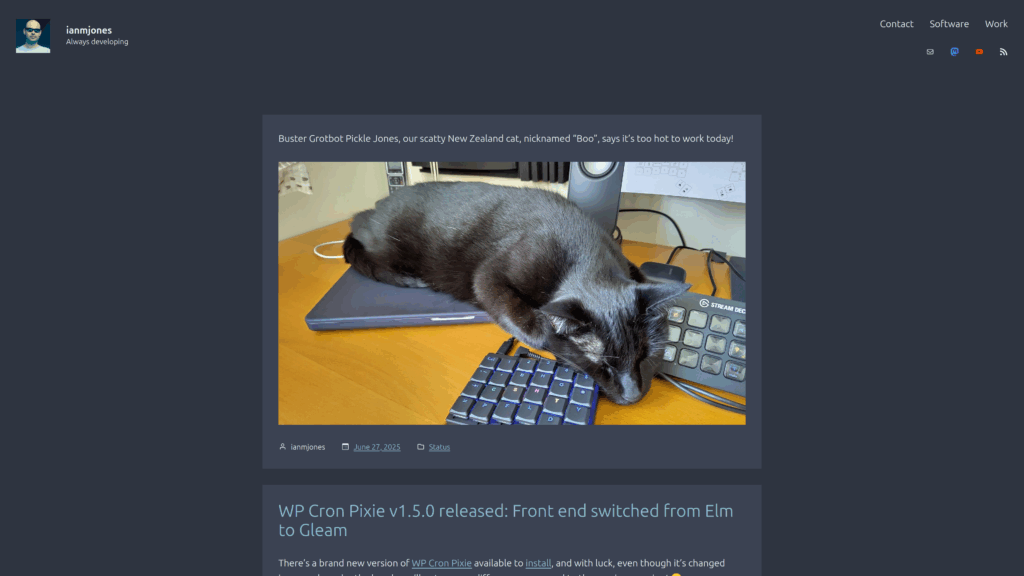
  • Buster Grotbot Pickle Jones, our scatty New Zealand cat, nicknamed “Boo”, says it’s too hot to work today!

    Picture of a black lying on top of a closed laptop, with head resting between keyboard and stream deck.
    ianmjones
    June 27, 2025
    Microblog
    life
Previous Page
1 2 3 4 5 … 63
Next Page
  • Mail
  • Mastodon
  • YouTube
  • RSS Feed
  • Blog (251)
  • Microblog (105)
  • Podcast (6)
  • Vlog (272)
  • July 2026 (1)
  • June 2026 (4)
  • February 2026 (2)
  • January 2026 (5)
  • December 2025 (10)
  • November 2025 (2)
  • September 2025 (2)
  • August 2025 (2)
  • July 2025 (1)
  • June 2025 (3)
  • May 2025 (3)
  • April 2025 (1)
  • March 2025 (2)
  • February 2025 (4)
  • November 2024 (1)
  • September 2024 (1)
  • August 2024 (2)
  • July 2024 (2)
  • May 2024 (4)
  • April 2024 (7)
  • March 2024 (1)
  • January 2024 (1)
  • December 2023 (7)
  • November 2023 (5)
  • September 2023 (1)
  • August 2023 (1)
  • April 2023 (1)
  • December 2022 (1)
  • November 2022 (2)
  • October 2022 (2)
  • September 2022 (4)
  • August 2022 (14)
  • July 2022 (12)
  • June 2022 (20)
  • May 2022 (15)
  • April 2022 (16)
  • March 2022 (16)
  • February 2022 (21)
  • January 2022 (14)
  • December 2021 (15)
  • November 2021 (15)
  • October 2021 (15)
  • September 2021 (6)
  • August 2021 (11)
  • July 2021 (5)
  • June 2021 (15)
  • May 2021 (22)
  • April 2021 (19)
  • March 2021 (1)
  • February 2021 (1)
  • January 2021 (2)
  • September 2020 (1)
  • March 2020 (6)
  • December 2019 (2)
  • November 2019 (1)
  • October 2019 (1)
  • July 2019 (6)
  • June 2019 (3)
  • May 2019 (5)
  • April 2019 (5)
  • February 2019 (1)
  • January 2019 (4)
  • December 2018 (1)
  • November 2018 (1)
  • October 2018 (3)
  • September 2018 (2)
  • August 2018 (12)
  • April 2018 (1)
  • February 2018 (1)
  • November 2017 (1)
  • August 2017 (1)
  • July 2017 (1)
  • May 2017 (1)
  • April 2017 (4)
  • March 2017 (1)
  • December 2016 (2)
  • September 2016 (2)
  • June 2016 (1)
  • May 2016 (1)
  • April 2016 (1)
  • February 2016 (2)
  • December 2015 (1)
  • November 2015 (1)
  • October 2015 (1)
  • September 2015 (1)
  • June 2015 (1)
  • May 2015 (1)
  • March 2015 (1)
  • January 2015 (1)
  • October 2012 (1)
  • September 2009 (2)
  • July 2009 (1)
  • March 2009 (2)
  • December 2008 (1)
  • November 2008 (1)
  • October 2008 (1)
  • July 2008 (1)
  • May 2008 (1)
  • March 2008 (2)
  • February 2008 (1)
  • January 2008 (2)
  • December 2007 (4)
  • November 2007 (2)
  • October 2007 (2)
  • September 2007 (4)
  • August 2007 (1)
  • July 2007 (5)
  • June 2007 (1)
  • May 2007 (2)
  • April 2007 (1)
  • March 2007 (5)
  • February 2007 (3)
  • January 2007 (3)
  • December 2006 (1)
  • November 2006 (2)
  • October 2006 (2)
  • September 2006 (2)
  • August 2006 (1)
  • July 2006 (2)
  • June 2006 (5)
  • May 2006 (2)
  • April 2006 (4)
  • March 2006 (8)
  • February 2006 (14)
  • January 2006 (5)
  • December 2005 (3)
  • November 2005 (6)
  • October 2005 (11)
  • September 2005 (7)
  • August 2005 (6)
  • July 2005 (7)
  • June 2005 (8)
  • May 2005 (2)
  • April 2005 (5)
  • March 2005 (3)
  • February 2005 (4)
  • January 2005 (1)
  • December 2004 (2)
  • November 2004 (5)
  • October 2004 (8)
  • September 2004 (4)
  • August 2004 (1)
  • January 2004 (1)
  • October 2003 (1)
  • September 2003 (2)
  • August 2003 (2)
  • May 2003 (1)
  • February 2003 (1)
  • November 2002 (1)
  • July 2002 (1)
  • June 2002 (2)
  • March 2002 (1)
  • February 2002 (7)
  • air/flex/flash (10)
  • alwaysdeveloping (12)
  • business (93)
  • casedetective (35)
  • ci (4)
  • citydesk (9)
  • cluster (1)
  • coding (3)
  • comments (1)
  • concourse (4)
  • conference (11)
  • cosmic (1)
  • daft (1)
  • database (6)
  • deliciousbrains (14)
  • design (1)
  • desktop (2)
  • development (3)
  • docker (4)
  • download (1)
  • elm (1)
  • films (1)
  • fogbugz (42)
  • freebsd (1)
  • friends/family (6)
  • garageband (1)
  • git (1)
  • gleam (6)
  • health (3)
  • homelab (1)
  • hosting (2)
  • ideas (1)
  • incus (1)
  • informix (6)
  • javascript (1)
  • kamal (2)
  • life (17)
  • linux (8)
  • live (3)
  • lustre (3)
  • mac (1)
  • mailing list (1)
  • microisv (92)
  • microsoft (2)
  • music (3)
  • open source (9)
  • php (1)
  • plugin (15)
  • productivity (12)
  • realbasic (23)
  • refreshdb (6)
  • release (1)
  • review (2)
  • simplicity (1)
  • sneak-peek (1)
  • snippetexpander (5)
  • software (7)
  • sourcehut (2)
  • technology (20)
  • template (1)
  • testing (2)
  • uncloud (1)
  • wails (3)
  • website (37)
  • windows (2)
  • wordpress (24)
  • wp-cron-pixie (4)
  • xojo (23)
  • youtube (12)
  • Mail
  • Mastodon
  • YouTube
  • RSS Feed