… please welcome Abigail Erise Jones to the big bad World!

Born at 10:32 on the 28th March 2007.

Weighing a nice healthy 7lb 3.5oz (3.32kg), and measuring 51cm in length.

Mother and baby are doing just fine.
Always developing
… please welcome Abigail Erise Jones to the big bad World!

Born at 10:32 on the 28th March 2007.

Weighing a nice healthy 7lb 3.5oz (3.32kg), and measuring 51cm in length.

Mother and baby are doing just fine.
I’ve just reset some goals at nikeplus.com, having not been running for a few weeks while my treadmill was guffed, and not being motivated enough to hit the very hard tarmac.
nikeplus.com has had a bit of a face lift, the previously US only map functionality is now available for us UK peeps too.
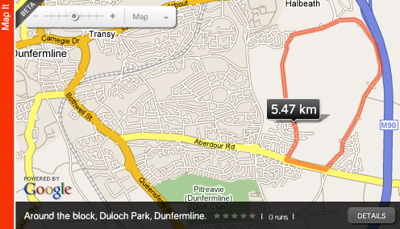
Although I’m not ready to run it just yet (my knees just can’t take the punishment yet, so I’m sticking to the springy treadmill), I’ve just mapped out the route I’ll probably take once the good weather is here to stay.
My route is called “Around the block, Duloch Park, Dunfermline.”, it’s just shy of 5.5km (3.4 miles), and I’ve shared it for other nikeplus users.

Everybody’s favourite technical news, views and reviews site Ars Technica has had a huge face lift.
I really like it, the colours are more subdued and sophisticated than before, and the text is larger and easier to read, with all the different sections and top stories much easier to find. I’d say that casual visitors to the site are going to find it much more accessible.
And what’s more, they’ve reduced the amount of advertising on the site, pulling it out of the body of stories. This is fantastic, I’ve always hated how adverts inserted into the body of an article squishes or breaks up the text, making it much harder to read. This is a very welcome change, and shows that Ars really does have their reader’s interests as top priority.
Well done to whoever created this new design, it works for me!
Long story short: If you downloaded WordPress 2.1.1 within the past 3-4 days, your files may include a security exploit that was added by a cracker, and you should upgrade all of your files to 2.1.2 immediately.
Thanks to John Gruber for pointing this out.
This post is very closely related to my previous post about the lessons I’ve learned while developing CaseDetective 1.3, as it’s also about my reliance on eSellerate’s tools. It’s therefore going to be a short post.
In the previous post I mentioned that with the change from Integrated eSeller to Embedded Web Store imposed by eSellerate when supporting Universal Binaries, it effected how CaseDetective checked for updates. If I’d had my own check for update code independent from eSellerate, I’d not have had any problems when eSellerate changed how they set up SKUs (Stock Control Units).
Lesson Learned: Develop your own check for update mechanism from end to end, or use an open source solution that you have full source for and control over.
I’ve just updated this blog to WordPress 2.1.1, and also updated all my Mint bits and bobs to the latest versions.
When I hit the “Check for Updates” button in the Mint preferences to make sure I got everything, this is what I got…

Well, would you expect anything less from a Jonesy! 🙂
Anyway, if you do notice anything fishy about the new setup, please let me know!
CaseDetective 1.3 took a little longer than I hoped to develop, partly because I took some time off to recharge my batteries after CaseDetective 1.2, but also because of some painful obstacles I had to overcome during it’s development.
This is the first post in a short series of “Lessons Learned” from development of CaseDetective 1.3 for FogBugz.
The first, and most asked for feature that I needed to develop for CaseDetective 1.3 wasn’t even a real feature; Universal Binary for the Mac OS X version.
A Universal Binary version was long overdue, I would have loved to have got one out for v1.2, but REALbasic hadn’t got that functionality stable by the time I started development, and more to the point, the eSellerate Universal Binary REALbasic plugin wasn’t anywhere near ready. As I rely on this plugin for validating serial numbers and for in-app purchases, this “feature” had to slip to v1.3.
Unfortunately the Universal Binary eSellerate plugin for REALbasic caused me a lot of headaches, which considering the Mac OS X users of CaseDetective are vastly outnumbered by Windows users, is very frustrating.
The first, and most annoying problem with the eSellerate UB plugin was that it wasn’t cross-platform, meaning I couldn’t compile CaseDetective for both Windows and Mac using the same eSellerate related code; I had to continue to use the old Integrated eSeller plugin for compiling the Windows version. And to add insult to injury, the old plugin would not work with the latest REALbasic IDE without being converted to the latest plugin format (a tool for this is provided with REALbasic), and even so, seemed to clash with the new plugin so that you had to compile for Windows and Mac as two separate steps (even when using #if to target the OS specific code). I resorted to making everything I could an external item and creating a copy of the project so that I had one project for Windows and one for Mac OS X. Each project referenced pretty much the same external items except for one module that included Windows or Mac specific eSellerate code, and ran each against a different version of the IDE so that the plugins didn’t clash. It worked, but wasn’t ideal for productivity.
The new eSellerate UB plugin for REALbasic was also different in operation to the old plugin, it used their “Embedded Web Store” framework, which used an embedded web browser in a window, and required setting up of a web store in the eSellerate admin panel. Now, I wouldn’t have had any problems with this change except that it required different handling of Stock Control Units (SKUs, don’t ask me why they use a “K”, I have no idea), which totally broke the way you setup the check for update functionality. Now I needed to update two areas of my eSellerate setup to cope with the Integrated eSeller used by the Windows version, and the Embedded Web Store (EWS) used in the Mac version. This is a recipe for disaster (although I think I’ve avoided disaster so far).
Also, unlike the old Integrated eSeller, the Mac EWS plugin needed a file to be copied into the app bundle after it was created, the old version didn’t require any extra files, it was compiled in and self installing.
Oh, and in the end I had to disable the in-app purchasing from the Mac version anyway because I found that if you tried to print the invoice shown after completing a purchase it totally hung the app and required a force-quit. Now, this may have been something that I did, but I’m stumped as to what that might be, seeing as printing the invoice had nothing to do with closing the window and returning to my app, so I’m pretty sure it’s a bug in the eSellerate plugin or EWS framework. When I found this bug I was about ready to explode, there was no way I was going to waste any more time in trying to find a workaround, so I just disabled in-app purchasing in the Mac version. Mac users will have to buy through the web store and copy their license details into the “Enter License” window, not a huge problem as most people seem to buy that way anyway, but still, it’s a shame I couldn’t use this convenient in-app purchasing mechanism which sets the user’s license details automatically on purchase completion.
I think version 2.0 of CaseDetective may just be using a custom serial number scheme rather than eSellerate’s own scheme, and then I won’t need to use any eSellerate plugins at all.
Don’t get me wrong, in general I like eSellerate, in all my dealings with them I have had superb support and have had zero problems reported to me by customers about their buying experience through them. It’s just that their REALbasic support has taken a serious nose-dive, which is unacceptable to me.
Lesson Learned:Â Develop your own license code scheme, regardless of purchasing mechanism.
Well, last Thursday I finally got CaseDetective 1.3 for FogBugz out and ready to download.
“What’s new?” I hear you ask…
CaseDetective is now even easier to use offline, you can use it when not able to connect to your FogBugz database and can tell it not to automatically refresh it’s local data on startup.
It now better supports Multipart/mime emails in the preview pane, for printing and for exporting to PDF.
The Mac version is now a Universal Binary for much improved speed on Intel Macs as well as PowerPC.
And there are of course lots of little speed and stability improvements.
You can download the latest version for either Windows or Mac from http://www.casedetective.com/download
Hey, good news for us Mac based peeps that help out peeps on remote machines now and then, Fog Creek’s Copilot service is now Mac compatible!
And, what’s more, the Copilot 2.0 day pass price has been cut in half from $10 to a very attractive $5, that’s nearly free!
 I also like the new “direct connection” feature whereby after an initial connection mediated through Fog Creek’s servers, if it can get a direct connection between the two helper and helpee machines, it will. I doubt this feature will actually be used all that often by casual users who have the ports closed on their firewalls, but for those that use Copilot a lot I expect this feature will further speed up an already pretty fast service.
But, probably the top feature for current users will be the ability to transfer files directly to the remote desktop, this’ll make it so much easier if you’ve got a file you want to use, such as a new build of your software or the remote debugging stub.
That’s a great update, me likes.
Merlin Mann pointed out a great article on TechDigs that addresses a lot of the problems people have with managing their ever increasing volume of media data, and how to back it up. I’ve been thinking about getting a ReadyNAS+ for a while, now I have some better information on how to use it more efficiently.
In the article Amazon’s S3 service is used for the off-site backup, but I wonder if something like CrashPlan wouldn’t be much better. With services like CrashPlan you backup over the internet to your own external disk that you’ve given to a friend to connect to their computer/network. It doesn’t incur any service charges, just a software purchase for the party wanting to backup, the friend doesn’t even need a license to be able to act as your backup target (just a pint every now and then to say thanks for the electricity).
What I really like is that you can do the initial (huge) backup locally, and then give the disk to your friend for the daily incremental backup offsite. I’m thinking about setting this up with a friend of mine, it’d backup early every morning while my ADSL bandwidth is free. If things were to go terribly wrong at home, I can pop around to my friends place to pick up the backup drive ready to do a local restore, much better than spending days downloading data from a server somewhere off in the cloud. Oh, and just in case someone nicks the device you’ve given to your friend, the data is compressed and encrypted before being sent, and saved encrypted too, which is nice to know.
I’m seriously considering CrashPlan and wonder if anyone out there has any experience of it or similar software?